Author: jeffpsherman

  • Your Database is not a Queue

    SaaS Scaling anti-patterns: The database as a queue

    Using a database as a queue is a natural and organic part of any growing system.  It’s an expedient use of the tools you have on hand. It’s also a subtle mistake that will consume hundreds of thousands of dollars in developer time and countless headaches for the rest of your business.  Let’s walk down the easy path into this mess, and how to carve a way out.

    No matter what your business does on the backend, your client facing platform will be some kind of web front end, which means you have web servers and a database.  As your platform grows, you will have work that needs to be done, but doesn’t make sense in an api / ui format. Daily sales reports and end of day reconciliation, are common examples.
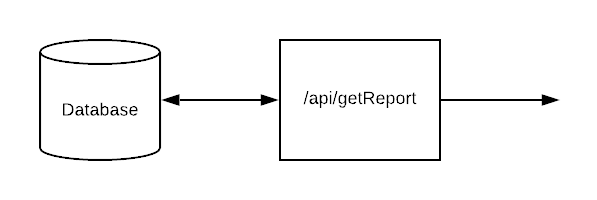
    Simple Straight Through Processing

    The initial developer probably didn’t realize he was building a queue.  The initial version would have been a single table called process which tracked client id, date and completed status.  Your report generator would load a list of active client ids, iterate through them, and write done to the database.
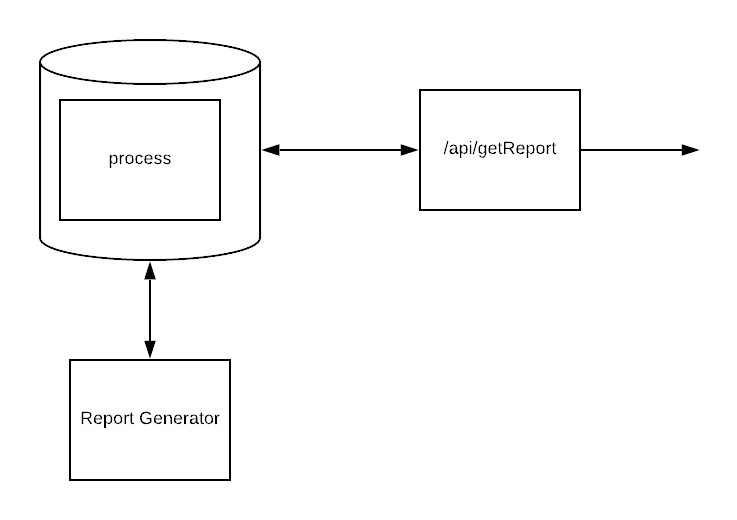
    Still pretty simple

    Simple, stateful and it works.

    For a while.

    But, some of your clients are bigger, and there are a lot of them, and the process was taking longer and longer, until it wasn’t finishing overnight.  So to gain concurrency and added worker processes your developers added “Not started” and “in process” states. Thanks to database concurrency guarantees and atomic updates, it only took a few releases to get everything working smoothly with the end-to-end processing time dropping back to something manageable.
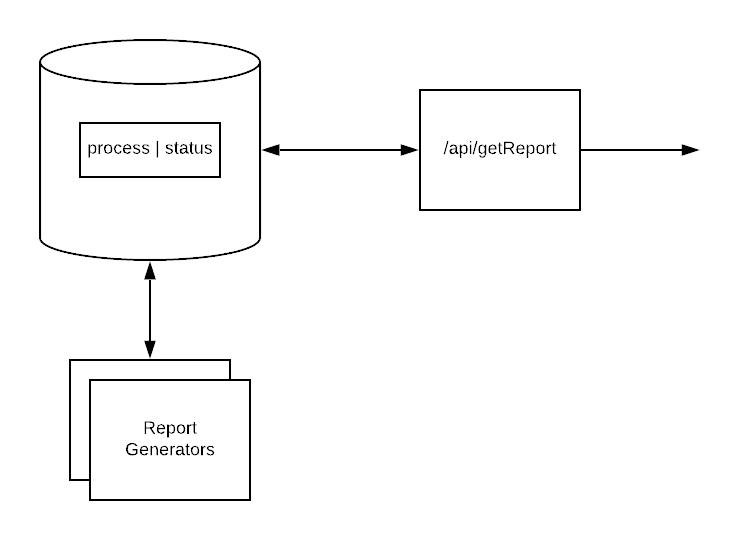
    Databases are atomic, what could go wrong?

    Now the database is a queue and preventing duplicate work.

    There’s a list of work, a bunch of workers, and with only a few more days of developer time you can even monitor progress as they chew through the queue.

    Except your devs haven’t implemented retry logic because failures are rare.  If the process dies and doesn’t generate a report, then someone, usually support fielding an angry customer call, will notice and ask your developers to stop what they’re doing and restart the process.  No problem, adding code to move “in-process” back to “not started” after some amount of time is only a sprint worth of work.

    Except, sometimes, for some reason, some tasks always fail.  So your developers add a counter for retries, and after 5 or so, they set the state to “skip” so that the bad jobs don’t keep sucking up system resources.
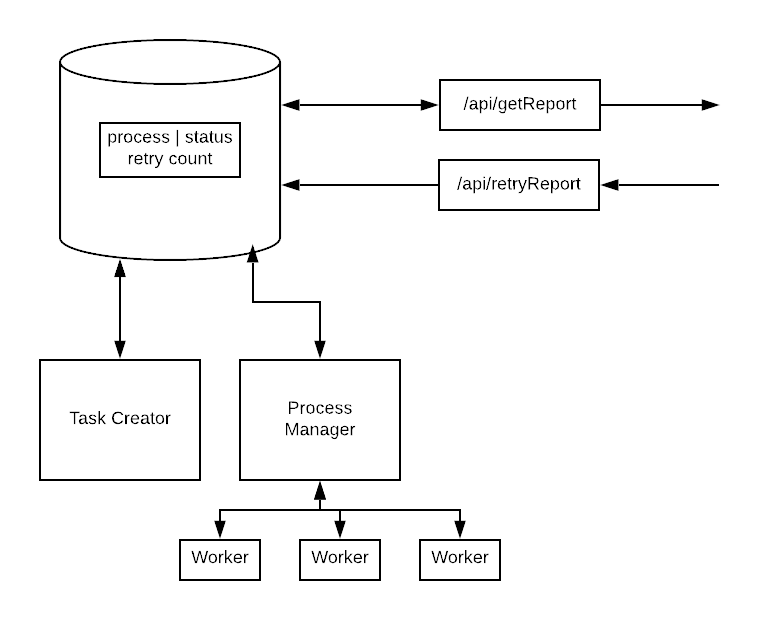
    Just a few more sprints and we’ll finally have time to add all kinds of new processes!

    Congratulations!  For about $100,000 in precious developer time, your SaaS product has a buggy, inefficient, poor scaling implementation of database-as-a-queue.  Probably best not to even try to quantify the opportunity costs.

    Solutions like SQS and RabbitMQ are available, effectively free, and take an afternoon to set up.

    Instead of worrying about how you got here, a better question is how do you stop throwing good developer resources away and migrate?

    Every instance is different, but I find it is easiest to work backwards.

    You already have worker code to generate reports.  Have your developers extend the code to accept a job from a queue like SQS in addition to the DB.  In the first iteration, the developers can manually add failed jobs to the queue. Likely you already have a manual retries process; migrate that to use the queue.
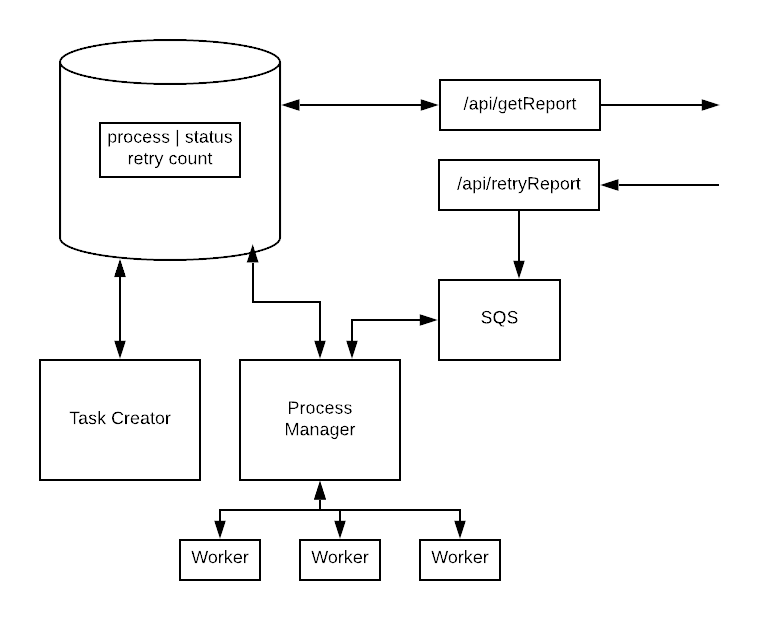
    Queue is integrated within the existing system

    Once you have the code working smoothly with a queue, you can start having the job generator write to the queue instead of the database.  Something magically usually happens at this point. You’ll be amazed at how many new types of jobs your developers will want to implement once new functionality no longer requires a database migration.

    Soon, you’ll be able to run your system off the db or a queue, but the db tables will be empty.

    Only then do you refactor the db queues out of your codebase.
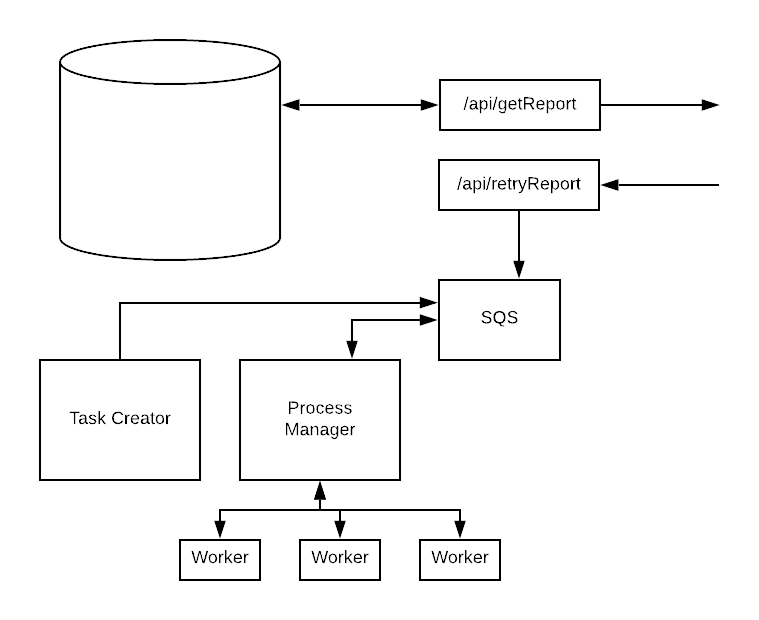
    Queue runs the system

    Adding a proper queue system gets your team out of the hole and scratches your developers itch for shiny and new technology.  You get improved functionality after the very first sprint, and aren’t rewriting your code from scratch.

    That’s your best alternative to a total rewrite, start today!

  • Replacement is not a release plan

    Replacement is not a release plan, it’s a sign that you are solving developer’s pain instead of client pain.

    Deployment gets glossed over in the pitch: First we will mimic the existing functionality.  Then turn off the old system.

    Since the plan is to re-implement the current functionality, your developers can start immediately!  No need to talk to the clients since they won’t notice any difference until we show them all the wonder improvements!

    Developers get super excited about these kinds of rewrites because it is all about them and their pain.  The plan fails because the client cares about client pain, not developer pain.

    Don’t assume the client wants what are you giving them!  Don’t assume they would love for you to give them more features, better code, or anything that excites your developers.  A more common situation is that someone has full time job doing manual data extractions, transformations, and other manipulations that software could do in seconds and your developers could write in a week.

    Find your client’s pain.  Appeal to your developer’s sense of empathy.  If they hate dealing with the system, have them imagine the low level person being kept in a pointless job.  It’s a good bet that once your developers find out how their software is being used they’ll find that there’s no need for a rewrite; the clients need new tools, not replacements.

  • Senior Developers Are Relatively Cheap

    Recently, I saw some heated arguments about the optimal ratio of senior to junior developers on teams.  There was much mashing of teeth about how companies are hurting themselves by having many seniors and few, if any, junior developers.  Long threads about proper ratios, code complexity, code quality, and management oversight followed.

    That’s all nice in theory, but the reason is that Senior Developers are overrepresented on development teams, is that they are *relatively* cheap compared to junior developers.

    Let’s look at some numbers from glassdoor.com:

    A senior developer costs about $31,000/year more than a junior developer, implying that a senior developer is 41% more productive and useful than a junior developer (or that a junior is 71% as effective as a senior developer).

    We are taking a very generic view of things, but if you expect a senior developer to be twice as effective and productive as a junior developer, then the value of a senior developer would be 2x a junior, or $154,000/year.

    Relative to junior developers, the average senior developer is 30% cheaper.

    My personal experience in Chicago looks even worse, with 1x junior devs getting paid around $100,000/year and 5x seniors getting paid $175,000.  This is effectively a 65% discount over junior devs.

    As a result of these huge discounts companies do the logical thing and only hire junior devs when they can’t hire enough senior devs.  The economically optimal number of junior developers on a team is always 0.

    But wait you say, what about non-salary costs?  Does that have an impact?

    Yes, but it makes the relative value of seniors worse:

    • The average employee receives about $30,000 in non-salary benefits (mostly healthcare).  Hiring 2 juniors instead of 1 senior costs an extra $30,000/year
    • Managers can only manage so many people, adding more juniors means adding more managers, scrum masters, and other process people.

    Why senior developers are relatively cheap is a good question, but not one I feel qualified to answer.

  • Node-Config and Heroku – It Just Works

    I’ve used dozens of config systems in my career, heavy XML, lightweight INI, and more “Config is easy, I’m just going to write my own” disasters than I care to count.  Recently I have been working in Node and deploying to Heroku, and I found what may be my favorite config system of all time.

    Node-Config is a JSON based hierarchical system that plays wonderfully with Heroku’s Environment variable based config.

    What does a hierarchical system mean?

    Imagine you are working on a system that can be run local, dev, or production, with different database and remote services.  When running locally your config might look like this:

    {
        “dbConn”: “DB Running locally on my laptop”,
        “webapp”: {
          “port”: 8080
        }
    },

    dev also runs on port 8080, but uses a shared database.  Instead of overwriting everything, you only have to specify the deltas:

    {
    “dbConn”: “Shared database location”,
    }

    Node-Config used the “NODE_ENV” magic variable to know which environment you are running, but no matter which environment you are running, config.webapp.portwill be 8080.

    Where does Heroku fit in?

    Heroku injects config variables into the system as environment variables at run time.  When using a Heroku Postgres database, they not only manage the system, but they will also automatically rotate the connection details periodically.  That’s great, but if means you can’t have a static config file.

    Well Node-Config ALSO supports environmental variable overrides!

    You need to create a config file called custom-environment-variables.jsonand place it with the rest of your config.  Instead of specifying values, you specify the environment variable names!  Continuing our example:

    {
        “dbConn”: “HEROKU_POSTGRESQL_NAVY_URL“,
        “webapp”: {
          “port”: “PORT”
        }
    },

    PORT is Heroku’s default PORT, and HEROKU_POSTGRESQL_NAVY_URL is a environment.

    Your Heroku config dashboard will look something like this:

    heroku_config_vars

    Node-config will pull Heroku’s config vars in at run time.  No need to handle multiple config injection logic.  Set it once and it will all just work like magic!

    Conclusion

    I really like the combination of Node-config with Heroku.  The hierarchy layering keeps things simple, even while Heroku is rotating security keys under you!

    Bonus for Visual Studio Code users

    I use vsCode for my development.

    If you follow the defaults, the environment and launch.json setup will look a lot like this:

    node-config-dir-struct


    launch.json, which is vsCode’s run/debug config will look like this:

    {
        “version”: “0.2.0”,
        “configurations”: [
        {
          “type”: “node”,
          “request”: “launch”,
          “name”: “RUN DEV”,
          “program”: “${workspaceFolder}/src/app.js”,
          “env”: {
            “NODE_ENV”: “dev”,
          },
          “outputCapture”: “std”
        },
        {
          “type”: “node”,
          “request”: “launch”,
          “name”: “RUN PROD”,
          “program”: “${workspaceFolder}/src/app.js”,
          “env”: {
            “NODE_ENV”: “production”,
          },
          “outputCapture”: “std”
        }
    }
  • Write the change log first!

    The first thing I do after creating a new branch, is write the changelog. Stating what new features go in the branch helps to focus my coding and keeps the branch clean and focused.

    As I work I do a reread and fix the changelog to match the implementation reality. There have been countless instances where I have started coding a second feature, realized it doesn’t fit, and used that signal to know that this branch is done and should be merged.

    If you write the changelog after you code, you probably won’t write a changelog. If you do it will be incomplete, because you won’t remember everything. Either way your branches will be less focused, and more difficult to merge.

    Write the changelog first! Your fellow developers, including future you will thank you for it!

  • What’s the first step towards fixing a terrible system?

    Imagine you’ve just been hired to fix a horrible legacy system.

    You’ve just been handed a giant monolith that talks to customers on the internet, accesses 4 different internal databases, handles employee and customer on-boarding, sends marketing emails, contains a proprietary task scheduling system, and has concurrency issues.  Which problem do you tackle first?

    Separation of concerns?  Maybe the massive number of exceptions in the logs?  Probably none of these.

    The first thing you really need to learn is why you been hired to fix the system in the first place.  Ignore the technical problems, what are the business problems with the current system?  What does the business need done so badly that they’ve hired you?  Your fellow programmers care about how difficult the current system is, but the business cares about how hard it is to get what they need.  Don’t confuse tech problems with business problems.

    Learn the business problem that justifies your salary.  Find a way to provide that value.  You can fix or replace the legacy system over time.

  • The Journey Begins

    Thanks for joining me!

    Good company in a journey makes the way seem shorter. — Izaak Walton

    post