


This article walks you through optimizing an import process. I’m going to lay out a simple SaaS db and api, discuss how imports emerge organically, and show you how to optimize for performance.
For the article, we are starting off with a simple CRM that lets you create email contacts, and add tags to them. This is a real, but very small, piece of functionality in all CRMs, and even most SaaS.


API First
Most SaaS start with basic CRUD abilities, an endpoint to create contacts, an endpoint to create tags, and an endpoint to associate tags with contacts. You
[POST] /api/contact – create the contact
[POST] /api/tag – create the tag
[POST[ /api/contact/{id}/tag – create the contactTag relationship
Simple and straightforward. Great for UIs. Cumbersome and clunky if you aren’t a programmer.
CSV Second
Since most people aren’t programmers, and most people can export their data to CSVs, “import data from a CSV” soon emerges.
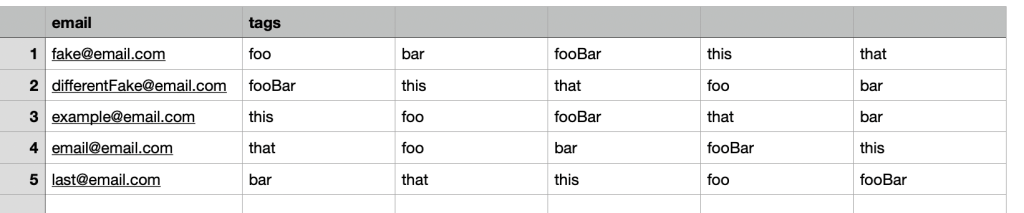
Here’s our CSV header:
Email, tag1, tag2, …, tagN


Each line starts with an email address, and then 0->N tags that should be associated with the contact. To keep things simple we won’t be deleting any tags that are in the database, but not in the file.
When done well the customer’s file will be written somewhere like Amazon’s S3, and then processed asynchronously. The CSV processing code will be DRY and use the same code from the API.
For each line in the file:
- Retrieve the existing contact’s id by email, or create a new contact
- For each tag
- Retrieve the existing tag’s id by name, or create a new tag
- Insert contactId, tagId into the database, if it doesn’t already exist
The code to exercise these steps already exists.
[POST] /api/contact and Retrieve the existing contact’s id by email, or create a new contact run the same code.
[POST] /api/tag and Retrieve the existing tag’s id by name, or create a new tag are the second pair.
[POST[ /api/contact/{id}/tag and Insert contactId, tagId into the database, if it doesn’t already exist complete the functionality.
The emergent model is great because the only new functionality is the ability to store and process the CSV file. The business logic, how data actually gets inserted into the database, gets reused.
Big O, Performance, and Scalability
The algorithm described above has a Big O of O(n^2). For something like an import that’s not great, but it’s also not terrible.
O(n^2) doesn’t tell you much about the real world performance or scalability of the implementation. There are a few different implementations for the data access patterns which could result in wildly different performance characteristics.
In our simple example we look up the tagId in the database for each contact. This mirrors the access pattern for the API. But, we aren’t in the API, we’re in a long running process. We could store the tag-name-to-id information in a map in memory.
Adding an in-memory cache would limit step 2a to running once-per-tag instead of once-per-tag-per-contact. A file with a single tag per contact would save almost ⅓ of its calls. As the number of tags increased, the savings would increase towards ½ of the db calls.
Cutting the number of DB calls in half won’t change the Big O value, but it will greatly improve performance and reduce load on your DB.
Moving From Rows To Columns
The emergent model is great because it reuses code. One drawback is that it involves lots of trips to the database to do single inserts. Trips to the database over a network are relatively slow. Most databases are also optimized for fewer, larger writes.
Processing the CSV file row by row will always push you towards more, smaller, writes because the rows of the file will be relatively short.
Instead, let’s consider a “columnar” approach.
Instead of processing line by line and pushing it to the database, we’re going to sort the data in memory, and push the results to the database.
For simplicity, we will do two passes through the file.
Pass 1 looks very similar to the original process:
- Retrieve the existing contact’s id by email, or create a new contact. Store the email/id relationship in a map.
- For each tag, retrieve the existing tag’s id by name, or create a new tag. Store the tagName/id relationship in a map.
At the end of Pass 1, we have ensured that all contacts exist, and that all tags exist.
For Pass 2, we replace emails and tags with ids and build a single, large, insert statement like this:
Insert into contactTags (contactId, tagId) values
(1, 1), (1, 2), (1, 3),
(2, 1), (2, 3),
…
Again, simplifying and glossing over the entire subject of upserts, duplicate keys, etc. This post is dense enough as it is.
How Much Faster Is Going A Column At A Time?
In the real world the impact will vary based on the number of rows in the table, contention, complexity, indexes, and a whole host of variables.
Instead let’s look at it by the number of queries each option requires.
Let’s pretend we were inserting a file with 100 new contacts, and each contact had the same 5 tags.

API / Basic Import
We would insert the contact, then insert the tag, then the 5 contactTags.
That is 11 operations per row – 1 contact, 5 tags, 5 contactTags.
Over 100 rows that works out to 100 contact inserts, 5 tag inserts, 495 tag lookups, 500 contactTag inserts.
That’s 1,100 Operations
Import (or API) with tag caching between rows
Adding the in-memory tag cache greatly decreases the number of operations. We no longer need to do the redundant 495 tag lookups.
Now over the course of 100 rows it works out to 100 contact inserts, 5 tag inserts, 500 contactTag inserts.
That’s 605 Operations, at 45% reduction!
Columnar
Finally, we switched to a 2-pass columnar strategy. Instead of doing 500 contactTag inserts, we do a single insert with 500 clauses.
Now our 100 rows become 100 contact inserts, 5 tag inserts, 1 contactTag insert.
That’s 105 Small Operations and 1 Large Operation. That’s a 90% reduction from our initial version, and an 82% reduction from the improved version!
Reminder – that one large operation is going to take significantly longer than any one of the single inserts. You won’t see an 82-90% reduction in processing time. In the real world you would probably cut time by 50%, a mere 2x improvement!
The columnar work could be further optimized to be 1 large insert for contacts, 1 large tag insert, and 1 large contactTag insert. It is more complicated because we need to get the ids, but we could get it down to as little as 5 total db operations – 3 Large Inserts and 2 key lookups. I can cover the final technique in another post if there is interest.
Summary – Tradeoffs Make Columnar Fastest
Having your import process reuse the code from your API is a great way to start. Because of the code reuse the only thing you have to implement is the file handling. That keeps things simple and lets you get the feature out fast.
But, following your API’s code path is also going to be very inefficient and not scale well.
Changing strategies to favor fewer, larger, operations can reduce the number of operations by 80-90% and increase real world performance by 50% or more.