I regularly point out problems with physical buttons. Physical buttons help visualize the conceptual problems behind buttons on websites, without the distractions of technology.
Today’s example comes courtesy of a minivan I rented in Texas. As a car, it was fine. As a UX platform, it was full of reused visual elements with different actions.
As an example, here is a closeup of the door panel.
This looks like pretty standard door stuff. Two doors, two handles, two buttons.
The front set (right side) performs like most other car door handles.
Sometimes the door button will toggle lock state, sometimes it only locks the doors. Likewise, some door handles will automatically unlock the car, and others will only allow you to open the door if the car is unlocked.
Pretty standard stuff.
The rear set of controls is for the minivan’s sliding door. They work entirely differently.
The sliding door is automatic. The handle and the button both engage the mechanism.
If you pull the handle, you should then let go, because the car door will open itself. The handle is also a toggle, if the door is open and you pull the handle, the door will close. At no time should you use human muscle to open or close the door. This is different from the front door, which requires human muscle to both open and close.
The rear button is also a door open and close toggle. While the front button performs an idempotent “lock only” action, pressing the rear button will always change the state of the door.
Same Element, Multiple Actions
There are 2 buttons that look the same, are placed the same, and do different things. The 2 handles also look the same, are placed the same and do different things.
The sliding door handle is redundant, it does the same thing as the button. It also introduces a major point of failure because it invites humans to use muscle against a self powered mechanism. To illustrate the fragility, I took a minivan taxi home after leaving Texas and the driver shouted not to touch the door handle. He explained that people pull hard on the handle and break the door mechanism.
Design Failures And Standard Resolutions
In summary there are 2 design failures here:
Using the same visual element to do different actions. When buttons and handles do different things, they should look different.
Using a design that encourages users to do the wrong thing. All door handles, except minivan sliding doors, are meant to open doors by pulling. Since the sliding door doesn’t want people to pull hard, it shouldn’t use a standard door handle.
Pushing My Buttons
After a few mistakes I stopped opening the sliding door when I meant to lock the car. I stopped using the sliding door handle entirely. I quickly learned the UX, but I never escaped the extra friction. My eyes would still lock onto the buttons and I would have to think about what they did before taking action.
Like the minivan, UIs are littered with inconsistent buttons, multiple ways to do the same thing, and the ability to do “the wrong thing” because your expectations don’t match what the designer was thinking. Users will learn the system, but the extra friction will never disappear.
My post about latency and throughput featured an extremely simplistic model to demonstrate that Latency and Throughput are independent. An astute reader called it a spherical cow, a model so over simplified that it is a bit ridiculous.
So, let’s deflate the cow, just a bit, and see how things hold up. I hope you like tables and cow jokes!
The original model was a streaming system that receives 1 million messages a second. Perfectly spherical.
There were two systems, one with 5s latency, one with 2s latency.
We will leave our processors completely spherical – they each process 100,000 events simultaneously. Our pipelines then look like this
5s Latency
Time
New Events/s
Process Instances
Events Being Processed
Throughput
Extra Capacity
1
1,000,000
50
1,000,000
0
4,000,000
2
1,000,000
50
2,000,000
0
3,000,000
3
1,000,000
50
3,000,000
0
2,000,000
4
1,000,000
50
4,000,000
0
1,000,000
5
1,000,000
50
5,000,000
1,000,000
0
6
1,000,000
50
5,000,000
1,000,000
0
7
1,000,000
50
5,000,000
1,000,000
0
8
1,000,000
50
5,000,000
1,000,000
0
2s Latency
Time
New Events/s
Process Instances
Events Being Processed
Throughput
Extra Capacity
1
1,000,000
20
1,000,000
0
1,000,000
2
1,000,000
20
2,000,000
1,000,000
0
3
1,000,000
20
2,000,000
1,000,000
0
4
1,000,000
20
2,000,000
1,000,000
0
5
1,000,000
20
2,000,000
1,000,000
0
6
1,000,000
20
2,000,000
1,000,000
0
7
1,000,000
20
2,000,000
1,000,000
0
8
1,000,000
20
2,000,000
1,000,000
0
Conclusion: Same Throughput
The Throughput of the two systems is the same.
The first system, with 5s of latency, takes longer to warm up and needs 2.5x more instances, but it still produces the same throughput. 3 seconds later..
What Happens If You Add Scaling?
Maybe that model is too simple. Let’s deflate the cow a little bit, vary the input and add auto-scaling.
Let’s make it an average of 1 million messages a second, with peaks and valleys between 500,000 and 1.5 million per second. 20 second period, so it changes +/- 100,000 messages every second. But, we’re only deflating the cow a little bit, so the changes will be step changes at the end of the second.
We will leave our processors completely spherical – they each process 100,000 events simultaneously. It takes 1 second to start a processor, and 1 second to shut down. The only difference between the two is that one takes 2s to process a message and the other takes 5s.
Now our input looks like this:
5s Latency
Time
New Events/s
Process Instances
Events Being Processed
Events Waiting to be Processed
Throughput
Extra Capacity
1
1,000,000
0
0
1,000,000
0
0
2
1,100,000
10
1,000,000
1,100,000
0
0
3
1,200,000
21
2,100,000
1,200,000
0
0
4
1,300,000
33
3,300,000
1,300,000
0
0
5
1,400,000
46
4,600,000
1,400,000
0
0
6
1,500,000
60
6,000,000
1,500,000
1,000,000
0
7
1,400,000
65
6,500,000
300,000
1,100,000
0
8
1,300,000
68
6,800,000
200,000
1,200,000
0
9
1,200,000
70
7,000,000
0
1,300,000
0
10
1,100,000
70
6,900,000
0
1,400,000
1
11
1,000,000
69
6,500,000
0
1,500,000
4
12
900,000
65
5,900,000
0
1,400,000
6
13
800,000
59
5,300,000
0
1,300,000
6
14
700,000
53
4,700,000
0
1,200,000
6
15
600,000
47
4,100,000
0
1,100,000
6
16
500,000
41
3,500,000
0
1,000,000
6
17
600,000
35
3,100,000
0
900,000
4
18
700,000
31
2,900,000
0
800,000
2
19
800,000
29
2,900,000
0
700,000
0
20
900,000
29
2,900,000
200,000
600,000
0
21
1,000,000
31
3,100,000
400,000
500,000
0
2s Latency
Time
New Events/s
Process Instances
Events Being Processed
Events Waiting to be Processed
Throughput
Extra Capacity
1
1,000,000
0
0
1,000,000
0
0
2
1,100,000
10
1,000,000
1,100,000
0
0
3
1,200,000
21
2,100,000
1,200,000
1,000,000
0
4
1,300,000
23
2,300,000
1,300,000
1,100,000
0
5
1,400,000
25
2,500,000
1,400,000
1,200,000
0
6
1,500,000
27
2,700,000
1,500,000
1,300,000
0
7
1,400,000
29
2,900,000
1,400,000
1,400,000
0
8
1,300,000
29
2,900,000
1,300,000
1,500,000
0
9
1,200,000
29
2,700,000
0
1,400,000
2
10
1,100,000
27
2,500,000
0
1,300,000
2
11
1,000,000
25
2,300,000
0
1,200,000
2
12
900,000
23
2,100,000
0
1,100,000
2
13
800,000
21
1,900,000
0
1,000,000
2
14
700,000
19
1,700,000
0
900,000
2
15
600,000
17
1,500,000
0
800,000
2
16
500,000
15
1,300,000
0
700,000
2
17
600,000
13
1,100,000
0
600,000
2
18
700,000
11
1,100,000
100,000
500,000
0
19
800,000
12
1,200,000
300,000
600,000
0
20
900,000
15
1,500,000
300,000
700,000
0
21
1,000,000
18
1,800,000
300,000
800,000
0
Result – Latency Does Not Impact Throughput
Our slightly less spherical model with perfect step changes produced the same fundamental result:
You can’t increase the throughput of a streaming system to be higher than the input.
Latency has a huge impact on the amount of resources required! The first system, with 5s latency, fluctuated between 29 and 70 instances. The second system, with 2s latency, fluctuated between 11 and 29.
The second system’s maximum scale out was equal in size to the first system’s minimum.
And yet, neither system was able to get above 1.5 million events/s.
No matter how non-spherical the cow may be, you can’t sustain a throughput faster than then inputs.
A counter intuitive property of streaming systems is that latency has no long term impact on throughput. Increasing or decreasing latency will give a short term change, but once the system stabilizes in its steady state, the throughput will be the same as before.
How can latency and throughput, two important performance metrics, be unrelated?
Let’s define some terms
Latency is the amount of time between when a message is sent and when it is fully processed. This includes the time spent getting the message onto the stream, in queue waiting to process, and process time.
Throughput is the number of completions in a time period. It could be 1 million messages a second, 5 per hour, or anything else. Throughput doesn’t include processing time, that’s part of latency. The million messages/s could have taken 10ms or 10 minutes each to process; so long as 1 million of them finish every second, the throughput is 1 million/s.
Steady State is when the system is fully warmed up and taking on its full load. For a streaming system, this means that it is consuming the full stream, it is producing its maximum output, and the work in progress is being added to as rapidly as it is finished.
Example
Imagine two systems that receive 1 million events per second. The first system takes 5s to process a million messages, the second system takes 2s to process the same messages.
The latency is different, the throughput is the same!
Implications beyond Latency and Throughput
Besides latency and throughput, there are 3 other notable differences between the two systems.
Higher latency means more events in flight. When it gets to steady state, the first system will be working on 5 million events at a time, the second system will only be working on 2 million. This usually means that the first system will require more resources – bigger queues, more workers, a higher degree of parallelism, etc.
Higher latency means slower startup. It takes 5 seconds for events to start emerging from the first system, but only 2 seconds for the second system.
Higher latency means slower shutdown. At the other end of the lifecycle, systems with higher latency take longer to drain and safely shut down than systems with lower latency.
Summary
Why doesn’t latency matter? Because streaming systems have constrained inputs. So long as the system has enough capacity to handle 100% of the inputs, then latency doesn’t impact throughput.
Latency still controls the system requirements; slow is expensive!
The Writeback Anti-Pattern is when a new Source Of Truth has to write data back to the legacy Source Of Truth because consumers are still getting data from the legacy source.
The Anti-Pattern allows you to pretend that the new system is indeed The Source Of Truth, and the legacy system has become an adapter. This is a lie that lets teams declare success and get the new system into production.
The reality is that the new system is really just another bolt on to the old. The new system now needs to transform all the inputs into the old format, creating tons of technical debt. You have the data model you want, the data model you don’t want, and all the business logic in between.
Another way to explain it, is that the new system tried to do a strangler-fig backwards. Instead of inserting itself between the old system’s outputs first, the new system intercepted the inputs. For the strangler-fig pattern to work it needs to replace the outputs first, or both the inputs and outputs simultaneously. Redirecting the inputs first leads to The Writeback.
The Strangler-Fig is a critical refactoring tool. The implementation sounds easy: wrap the existing code with the strangler, and replace the references over time. This glosses over an important implementation detail – there’s an order to wrapping code: The outputs have to go before the inputs.
Strangler-Fig Examples Are Single Step
Oftentimes you can fully wrap the strangler around the existing code in a single step. For example, Amazon’s Elastic Load Balancer can be used as a Strangler. It instantly proxies all requests to a service; and makes it easy to migrate routes to a new service over time.
Systems with Multiple Outputs Need Multiple Stranglers
That works great for simple architectures with a single entrance and exit. But what about something more complicated? What if your system has a RESTful interface for data inputs and then publishes events onto Kafka?
Because the system has one input and two outputs, a single strangler like ELB is insufficient.
This system requires 2 different strangler-fig implementations. An ELB, or web proxy, to handle RESTful communication, and kafka to proxy the communications from the service to kafka.
Even in an ideal world, where you can put the proxies into place with just simple config changes, this is a two step process. More realistically, there will be weeks or months between setting up the first strangler, and the second.
The Partial Strangle Limits Options
Remember, the goal of the Strangler-Fig pattern is to squeeze out the original system over time.
A partial strangle limits your options.
Doing ELB first lets you redirect RESTful inputs and outputs, but won’t populate the kafka stream. This will break your system if you attempt to migrate any endpoints. The Writeback anti-pattern, where the new system will write to the original system for the benefit of downstream listeners, is a common solution.
Putting the first strangler around the Kafka connection won’t break anything, and creates limited opportunity for migration. Any messages that can be generated outside of the REST inputs can be migrated in this state.
For Complex Systems, Strangle The Outputs First
The Strangler-Fig pattern should be in every developer’s toolbox; there is nothing better for reducing risk during refactors. If you have a complicated system, with more than one type of output, you will need multiple stranglers, and the order of application is critical. Apply the stranglers to pure outputs first, input/output groups second, and pure inputs last.
Applying the stranglers in the wrong order will lead you to implement anti-patterns like The Writeback. Far from making the transition easier and lower risk, the anti-patterns will make your work harder and riskier.
Sherman’s Law of Doomed Software Projects – Software projects with the word “Next” or “New” in the name are doomed.
Sherman’s Law only applies to the internal name used by the people working on the software itself. Names used in marketing or external communication don’t count.
Projects with the word “Next” in the title are doomed because no one wants the next version of your software. Paying customers aren’t paying today because of the promise of a Next generation of the software. Internal customers want software that helps them do their job today. They are using the software today, because it solves a problem today.
Could there be future customers out there who have the problem your current software solves, but who will only buy if you release the next generation? Sure, but if they’re willing to wait the problem isn’t that pressing and they probably won’t buy the next generation either.
Projects with the word “New” in the title are doomed because new is temporary and muddles project goals. The new version starts off with clear goals and business value, but time is the enemy. Whatever gets released is new, regardless of the goals and value in the final product.
If “next” and “new” are names for doomed projects, what names can you use?
You’ve got an existing product or service, and you need to do major work on it. At the end, you’ll have the “next” generation, or “new” version of the product or service. Speak to the reason you need to do the work.
If you discover that your software is fundamentally insecure, you don’t need a “Next Generation” project, you need “Maximum Security”. If your system is slow, don’t start a “New” version that is faster, you need project “Lightspeed”.
I once wrote a piece of software named Polaris. When the time came for major work, which name would focus the team and drive alignment better – Next Generation Polaris, or Maximum Security Polaris? New Polaris, or Lightspeed Polaris?
Don’t doom your project, don’t use “Next” or “New”!
“New” is a temporary adjective; one that will disappear when the original disappears.
This is especially true when applied to software.
The “New UI” becomes just the UI. The “New Reports” become the reports. Any “New Experience” will fade into the experience.
Your current customers won’t remember “new”. Customers that join after the release will never know about “new” because they never experienced the “old”.
The only ones who know, or care, about “new”, or “old” are the people who built and maintain the code.
“New” versions of existing services aren’t new, they’re the same service, with the same limitations. Truly new experiences have new names that speak to customer value.
If you are talking about “New Service”, you’re not talking to the customer, you’re talking to yourself. New is temporary, take the time to figure out what you’re really building before it becomes just the current version of what you had before.
Whether you use Kafka, RabbitMQ, or even SMS, messaging infrastructure is neutral about what you are sending and why. It is up to you, the developer, to decide on the contract between the producer and consumer of your messages.
There are 2 main considerations:
Are your messages Predefined or Ad Hoc?
Are your messages Ignorable or is Processing Expected?
It is critical that you set appropriate expectations for your messaging structure. Otherwise, you’ll end up with the Command-Event Anti-Pattern.
Event Pattern – Ad Hoc & Ignorable
The Event Pattern has the least structure and fewest guarantees: You publish events in any format you want, and they may or may not get consumed.
The publisher has no expectations about whether the consumer cares about the event. The consumer has minimal expectations about the event’s structure or data.
Generally, the only time to use the Event Pattern is with logging.
Logs are minimally structured. You want enough structure for your logs to get consumed by your observability platform, but not enough that it is difficult to add logs in the code.
Log messages may or may not be consumed. Most logging systems determine whether to log based on severity settings. In production, ERROR will almost always be on, while DEBUG will almost always be off. Those are run time decisions though, the code doesn’t have any expectations.
State Change Pattern – Structured & Ignorable
With the State Change Pattern each event represents a change to the state of the system. The messages are highly structured so that the consumer understands how the state just changed. However, there is no guarantee that anyone will consume the message, and no guarantees about what the consumers will do about the change.
The State Change Pattern is extremely powerful, and difficult to do correctly.
The largest State Change Messaging platforms publish market data from stock exchanges. Each message is either a new order, a canceled order, or an execution (trade). Trading software uses the data to determine current prices, build books, and do everything else needed to help stock traders make decisions.
The stock market (the publisher) doesn’t have any expectations about what the consumer (the trader) on the other end will do about each message.
A more technical example of State Change is database replication. The primary database publishes change events (called binlogs in Mysql) and the replicas database servers consume the messages to stay in sync. From the primary server’s perspective it doesn’t matter if there are 0 replicas or 100. Or if the replicas are only doing partial replication. The primary server will still publish all changes.
Command Pattern – Structured with Processing Expected
In the Command Pattern, or RPC (Remote Procedure Call) each message represents an attempt to run a command or execute work. The important difference from the Event Pattern and State Change Pattern is that the Command Pattern has expectations about the consumer’s behavior.
The publisher has the expectation that all of the messages will be processed by the consumers. Some implementations allow the publisher to know about the consumers and direct specific messages to specific consumers, but that isn’t a requirement.
Background workers, control planes, and job queues are some of the places you would use the command pattern.
Infrastructure – Ad Hoc with Processing Expected
The final quadrant, Infrastructure, describes messaging platforms themselves. The publisher can send whatever they want, and the platform will process it.
Because this pattern describes messaging infrastructure, there are few uses for it ON messaging infrastructure. Having RabbitMQ tunnel through Kafka might be an interesting project, but it wouldn’t be very useful.
Beware The Command-Event Anti-Pattern
If you aren’t intentional about your messaging pattern, you will inevitably end up with the Command-Event Anti-Pattern. This is when you have multiple, loosely defined, message structures, some of which place processing expectations on the consumer.
The Command-Event pattern makes it easy for incorrect messages to clog up the system. It creates confusion about which messages can be ignored, and which must be processed. You will have a muddled mess and a long hard transition to separate your message types.
Conclusion – Be Intentional About Your Messages
Remember, the messaging infrastructure will accept any structure, or no structure. It is concerned with delivery, not processing. So long as every consumer gets every message that it is supposed to, your infrastructure is working properly.
It is up to you, the developer, to add expectations.
How much structure do your messages need? Can they be skipped? Depends on what problem you are trying to solve! If you go forward without deciding you’ll end up with a mess known as the Command-Event anti-pattern.
If you’ve got a mess, you can fix it iteratively! Never try a rewrite! Iteratively separate your messages onto new, problem specific, streams.
This article walks you through optimizing an import process. I’m going to lay out a simple SaaS db and api, discuss how imports emerge organically, and show you how to optimize for performance.
For the article, we are starting off with a simple CRM that lets you create email contacts, and add tags to them. This is a real, but very small, piece of functionality in all CRMs, and even most SaaS.
API First
Most SaaS start with basic CRUD abilities, an endpoint to create contacts, an endpoint to create tags, and an endpoint to associate tags with contacts. You
[POST] /api/contact – create the contact
[POST] /api/tag – create the tag
[POST[ /api/contact/{id}/tag – create the contactTag relationship
Simple and straightforward. Great for UIs. Cumbersome and clunky if you aren’t a programmer.
CSV Second
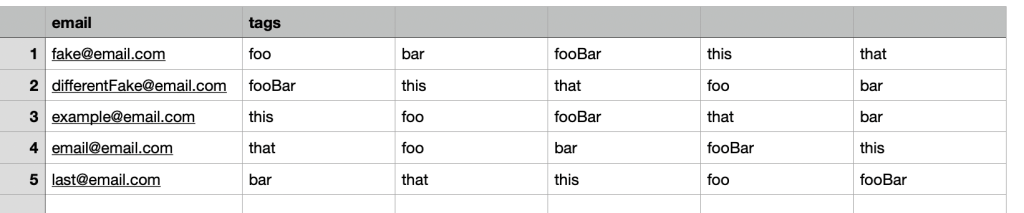
Since most people aren’t programmers, and most people can export their data to CSVs, “import data from a CSV” soon emerges.
Here’s our CSV header:
Email, tag1, tag2, …, tagN
Each line starts with an email address, and then 0->N tags that should be associated with the contact. To keep things simple we won’t be deleting any tags that are in the database, but not in the file.
When done well the customer’s file will be written somewhere like Amazon’s S3, and then processed asynchronously. The CSV processing code will be DRY and use the same code from the API.
For each line in the file:
Retrieve the existing contact’s id by email, or create a new contact
For each tag
Retrieve the existing tag’s id by name, or create a new tag
Insert contactId, tagId into the database, if it doesn’t already exist
The code to exercise these steps already exists.
[POST] /api/contact and Retrieve the existing contact’s id by email, or create a new contact run the same code.
[POST] /api/tag and Retrieve the existing tag’s id by name, or create a new tag are the second pair.
[POST[ /api/contact/{id}/tag and Insert contactId, tagId into the database, if it doesn’t already exist complete the functionality.
The emergent model is great because the only new functionality is the ability to store and process the CSV file. The business logic, how data actually gets inserted into the database, gets reused.
Big O, Performance, and Scalability
The algorithm described above has a Big O of O(n^2). For something like an import that’s not great, but it’s also not terrible.
O(n^2) doesn’t tell you much about the real world performance or scalability of the implementation. There are a few different implementations for the data access patterns which could result in wildly different performance characteristics.
In our simple example we look up the tagId in the database for each contact. This mirrors the access pattern for the API. But, we aren’t in the API, we’re in a long running process. We could store the tag-name-to-id information in a map in memory.
Adding an in-memory cache would limit step 2a to running once-per-tag instead of once-per-tag-per-contact. A file with a single tag per contact would save almost ⅓ of its calls. As the number of tags increased, the savings would increase towards ½ of the db calls.
Cutting the number of DB calls in half won’t change the Big O value, but it will greatly improve performance and reduce load on your DB.
Moving From Rows To Columns
The emergent model is great because it reuses code. One drawback is that it involves lots of trips to the database to do single inserts. Trips to the database over a network are relatively slow. Most databases are also optimized for fewer, larger writes.
Processing the CSV file row by row will always push you towards more, smaller, writes because the rows of the file will be relatively short.
Instead, let’s consider a “columnar” approach.
Instead of processing line by line and pushing it to the database, we’re going to sort the data in memory, and push the results to the database.
For simplicity, we will do two passes through the file.
Pass 1 looks very similar to the original process:
Retrieve the existing contact’s id by email, or create a new contact. Store the email/id relationship in a map.
For each tag, retrieve the existing tag’s id by name, or create a new tag. Store the tagName/id relationship in a map.
At the end of Pass 1, we have ensured that all contacts exist, and that all tags exist.
For Pass 2, we replace emails and tags with ids and build a single, large, insert statement like this:
Insert into contactTags (contactId, tagId) values
(1, 1), (1, 2), (1, 3),
(2, 1), (2, 3),
…
Again, simplifying and glossing over the entire subject of upserts, duplicate keys, etc. This post is dense enough as it is.
How Much Faster Is Going A Column At A Time?
In the real world the impact will vary based on the number of rows in the table, contention, complexity, indexes, and a whole host of variables.
Instead let’s look at it by the number of queries each option requires.
Let’s pretend we were inserting a file with 100 new contacts, and each contact had the same 5 tags.
API / Basic Import
We would insert the contact, then insert the tag, then the 5 contactTags.
That is 11 operations per row – 1 contact, 5 tags, 5 contactTags.
Over 100 rows that works out to 100 contact inserts, 5 tag inserts, 495 tag lookups, 500 contactTag inserts.
That’s 1,100 Operations
Import (or API) with tag caching between rows
Adding the in-memory tag cache greatly decreases the number of operations. We no longer need to do the redundant 495 tag lookups.
Now over the course of 100 rows it works out to 100 contact inserts, 5 tag inserts, 500 contactTag inserts.
That’s 605 Operations, at 45% reduction!
Columnar
Finally, we switched to a 2-pass columnar strategy. Instead of doing 500 contactTag inserts, we do a single insert with 500 clauses.
Now our 100 rows become 100 contact inserts, 5 tag inserts, 1 contactTag insert.
That’s 105 Small Operations and 1 Large Operation. That’s a 90% reduction from our initial version, and an 82% reduction from the improved version!
Reminder – that one large operation is going to take significantly longer than any one of the single inserts. You won’t see an 82-90% reduction in processing time. In the real world you would probably cut time by 50%, a mere 2x improvement!
The columnar work could be further optimized to be 1 large insert for contacts, 1 large tag insert, and 1 large contactTag insert. It is more complicated because we need to get the ids, but we could get it down to as little as 5 total db operations – 3 Large Inserts and 2 key lookups. I can cover the final technique in another post if there is interest.
Summary – Tradeoffs Make Columnar Fastest
Having your import process reuse the code from your API is a great way to start. Because of the code reuse the only thing you have to implement is the file handling. That keeps things simple and lets you get the feature out fast.
But, following your API’s code path is also going to be very inefficient and not scale well.
Changing strategies to favor fewer, larger, operations can reduce the number of operations by 80-90% and increase real world performance by 50% or more.