How I Will Talk You Out Of A Rewrite

If you come to me saying “we need a rewrite”, I will run you through a lot of “why” questions to discover if you actually need a rewrite.  I am basically trying to answer these three questions:

  1. What will the new system do differently?
  2. Why can’t you do that in the current system?
  3. Why can’t you build the new things separately?

Answering these questions yourself will help you think through whether you really need to rewrite your existing system.

Let’s examine each more closely.

What Will The New System Do Differently

What will be different about the new system?

For this exercise you have to ignore code quality, bugs, and developer happiness.  Those are all important, but corporate reality hasn’t changed.  The same forces that resulted in low quality code, endless bugs, and developer unhappiness are still there.  A rewrite might get you temporary relief, but over the long term, the same negative forces will be at work on the new system.

So, what is different about the new system?  The differences could be technical, like a new programming language, framework, or architecture.  Maybe you need to support a new line of business and the existing system can’t stretch to cover the needs.

Get clear on what will be different, and write it down.  These are your New Things.

Why Can’t You Do It In The Current System

Now that you are clear on what New Things you need, why can’t you build the New Things into the existing system?

We are still putting aside issues like the existing code quality, bugs, and developer happiness.  If those forces are all that is stopping you from doing the new work in the existing system, I have bad news, those forces will wreck the new system as well.  You don’t need new software, you need to change how you write software.  Stop now, while you only have one impossible system to maintain.

Other than the forces that cause you to write bad software, why you can’t use the current system.  Get clear.  Write it down.  These are your Forcing Functions.

Why Can’t You Build The New Things Separately?

At this point we know what the New Things are and we know the Forcing Functions that prevent you from extending the current system.  Why can’t the New Things live alongside the existing system?

A rewrite requires rewriting all of your existing system.  Building New Things in a new system because of Forcing Functions, only requires building the New Things.  Why can’t you do that?

By this point office politics are out.  Office politics can’t overcome Forcing Functions.

Quality and bugs are also out, because there is no existing code to consider.

Get clear.  Write it down.  This is your Reasoning.

Now, take your Reasoning, backed by the Forcing Functions, and you have explained how getting the New Things requires a rewrite.  If your Reasoning can convince your coworkers, then I’m sorry, you do actually need a rewrite.  

If not, it is time to talk about alternatives.

What Happens After I Talk You Out Of A Rewrite

Most rewrites are driven by development culture issues, not the software itself.  This brings us back to code quality, bugs, and developer happiness.  A rewrite won’t fix any of those issues.

The good news is that you can fix all of them without a rewrite.  Even better news is that fixing them will only take about as much effort as you think a rewrite would take.  The bad news is that your culture is pushing against making the fixes.

Take it one step at a time, and keep delivering.

The Software Engineer And The Mechanical Engineer: A Parable

Once upon a time a Software Engineer and a Mechanical Engineer needed to lift the leg of a table and slide a carpet underneath.  The Software Engineer, being younger, offered to lift the table with his hands.  This would create enough room for the Mechanical Engineer to slide the carpet under.  They would repeat the process for each leg.

The Software Engineer lifted with all of his might, but could not raise the table.  “The worker is not powerful enough”, he declared.  “I will call in some more people.  By scaling out the number of workers, we will reduce the amount of power each worker needs.  When we have sufficient parallel workers, the table leg will rise.”

The Mechanical Engineer replied, “Get me a 2x4 and a brick.”

And so the edge of the table was lifted.  “I estimate that the lever gives me about 20:1 leverage,” the Mechanical Engineer said, holding the table up with one hand.

Your SaaS Has Scaling Bottlenecks – Do You Know Where?

Scaling bottlenecks choke SaaS growth.  Bottlenecks can prevent you from onboarding customers fast enough, make supporting your largest customers impossible, and even leave you saying no to giant deals.  Scaling issues impact your annual recurring revenue (ARR), net dollar retention (NDR), and customer lifetime value (CLTV).  Imagine telling paying customers that they’ve grown too big and need to move to another platform!  It is not only extremely frustrating, it weighs down all of your major metrics.

The rate at which you can onboard new customers is knowable.  So is the maximum customer size that has delightful experiences.  Customers don’t get too big overnight, they grow with you for years.  You can write tools to discover the system maximums.  Knowing the limits won’t prevent you from hitting them, but it will prevent you from being surprised.

Scaling bottlenecks are a form of tech debt; bottlenecks are the result of your past decisions, regardless of whether those decisions were intentional.  Accidentally creeping up on the system’s limits requires not knowing where they are in the first place.  

Do you know where the limits are?  Was it not worth investigating because it wasn’t maxed out?

If you don’t know, you will end up turning away customers and limiting ARR growth.  Capping customer size also caps CLTV.  Saying goodbye to long term customers tanks your NDR and hurts your ARR.

All systems have bottlenecks.  The only question is: How do you want to find them?  You can seek them out, or you can find them in your bottom line.

Latency, Throughput, And Spherical Cows

My post about latency and throughput featured an extremely simplistic model to demonstrate that Latency and Throughput are independent.  An astute reader called it a spherical cow, a model so over simplified that it is a bit ridiculous.

So, let’s deflate the cow, just a bit, and see how things hold up.  I hope you like tables and cow jokes!

(Keenan Crane; GIF by username:Nepluno, CC BY-SA 4.0 <https://creativecommons.org/licenses/by-sa/4.0>, via Wikimedia Commons)

(Keenan Crane; GIF by username:Nepluno, CC BY-SA 4.0 <https://creativecommons.org/licenses/by-sa/4.0>, via Wikimedia Commons)

Chewing The Cud

The original model was a streaming system that receives 1 million messages a second.  Perfectly spherical.

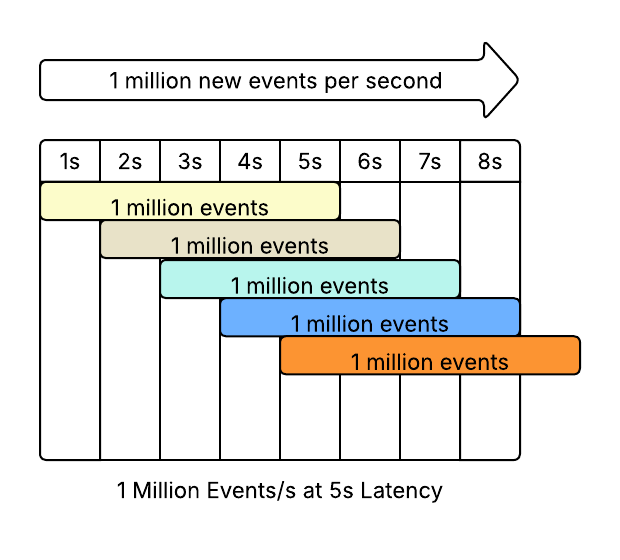
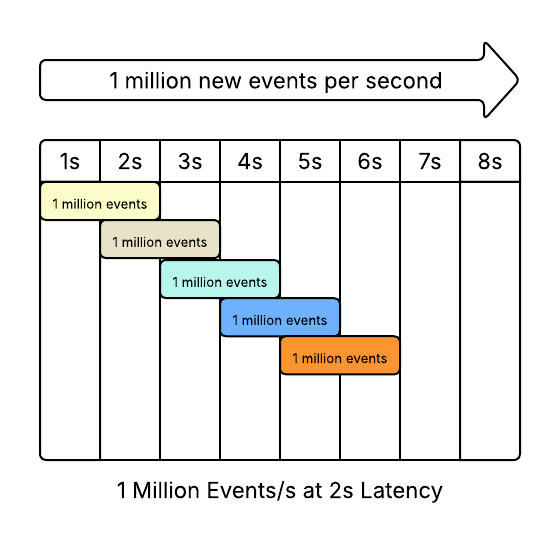
There were two systems, one with 5s latency, one with 2s latency.

We will leave our processors completely spherical - they each process 100,000 events simultaneously.  Our pipelines then look like this

5s Latency

TimeNew Events/sProcess InstancesEvents Being ProcessedThroughputExtra Capacity
11,000,000501,000,00004,000,000
21,000,000502,000,00003,000,000
31,000,000503,000,00002,000,000
41,000,000504,000,00001,000,000
51,000,000505,000,0001,000,0000
61,000,000505,000,0001,000,0000
71,000,000505,000,0001,000,0000
81,000,000505,000,0001,000,0000

2s Latency

TimeNew Events/sProcess InstancesEvents Being ProcessedThroughputExtra Capacity
11,000,000201,000,00001,000,000
21,000,000202,000,0001,000,0000
31,000,000202,000,0001,000,0000
41,000,000202,000,0001,000,0000
51,000,000202,000,0001,000,0000
61,000,000202,000,0001,000,0000
71,000,000202,000,0001,000,0000
81,000,000202,000,0001,000,0000

Conclusion: Same Throughput

The Throughput of the two systems is the same.

The first system, with 5s of latency, takes longer to warm up and needs 2.5x more instances, but it still produces the same throughput.  3 seconds later..

What Happens If You Add Scaling?

Maybe that model is too simple.  Let’s deflate the cow a little bit, vary the input and add auto-scaling.

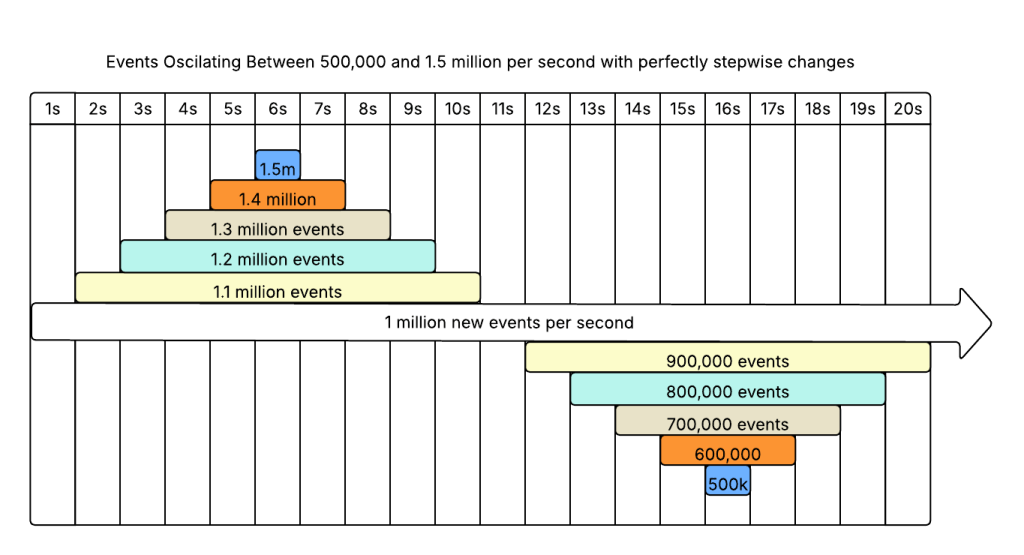
Let’s make it an average of 1 million messages a second, with peaks and valleys between 500,000 and 1.5 million per second.  20 second period, so it changes +/- 100,000 messages every second.  But, we’re only deflating the cow a little bit, so the changes will be step changes at the end of the second.

We will leave our processors completely spherical - they each process 100,000 events simultaneously.  It takes 1 second to start a processor, and 1 second to shut down.  The only difference between the two is that one takes 2s to process a message and the other takes 5s.

Now our input looks like this:

5s Latency

TimeNew Events/sProcess InstancesEvents Being ProcessedEvents Waiting to be ProcessedThroughputExtra Capacity
11,000,000001,000,00000
21,100,000101,000,0001,100,00000
31,200,000212,100,0001,200,00000
41,300,000333,300,0001,300,00000
51,400,000464,600,0001,400,00000
61,500,000606,000,0001,500,0001,000,0000
71,400,000656,500,000300,0001,100,0000
81,300,000686,800,000200,0001,200,0000
91,200,000707,000,00001,300,0000
101,100,000706,900,00001,400,0001
111,000,000696,500,00001,500,0004
12900,000655,900,00001,400,0006
13800,000595,300,00001,300,0006
14700,000534,700,00001,200,0006
15600,000474,100,00001,100,0006
16500,000413,500,00001,000,0006
17600,000353,100,0000900,0004
18700,000312,900,0000800,0002
19800,000292,900,0000700,0000
20900,000292,900,000200,000600,0000
211,000,000313,100,000400,000500,0000

2s Latency

TimeNew Events/sProcess InstancesEvents Being ProcessedEvents Waiting to be ProcessedThroughputExtra Capacity
11,000,000001,000,00000
21,100,000101,000,0001,100,00000
31,200,000212,100,0001,200,0001,000,0000
41,300,000232,300,0001,300,0001,100,0000
51,400,000252,500,0001,400,0001,200,0000
61,500,000272,700,0001,500,0001,300,0000
71,400,000292,900,0001,400,0001,400,0000
81,300,000292,900,0001,300,0001,500,0000
91,200,000292,700,00001,400,0002
101,100,000272,500,00001,300,0002
111,000,000252,300,00001,200,0002
12900,000232,100,00001,100,0002
13800,000211,900,00001,000,0002
14700,000191,700,0000900,0002
15600,000171,500,0000800,0002
16500,000151,300,0000700,0002
17600,000131,100,0000600,0002
18700,000111,100,000100,000500,0000
19800,000121,200,000300,000600,0000
20900,000151,500,000300,000700,0000
211,000,000181,800,000300,000800,0000

Result - Latency Does Not Impact Throughput

Our slightly less spherical model with perfect step changes produced the same fundamental result:

You can’t increase the throughput of a streaming system to be higher than the input.

Latency has a huge impact on the amount of resources required!  The first system, with 5s latency, fluctuated between 29 and 70 instances.  The second system, with 2s latency, fluctuated between 11 and 29.

The second system’s maximum scale out was equal in size to the first system’s minimum.

And yet, neither system was able to get above 1.5 million events/s.

No matter how non-spherical the cow may be, you can’t sustain a throughput faster than then inputs.

Reducing Latency Won’t Increase Throughput Of Streaming Systems

A counter intuitive property of streaming systems is that latency has no long term impact on throughput.  Increasing or decreasing latency will give a short term change, but once the system stabilizes in its steady state, the throughput will be the same as before.

How can latency and throughput, two important performance metrics, be unrelated?

Let’s define some terms

Latency is the amount of time between when a message is sent and when it is fully processed.  This includes the time spent getting the message onto the stream, in queue waiting to process, and process time.

Throughput is the number of completions in a time period.  It could be 1 million messages a second, 5 per hour, or anything else.  Throughput doesn’t include processing time, that’s part of latency.  The million messages/s could have taken 10ms or 10 minutes each to process; so long as 1 million of them finish every second, the throughput is 1 million/s.

Steady State is when the system is fully warmed up and taking on its full load.  For a streaming system, this means that it is consuming the full stream, it is producing its maximum output, and the work in progress is being added to as rapidly as it is finished.

Example

Imagine two systems that receive 1 million events per second.  The first system takes 5s to process a million messages, the second system takes 2s to process the same messages.

The latency is different, the throughput is the same!

Implications beyond Latency and Throughput

Besides latency and throughput, there are 3 other notable differences between the two systems.

  1. Higher latency means more events in flight.  When it gets to steady state, the first system will be working on 5 million events at a time, the second system will only be working on 2 million.  This usually means that the first system will require more resources - bigger queues, more workers, a higher degree of parallelism, etc.
  2. Higher latency means slower startup.  It takes 5 seconds for events to start emerging from the first system, but only 2 seconds for the second system.
  3. Higher latency means slower shutdown.  At the other end of the lifecycle, systems with higher latency take longer to drain and safely shut down than systems with lower latency.

Summary

Why doesn’t latency matter?  Because streaming systems have constrained inputs.  So long as the system has enough capacity to handle 100% of the inputs, then latency doesn’t impact throughput.

Latency still controls the system requirements; slow is expensive!

Rewrite Anti-Patterns: The Writeback

In my post, The Strangler-Fig Pattern Has An Implementation Order; Outputs First, I mentioned The Writeback Anti-Pattern.  Turns out, that this anti-pattern hasn’t been named and described before; so I get to be first!

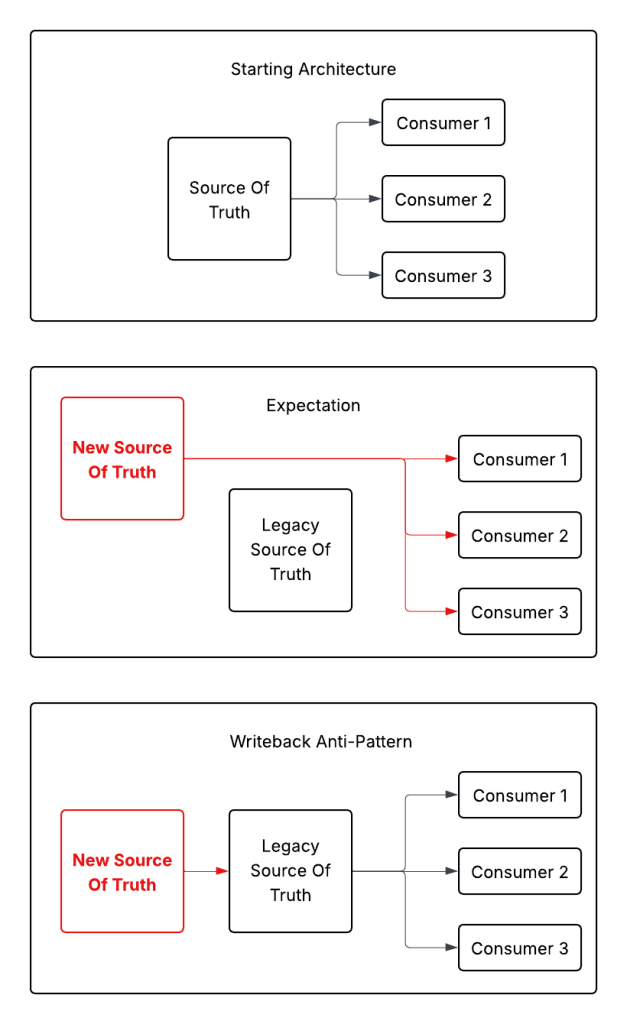
The Writeback Anti-Pattern is when a new Source Of Truth has to write data back to the legacy Source Of Truth because consumers are still getting data from the legacy source.

The Anti-Pattern allows you to pretend that the new system is indeed The Source Of Truth, and the legacy system has become an adapter.  This is a lie that lets teams declare success and get the new system into production.

The reality is that the new system is really just another bolt on to the old.  The new system now needs to transform all the inputs into the old format, creating tons of technical debt.  You have the data model you want, the data model you don’t want, and all the business logic in between.

Another way to explain it, is that the new system tried to do a strangler-fig backwards.  Instead of inserting itself between the old system’s outputs first, the new system intercepted the inputs.  For the strangler-fig pattern to work it needs to replace the outputs first, or both the inputs and outputs simultaneously.  Redirecting the inputs first leads to The Writeback.

Messaging Patterns: What They Are, When To Use Them

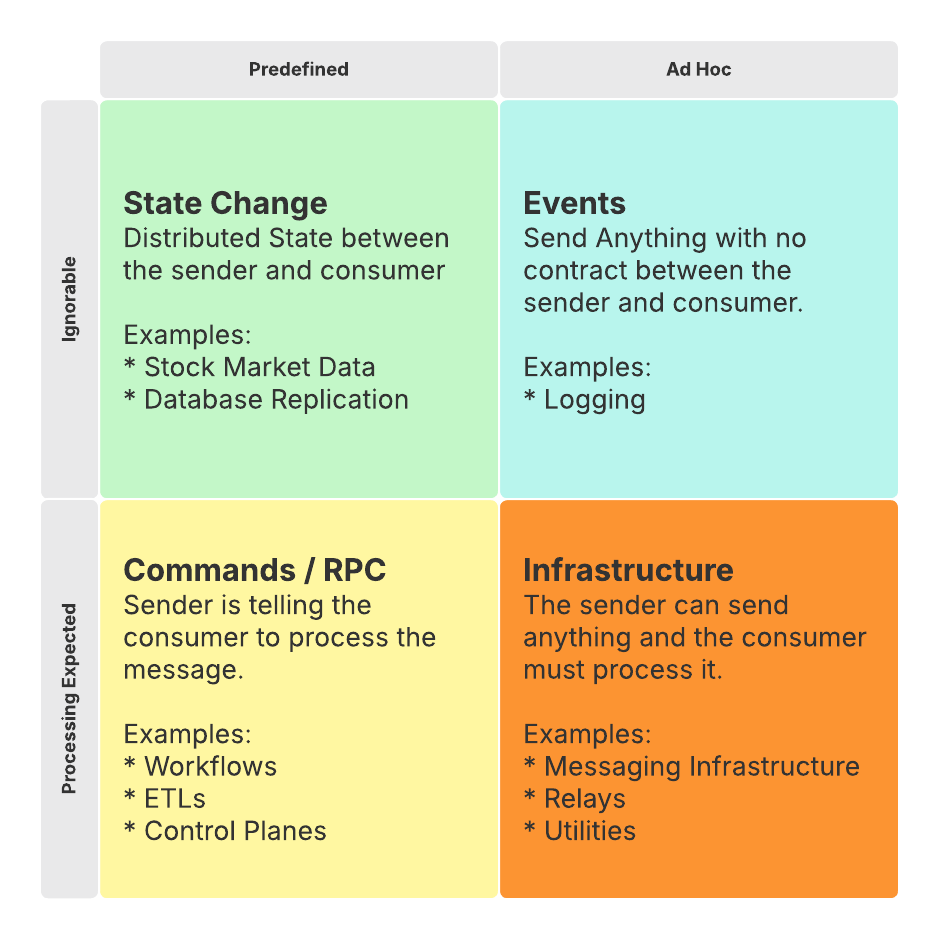
Whether you use Kafka, RabbitMQ, or even SMS, messaging infrastructure is neutral about what you are sending and why.  It is up to you, the developer, to decide on the contract between the producer and consumer of your messages.

There are 2 main considerations:

  1. Are your messages Predefined or Ad Hoc?
  2. Are your messages Ignorable or is Processing Expected?

It is critical that you set appropriate expectations for your messaging structure.  Otherwise, you’ll end up with the Command-Event Anti-Pattern.

Event Pattern - Ad Hoc & Ignorable

The Event Pattern has the least structure and fewest guarantees: You publish events in any format you want, and they may or may not get consumed.

The publisher has no expectations about whether the consumer cares about the event.  The consumer has minimal expectations about the event’s structure or data.

Generally, the only time to use the Event Pattern is with logging.  

Logs are minimally structured.  You want enough structure for your logs to get consumed by your observability platform, but not enough that it is difficult to add logs in the code.

Log messages may or may not be consumed.  Most logging systems determine whether to log based on severity settings.  In production, ERROR will almost always be on, while DEBUG will almost always be off.  Those are run time decisions though, the code doesn’t have any expectations.

State Change Pattern - Structured & Ignorable

With the State Change Pattern each event represents a change to the state of the system.  The messages are highly structured so that the consumer understands how the state just changed.  However, there is no guarantee that anyone will consume the message, and no guarantees about what the consumers will do about the change.

The State Change Pattern is extremely powerful, and difficult to do correctly.

The largest State Change Messaging platforms publish market data from stock exchanges.  Each message is either a new order, a canceled order, or an execution (trade).  Trading software uses the data to determine current prices, build books, and do everything else needed to help stock traders make decisions.  

The stock market (the publisher) doesn’t have any expectations about what the consumer (the trader) on the other end will do about each message.

A more technical example of State Change is database replication.  The primary database publishes change events (called binlogs in Mysql) and the replicas database servers consume the messages to stay in sync.  From the primary server’s perspective it doesn’t matter if there are 0 replicas or 100.  Or if the replicas are only doing partial replication.  The primary server will still publish all changes.

Command Pattern - Structured with Processing Expected

In the Command Pattern, or RPC (Remote Procedure Call) each message represents an attempt to run a command or execute work.  The important difference from the Event Pattern and State Change Pattern is that the Command Pattern has expectations about the consumer’s behavior.

The publisher has the expectation that all of the messages will be processed by the consumers.  Some implementations allow the publisher to know about the consumers and direct specific messages to specific consumers, but that isn’t a requirement.

Background workers, control planes, and job queues are some of the places you would use the command pattern.

Infrastructure - Ad Hoc with Processing Expected

The final quadrant, Infrastructure, describes messaging platforms themselves.  The publisher can send whatever they want, and the platform will process it.

Because this pattern describes messaging infrastructure, there are few uses for it ON messaging infrastructure.  Having RabbitMQ tunnel through Kafka might be an interesting project, but it wouldn’t be very useful.

Beware The Command-Event Anti-Pattern

If you aren’t intentional about your messaging pattern, you will inevitably end up with the Command-Event Anti-Pattern.  This is when you have multiple, loosely defined, message structures, some of which place processing expectations on the consumer.

The Command-Event pattern makes it easy for incorrect messages to clog up the system.  It creates confusion about which messages can be ignored, and which must be processed.  You will have a muddled mess and a long hard transition to separate your message types.

Conclusion - Be Intentional About Your Messages

Remember, the messaging infrastructure will accept any structure, or no structure.  It is concerned with delivery, not processing.  So long as every consumer gets every message that it is supposed to, your infrastructure is working properly.

It is up to you, the developer, to add expectations.

How much structure do your messages need?  Can they be skipped?  Depends on what problem you are trying to solve!  If you go forward without deciding you’ll end up with a mess known as the Command-Event anti-pattern.

If you’ve got a mess, you can fix it iteratively!  Never try a rewrite!  Iteratively separate your messages onto new, problem specific, streams.

20 Things You Shouldn’t Build At A Midsize SaaS

I have seen developers build a lot of unnecessary and counterproductive pieces of software over the years.  Generally, developers at small to midsize SaaS companies shouldn’t build any software that doesn’t directly help them deliver a service to their customers.

Whether it was the zero interest rate period, bad management, or hubris, developers spent a lot of company money on projects that never made sense given their employer’s goals and size.  I have seen custom implementations of every type of software on this list.  None of it worked better than open source, and none offered a competitive advantage.

If you find yourself developing or managing any of these twenty types of projects, stop and seriously consider what you are doing.

  1. Scripting languages
  2. Compiler extensions
  3. Transpilers
  4. Database extensions
  5. Databases
  6. DSLs
  7. ORMs
  8. Queues
  9. Background work schedulers
  10. GraphQL
  11. Stateful REST
  12. Frontend Frameworks
  13. Backend Frameworks
  14. Servers
  15. Dependency Injectors
  16. CSV writers or parsers
  17. Cryptography Implementations
  18. Logging Libraries
  19. DateTime libraries
  20. Anything from “First principles”

There are always exceptions, if building this software has some competitive advantage, go ahead.  In general, anyone suggesting these projects is biting off more than they can chew and doesn’t fully understand the problem they are trying to solve.

Most often things start out as a quick hack - “I’ll just concatenate these strings with a comma, it will be faster than finding a full CSV library.”  Soon you’re implementing custom separators and string escaping.

If your company has done their own implementations don’t despair, iterate towards a better library!

The Anna Karenina Principle of Scaling Software Systems

The Anna Karenina Principle says “All happy families are alike; each unhappy family is unhappy in its own way.”  The same is true for software scalability.  All scalable systems are alike; each unscalable system is unscalable in its own way.

Scalable Systems Scale Linearly

Scaling software systems means doing more work with more resources.  As software scales various state management issues will require ever more resources.  In the beginning processing 2x more requests will require less than 2x more resources.  Over time, the ratio will become 1-to-1 and continue to slide.  2x more requests will require 4x more resources.

So long as the ratio is linear, the system is scalable.  When the ratio becomes exponential, for example 2x more requests require x^2 more resources, the system is no longer scalable.

Scalable Systems Are Fault Tolerant

A system with 5 nines will process 99.999% of all events correctly.  Failures are 1 in a million.  A system doing 1 million events per second will have a failure every second.

Scalable systems have defined ways of handling failure - they will return an error and make the caller handle it, they will do retries, they may even fail silently.  What they won’t do is crash or error out.

Scalable Systems Are Idempotent

Exactly once delivery is nearly impossible.  As a system scales, it becomes inevitable that some events will be processed multiple times.

Scalable systems are idempotent and indifferent to how many times an event is processed.  It doesn’t matter how many times an event enters the system, once, twice, 100 times, it is all the same.

Non-idempotent systems are much easier to build, but they will fail in all kinds of different ways as customers and networks send in duplicate events.

Scalable Systems Have Minimal Human Interaction

Humans are expensive and do not scale.  The more human intervention a system requires, the less scalable it is.

Scalable systems do not require humans to deploy code, scale up or down, or watch the logs.

Conclusion

Remember, all scalable systems are alike:

  1. Linear Scaling
  2. Fault Tolerant
  3. Idempotent
  4. Require Minimal Human Interaction

Systems that are not scalable are not scalable in their own unique way.

If you don’t know why your system isn’t scalable, these 4 points are a great place to start looking.

Musketeering Makes Problems Intractable

Musketeering is lumping multiple difficult problems together to present a giant, intractable, disaster.

The name comes from the famous slogan: All for one, and one for all!  Each musketeer supports the group, and the group supports each musketeer.  When multiple problems form as one, they become impossible to defeat.

Most developers have faced a classic Three Musketeer problem with legacy code:

  1. The code is full of bugs
  2. Unit testing is nearly impossible
  3. Touching anything can have unknown side effects

Each of these issues are fixable on their own, together they bring development to a halt.

Why can’t you fix the bugs?  Because testing is nearly impossible and everything you touch has side effects.

Why can’t you write tests?  Because the code is tightly coupled, which produces side effects.  Also, it is full of bugs so we don’t know what the correct functionality is.

Why can’t you reduce side effects?  Because the code is buggy and there are no tests.  If you can’t separate the concerns, you can’t make progress.

Site Footer