Sherman On Software Latest

  • The Never Rewrite Podcast, Episode Sixty-Two, The Peculiar Failure of Correctly Predicting Problems

    The Never Rewrite Podcast, Episode Sixty-Two, The Peculiar Failure of Correctly Predicting Problems

    Isaac and Jeffrey discuss the peculiar failure of correctly predicting problems. Jeffrey shares his experience of being able to accurately predict problems in projects but failing to gain traction and prevent them. They explore the importance of buy-in from leadership and the need for a collaborative engagement structure. They also discuss the role of consultants and the difference between being diagnostic and being collaborative. The conversation highlights the challenges of convincing leadership and the potential consequences of not being able to prevent problems.

    Watch on YouTube or listen to it at NeverRewrite, Spotify, Apple Podcasts, or Amazon Music, and let us know if you have ever been involved in a rewrite. We would love to have you on the show to discuss your experience!

  • Multiple Queues Vs Prioritized Queues at the Airport

    Multiple Queues Vs Prioritized Queues at the Airport

    Multiple Queues Vs Prioritized Queues For SaaS Background Workers was a dense discussion of queues, prioritization, trade offs, and outcomes.

    This post is a much less dense discussion of the same topic with examples from airports.  Airports use a multiple queue system at Security, and a priority queue at Boarding.

    Security Has Multiple Queues

    Image from https://www.wanderingearl.com/the-benefits-of-tsa-precheck/

    Most airports in the US have 2 or 3 different queues to get through the security checkpoint: Clear, TSA Pre, and regular.  Agents help filter passengers into the different lines.  Each line represents different priorities and has a different number of agents conducting security screenings.  Once in a line, it operates as a FIFO (First in, first out) Queue.  There’s no additional sorting.

    This is a human driven Multiple Queue system, and it makes sense:

    1. The workload is highly variable.  There are peak times and slow times.  Times that favor high priority people, and times that favor regular people.  It is impractical to constantly shuffle the security checkpoint layout, so the system must accommodate all workloads.
    2. You need to prevent resource starvation.  Ie – you need to keep the regular line moving no matter how many people show up at TSA Pre 
    3. You want to minimize worker waste.  Ie – when the TSA Pre line is empty, the agent starts screening people from the regular security line.
    Image from https://www.inquirer.com/things-to-do/travel/tsa-precheck-clear-plus-global-entry-phl.html

    Security checkpoints are slow and frustrating.  They are also well balanced to provide a simple, understandable, system that supports multiple priorities and minimizes agent idle time.

    Boarding Gates Are Priority Queues

    Boarding gates, where passengers wait to get on the airplane, are Priority Queues.  

    The gates operate under different constraints from the security checkpoint:

    1. Nearly all passengers are at the gate when boarding begins
    2. There are a set number of passengers
    3. All of the high priority passengers should board before any of the regular priority passengers board.  Unlike the security checkpoint, resource starvation is desirable.
    4. The resources cannot be scaled.  There’s one plane, one door, and one person through at a time.

    The queues take multiple forms.  They can be simple, like United’s

    Image From https://www.tripadvisor.com/LocationPhotoDirectLink-g1-d8729177-i375422300-United_Airlines-World.html

    Or complex, like Southwest’s

    From https://www.quora.com/On-Southwest-Airlines-have-you-been-asked-to-switch-seats-after-the-open-seat-boarding-process

    The Priority Queues have a common structure.  They have self sorting guided by signs and instructions.  The ticket agent acts as a final filter, either accepting or rejecting people.  The ticket agent (the worker) always runs at full capacity, while the queue itself is extremely inefficient and keeps people waiting a long time.

    Since the plane only has one entrance, a Priority Queue is the only way to ensure that the high priority passengers get on first.

    Reminder – We’re Really Talking About Scaling

    Airports are designed to scale.  They use Multiple Queues at the security checkpoint, because it fits the problem.  They use Prioritized Queues at the boarding gate because it fits the problem.

    How should your Background Worker system be designed?

    These are the considerations:

    1. Resource Starvation aka job latency
    2. Workload and priority variation
    3. Worker waste
    4. Scalability and configurability – aka how hard is it to add workers, or shift them around

    If you get stuck, let me know and I’ll help you out in a future post!

  • Case Study – A Failure To Iterate Became A Full rewrite

    Case Study – A Failure To Iterate Became A Full rewrite

    This is a story of how a project that could have been done in a highly iterative fashion became a big bang rewrite.

    We chose to do fewer, larger, steps in order to get some features out the door faster.  Ultimately, we failed to deliver the most important feature sooner; and probably delivered it later than if we had gone with the more iterative approach.

    Along the way we also encountered all of the expected problems from doing a full rewrite instead of iterating.  This includes more impactful bugs, multiple rollbacks, and a longer project timeline.  As a result we decreased customer satisfaction for no benefit.

    The Problem: A Highly Visible Legacy Dashboard

    We had a dashboard page with multiple visible problems:

    1. The page had 4s latency to first paint (that means you stare at a blank screen for 4s before you start to see anything).
    2. The widgets on the page had additional load time on top of the page load.
    3. The widgets hadn’t been rethought in ~8 years and weren’t well designed to show customers the most important data.
    4. The dashboard and the widgets were loaded via server side rendering, while the rest of the app had migrated to React and APIs

    For these reasons the product group wanted to replace the existing page with an API driven React page.

    Lesson: There were also multiple problems that weren’t visible that became problems.  We did not do any research into what other business processes were running through the page.

    Tech’s proposal: iterate.

    The developers proposed an iterative approach:

    1. First replace each widget with an API + React component.  The widgets would replace the existing widgets on the dashboard page.  Work would be done one widget at a time; and the widget would go into production immediately.  (This would have no impact on the 4s page load time.)
      1. This would keep work in progress minimal.
      2. It would allow us to change widgets one at a time, and roll back one at a time if there was a problem.
      3. Customers would see the widgets changing one at a time.
      4. Once a widget had been converted to react, the frontend devs could also begin iterating on the widget’s design in parallel.
    2. Once all the widgets are converted, replace the dashboard framework.  This would get rid of the 4s load time.
      1. The complete dashboard framework was estimated as half of the total work.  (As much as the widgets).
      2. Customers would be offered a “try the new version” link which would allow them to opt-in to the faster version before all the features were complete.  This would allow the work to go into prod immediately, but without all of the features.

    Product’s Counter: The only thing that matters is the 4s load time.

    The product group told tech tech that the CEO was personally embarrassed by the 4s load time.  He didn’t care about the widgets themselves.  Therefore, the dashboard framework must go first.

    Back and forth, attempts to iterate:

    1. Devs: If we go with the framework first, none of the widgets will be available.  What’s the minimum number of widgets we can use to go live?
      Product: We can do a release with half (4/8) the widgets.  Feature flagged off so that only the CEO and testers can see.
    2. Devs: Once we have the framework and some widgets done, we want to put up a link letting users try/switch to the new dashboard.
      Product: No, no reveal until we have all the widgets.
    3. Devs: Do we need feature parity on the framework before showing to customers?
      Product: No, we can remove things like customized layout for the first release.
    4. Devs: There are a bunch of features that have terrible performance or don’t make sense.  Can we fix them as part of the rewrite?  (NOTE: This was a mistake on our part)
      Product: Yes.  We approve some of the changes on this list

    Table is set; we have agreed to do a 50-75% rewrite because that is the minimum for the feature that our stakeholder, the CEO, wants.

    Lesson: “The CEO wants the framework first” was an unverified claim.  The CEO (the stakeholder) was never presented with the widget vs framework.  The project manager seized on the difference as a way to get the main feature out faster.

    Lesson: No opt-in link was a personal preference of the project managers.  No evidence was presented.  An opt-in link would have mitigated many of the issues by reducing WIP and surprise around the change.

    The Project Went Off The Rails

    First Derailment: 50% of the widgets is not actually ok

    The first project derailment came when the CEO and CPO looked at the dashboard and declared that it was not ok to go out without all of the widgets.  

    “Removing features for customers is not ok”, said the CPO.

    We were able to put the project back on track by agreeing to only release it to NEW customers.  They would not be losing functionality and would see new features appear every week.

    Lesson: At this point it was clear that the project people representing the customer had missed the project set up.  We should have had a meeting with the customer (the CEO) and confirmed/denied the rest of the project.  This would have revealed other issues.

    New customers were the first to work with the MVP set of re-written widgets and did find bugs that were missed.  Because the MVP represented a lot of built up work in progress, customers encountered all of the bugs at once.  The iterative approach would not have resulted in any fewer bugs, but they would have emerged once a week instead of all at once.  Iteration would have made the bugs less noticeable and allowed developers to fix them faster.

    Lesson: Releasing the MVP to new customers was a mistake.  It put our new customers in a situation where they were more likely to have a poor experience.

    Second Derailment: We didn’t know what the framework did

    The second project derailment came when we discovered that the framework ALSO contained a billing workflow.  Because we didn’t know it was there, it wasn’t ported, and accounts with free trials were unable to convert.

    Because we were only targeting new customers, this meant that the issue hit almost everyone.  We rolled the feature back.

    We got the project back on track by adding the billing logic.

    Lesson: Neither tech or product did research to understand what ELSE the framework might be doing before beginning the work.  We knew the code was over 10 years old, assuming that only the visible parts were meaningful was foolish. 

    Third Derailment: We must respect settings

    The third derailment came after we had ported all of the widgets.  At that time the CPO declared that we must also respect customizations (widget ordering and removal) before going live to any existing customers.

    Dev pushed back by asking how many customers actually used the feature.  Turns out we did not know.  Search was done at this point to determine that ~11% of users had customized the dashboard.

    Project was blocked until we had drag and drop ordering, widget add/remove, and a way to migrate the settings.

    At this point we were at full parity with the original dashboard.  The 4s delay was gone, the widgets were optimized for performance, and cleaned up to make the visualizations easier to understand.

    Lesson: At this point we had done 100% of the original project as a full rewrite.  We did not achieve our original goal of getting rid of the 4s page load first.  We did not keep WIP low.  We did not release incrementally and gather feedback.  Existing customers got a big bang – we did not hit any intermediate release goals for existing customers.

    Fourth Derailment: The features we cut were important to a vocal minority

    Turns out that one of the features we cut due to bad performance and clutter, were important to a vocal minority of customers.

    Dev tried to argue that the features were available, in a better form, elsewhere, but the decision was made to roll the rewrite back.

    Lesson: “I hate the new design” is a common phenomenon when an existing UI is re-skinned.  Iterative releases would have defused the issue.

    Lesson: We did not do any customer research to understand how customers used the original page before making performance optimizations.

    Lesson: There was a meaningful feature that was only available in a dashboard, and we cut it.  We had to restore the feature and create alternative ways to access the data.

    Conclusion: The Worst Of All Successes

    We managed to achieve success in the worst possible way:

    • Customers were hit with multiple disruptive issues.
    • The customers most impacted were those on brand new on trial accounts, and our longest most loyal customers.
    • We didn’t communicate directly with stakeholders, and completely missed his desires.
    • We missed every deadline and release date.
    • All of the value came in a single burst at the end of the project.  The project came close to being canceled several times, which would have made all of our efforts a waste.

    The lessons were clear:

    • Stakeholders must be involved with the project.  Speaking to intermediaries when discussing trade offs is a recipe for disaster.
    • Larger steps require more research.  Research takes time.  More time means you need to pack in more features in the step.  This is a vicious cycle.  Making the steps smaller is a virtuous cycle.
    • Reduce the number of changes going on concurrently.  Pushing to remove features increased the risk of unhappy customers.

    Above all, iterate!

  • The Never Rewrite Podcast, Episode Sixty-One, Challenges of Multi-Product Platforms with Dustin Rea

    The Never Rewrite Podcast, Episode Sixty-One, Challenges of Multi-Product Platforms with Dustin Rea

    Dustin Rea, CEO of Red Hook Agency, discusses the challenges and considerations of bringing new products into an existing platform and splitting products within the same platform. The conversation covers topics such as authentication and authorization, merging different products onto a platform, reorganizing teams, and converting internal tools to SaaS. The speakers also touch on the importance of onboarding experiences for new and existing customers.

    Watch on YouTube or listen to it at NeverRewrite, Spotify, Apple Podcasts, or Amazon Music, and let us know if you have ever been involved in a rewrite. We would love to have you on the show to discuss your experience!

  • Multiple Queues Vs Prioritized Queues For SaaS Background Workers

    Multiple Queues Vs Prioritized Queues For SaaS Background Workers

    Every SaaS has background workers.  Processes that sync data between platforms, aggregate stats, run billing, send alerts, and a million other things that don’t happen through direct user interaction.  Every SaaS also has limited resources; servers, databases, caches, lambdas, and other infrastructure all cost money.  

    Most SaaS go through three main phases as they mature and discover that queues are harder than they seem:

    On Demand -> Homegrown database as a Queue -> 3rd party queue software

    Whether driven by a database or proper queue, this high level system emerges:

    Enter The Dream Of Priority

    Because resources are limited and some jobs, and some customers, are more important than others, the idea of a Priority Queue will emerge.  

    “There are hours of work on the queue, and an important batch of jobs needs to be done now!  If only some jobs can move to the front of the line.”

    A Priority Queue seems like a great solution.  The processes that create work can set a priority, add it to the queue, and sorting will take care of everything!

    Unfortunately, what happens is that only high priority work gets processed.  This is known as resource starvation. Low priority jobs sit at the back of the queue and wait until there are no high priority jobs.  

    Priority Queues only give you two options: add enough workers to prevent queue starvation, or make the priority algorithm more complex.  Since resources are limited, engineers start getting creative and work on algorithms involving priority and age.

    There is a much simpler solution.

    Multiple Queues Have Priority Without Starvation

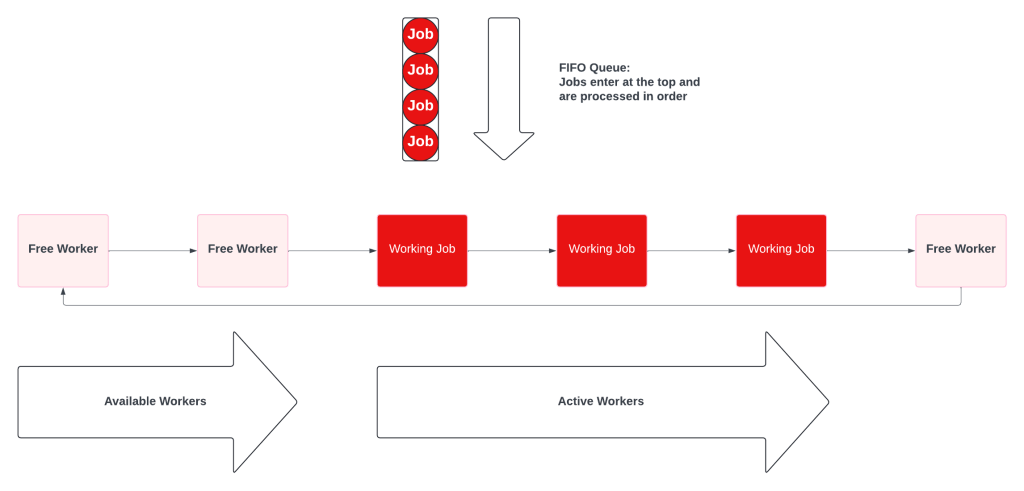
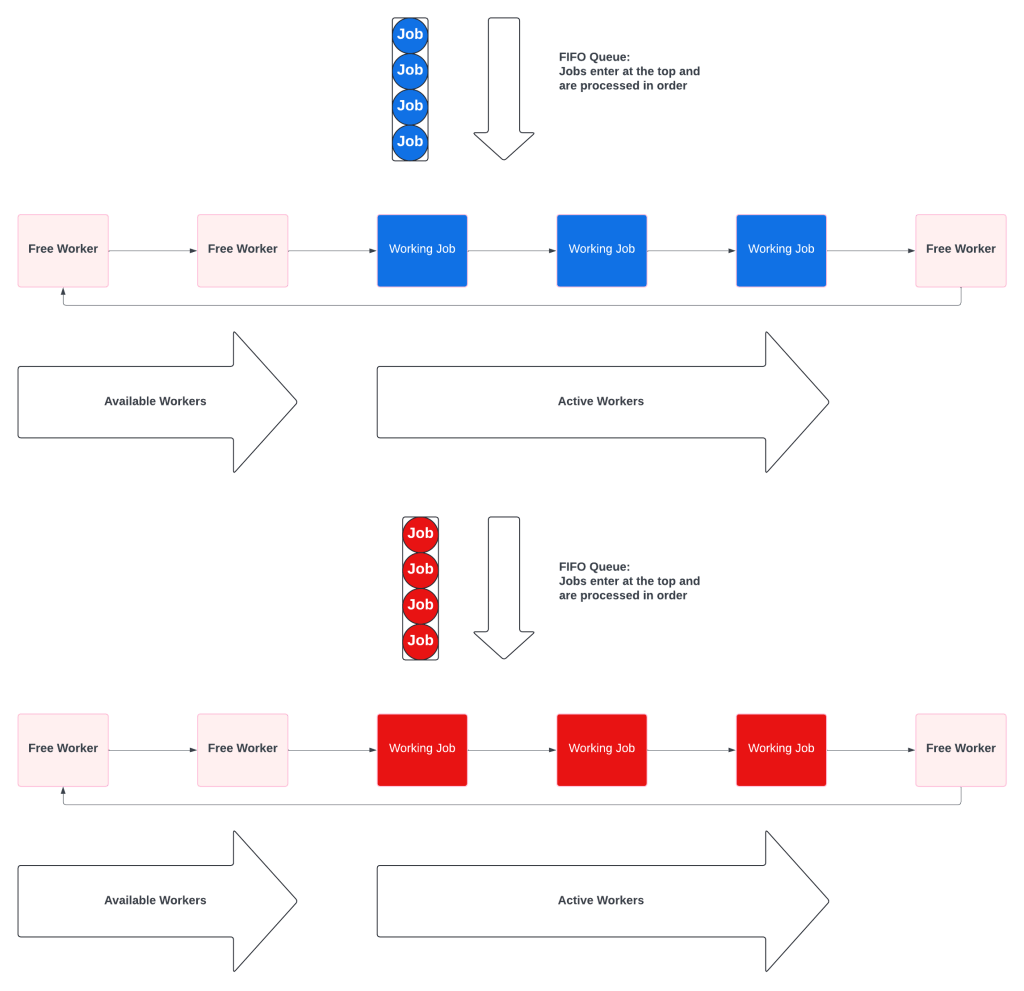
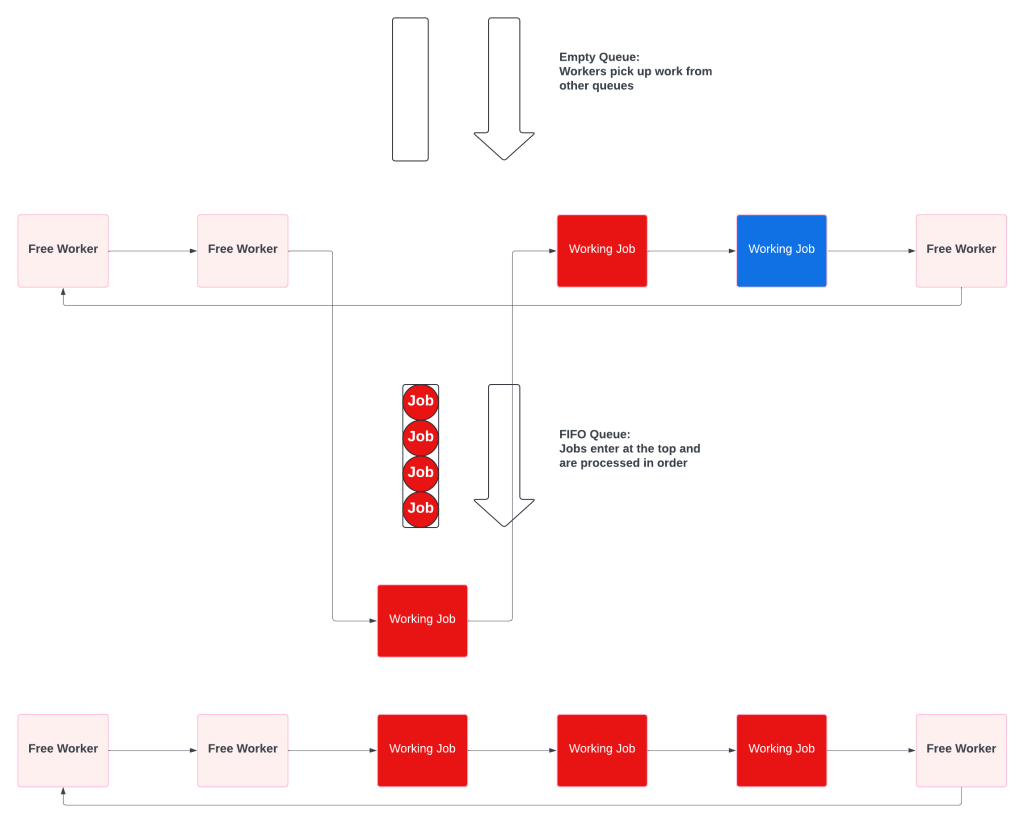
    A Multiple Queue system is a prioritized collection of simple fifo queues.  Each queue also has a dedicated worker pool, which prevents starvation.  The key difference is that the workers will check the other queues when theirs is empty.

    When all the queues have work, they behave like independent queues:

    When the priority queue is empty, the priority workers pick up low priority tasks.

    Multiple Queues solve priority in SaaS friendly ways:

    • No resource starvation.  Some customers may be more important, but no customer ever gets ignored.
    • No wasted resources.  High priority workers never sit idle waiting for high priority work.

    Multiple Queues Push Complexity To Workers

    Instead of having a complex Priority Queue, Multiple Queue systems push some complexity to the workers.  Workers have to know which queue is their primary, and the order of the remaining queues.

    Multiple Queues Have More Adjustment Options

    Priority Queues only had 2 adjustment options: add more workers or adjust the algorithm.  Multiple Queues allow much finer grained controls:

    • The number of different queues.  Adding a new, super duper higher priority pool would not require a code change.
    • The size of the worker pool for each queue.  Queues do not need to have the same size pools, and can be adjusted dynamically.
    • The relative priority of the queues.  Priority becomes config, not an algorithm.

    Conclusion – For SaaS Workers, Use Multiple Queues

    Background workers are a common, critical, feature for most SaaS companies.  Resource constraints make it impossible to run all background jobs as soon as they are created.  Some jobs will have different priorities, which will require implementing either Priority Queues or Multiple Queues.  Priority Queues sound like the correct answer because they describe the problem, but create resource starvation and ever increasing complexity.  Multiple Queues are simple, safe from starvation, and much more effective for SaaS use cases.

  • The Never Rewrite Podcast, Episode Sixty, Anybody Could Have Done It…But I Actually Did

    The Never Rewrite Podcast, Episode Sixty, Anybody Could Have Done It…But I Actually Did

    Isaac and Jeffrey discuss the feeling of anyone being able to make small, simple changes in code and question the value of their own contributions. They share anecdotes of fixing issues that others could have easily addressed but didn’t, highlighting the importance of being the one to take action. They emphasize the value of iterative changes and the knowledge work involved in understanding the system. They also encourage developers to listen to complaints and pain points in order to identify opportunities for impactful improvements.

    Watch on YouTube or listen to it at NeverRewrite, Spotify, Apple Podcasts, or Amazon Music, and let us know if you have ever been involved in a rewrite. We would love to have you on the show to discuss your experience!

  • Calling The Baby Ugly Won’t Short Circuit The Emperor’s New Clothes 

    Calling The Baby Ugly Won’t Short Circuit The Emperor’s New Clothes 

    You can’t point out that the Emperor Has No Clothes until the emperor puts on his invisible garments.  Pointing out the problems before it is too late, is Calling The Baby Ugly.  Incomplete software can be “ugly” right now and still be great by the time it is released.

    That potential, it might still be fine, makes it difficult to short circuit the story as it unfolds.  Software literally emerges from thin air as developers work.  Pointing out that the pants only have one leg, the response can be that the second leg is coming in phase 2.

    By itself, pointing out the flaws will not short circuit the process.  Flawed architecture, wrong technology, and hostile UX don’t matter until it is too late.  Nothing is real until it is time to put on the clothes.  Calling the baby ugly makes you Cassandra, doomed to be correct and ignored.

    The key to the Emperor Has No Clothes is that the truth emerges when the software meets reality.  The Grand Reveal is a mistake and totally unnecessary.  The baby may be ugly, but the Emperor can only have no clothes when he puts on a whole new wardrobe for the first time.

    Iterative delivery short circuits the process because software is constantly going into production.  Don’t bet on the Emperor’s New Clothes, send him out with a new jacket and find out if people see it, or the regular shirt underneath.

  • The Never Rewrite Podcast, Episode Fifty-Nine, The Myth of the Boy Scout Rule

    The Never Rewrite Podcast, Episode Fifty-Nine, The Myth of the Boy Scout Rule

    Isaac and Jeffrey discuss the myth of the Boy Scout rule, which is the idea of leaving code better than you found it. Isaac shares his experience of encountering problems when trying to follow this rule in a codebase with no test coverage. He explains how fixing one issue led to unintended consequences and a cascade of errors. They emphasize the importance of being cautious when making changes in old and tightly coupled code and the need for thorough testing. They conclude that while refactoring is important, it should be done intentionally and not mixed with other changes.

    Watch on YouTube or listen to it at NeverRewrite, Spotify, Apple Podcasts, or Amazon Music, and let us know if you have ever been involved in a rewrite. We would love to have you on the show to discuss your experience!

  • Common Cause Vs Special Cause in Software Variation

    Common Cause Vs Special Cause in Software Variation

    In Yes, Software Execution Has Variation, I laid out a dozen places where successful software will have variation:

    There are at least a dozen places for variation in a single, successful, RESTful POST:

    1. Time to establish a connection between client and server
    2. Time to send the data between client and server
    3. Time for the event to go up the OSI stack from physical to application layer
    4. Time for the application to process the event.  This is impacted by CPU, Memory, Thread models, etc.
    5. Time for the event to go back down the OSI stack
    6. Time needed to connect to the database
    7. Time database needs to perform the action
    8. Network time to and from the database
    9. Time for the event to go back up the OSI stack
    10. Time for the application to process the database’s response and prepare a response to the client
    11. Time for the event to go back down the OSI stack
    12. Time to send the response to the client

      Let’s say that your SaaS has an SLA that all calls should return to the customer within 300ms.  Looking at the system metrics, you see that your endpoint meets the SLA 95% of the time.  What to make of the remaining 5%?

      Common Cause vs Special Cause Variation

      Common Causes are issues due to the nature of the system and will continue until the system is changed.  In software, Special Causes are bugs and hiccups and will appear and disappear at random.

      For our RESTful POST that needs to return in under 300ms, a source of Common Cause could be the physical distance between the client and server.  If you are running on AWS in US-EAST-1, it is physically impossible to meet the SLA for customers in Asia.  Round trip to places like Seoul and Tokyo is at least 450ms!

      Requests from Asia will fall outside the SLA 100% of the time.  The only solutions are to change the SLA or stand up an instance of your system closer to your Asian customers.  You must change the system.

      An example of a Special Cause could be an overloaded database.  Some requests will be fine, others will break the SLA.  The issue will go away once load decreases.  The answer may be to change the system by increasing the size of the databases.  Or keep the system the same and change the software to make the database insert asynchronous.  The software change decouples the SLA from database performance.

      Deming’s Path Of Frustration

      Fixing all the Special Causes won’t solve all the problems.

      Knowing that 5% of your requests break the SLA doesn’t tell you anything about Common vs Special Cause.  Developers can fix some of the problems with software, but some can only be fixed by changing the system architecture.

      Until you analyze and determine the source of your variation, you’ll be stuck on the Path Of Frustration.  Pouring ever more resources into ever smaller gains.

    1. Yes, Software Execution Has Variation

      Yes, Software Execution Has Variation

      Software development has strongly resisted learning about quality from physical manufacturing.  After all, our product isn’t physical and isn’t bound by the same constraints as the physical world.  One of Deming’s core messages is that quality will increase as variation decreases.  This applies to software too!

      Even a simple CRUD app has tons of variation.

      There are at least a dozen places for variation in a single, successful, RESTful POST:

      1. Time to establish a connection between client and server
      2. Time to send the data between client and server
      3. Time for the event to go up the OSI stack from physical to application layer
      4. Time for the application to process the event.  This is impacted by CPU, Memory, Thread models, etc.
      5. Time for the event to go back down the OSI stack
      6. Time needed to connect to the database
      7. Time database needs to perform the action
      8. Network time to and from the database
      9. Time for the event to go back up the OSI stack
      10. Time for the application to process the database’s response and prepare a response to the client
      11. Time for the event to go back down the OSI stack
      12. Time to send the response to the client

      Most of the time, things like traversing the OSI stack, CPU and memory management take minimal time and have minimal variation.  One major source of variation is when the JVM or CLR enters a garbage collection cycle and halts execution for several seconds.

      Even when every request succeeds, some requests can take 100x or even 10,000x longer than the median.  Does that variation matter?  Sometimes.

      In rare cases, like High Frequency Trading, this variation can be the difference between earning millions and going bankrupt.  Most of the time the variation is a sign of system health and doesn’t matter much in isolation.  But if the variance gets bigger, week after week, release after release, it is a sign that your system has long term health problems.

      Just because the code does the same thing every time, doesn’t mean that it executes the same.  Variation applies to software and we can learn a lot from physical manufacturing.