The SaaS Business Model can be confusing to anyone not intimately familiar with how it works. For developers, this makes it hard to understand priorities, see the levers, and understand their impact. This post is going to try a simple metaphor.
The SaaS Business Model is like pumping air into a balloon with a leak.
The pump represents new customers, the leaks are churn, and customers are the air in the balloon - the life breath of the SaaS.
You want to pump as hard as possible to get as many customers as possible. But the more customers you acquire, the more the balloon fills, the more pressure there will be pushing against the leaks.
SaaS Always Needs New Customers
A SaaS company can never stop acquiring new customers, because it can never stop losing customers. Through no fault of their own, the SaaS customers' needs will change and some will go out of business. Without a steady stream of new customers, the balloon will deflate and the SaaS will go out of business
The Pump And The Leaks Are Tradeoffs
The Pump is the force that brings in new customers. There are many ways to acquire new customers - marketing, sales, and referrals are some of the major ones.
The Leaks are the things that cause customers to churn. Some are outside of your control; customers go out of business. Most are things you can control like price, easy of use, and buggyness.
The pump has a huge impact on the leaks. A SaaS that brings in customers via Enterprise Sales is much more immune to issues with performance, ease of use, and bugs than a SaaS that brings in new customers through referrals.
Features And Quality Can Be Tradeoffs
A common confounding example is when a SaaS brings in new customers through a steady stream of new features. This sets up a model where Features and Feature Quality have become tradeoffs. For developers, this manifests as strange and confounding choices - create lots of features very quickly, and then occasionally go back and fix bugs.
Features bring in new customers, they optimize the pump. Quality reduces churn, it helps patch the leaks. Depending on the pressure in the balloon it may make sense to pump harder, or it may make sense to slow the leaks. Churn is a laggy indicator, problems take a while to drive customers away, and fixing the problem doesn’t immediately reduce churn. Developers also aren’t usually privy to the data so the switch from features to quality can appear with little warning.
Referrals Make Quality Additive
Alternatively, when the pump is driven by referrals, that can drive developers to prioritize Quality and make Price the tradeoff. Software can be made easier, faster, prettier, and more reliable by throwing money at the problem. Referrals come from happy and satisfied customers, great service at a great price.
Conclusion - The SaaS Model Requires Tradeoffs
The SaaS Business Model can be confusing because the drivers can be obscure. Business tradeoffs aren’t static, they change based on the source of new customers and sources of churn. This can be especially confusing for developers because churn is a lagging indicator and the switch from working on acquiring new customers to reducing churn can be sudden.
Above all else, churn is inevitable and you must always be working to acquire new customers!
I was making a diplomatic comment about some software I was refactoring, “Regardless of the original programmer’s vision, the original code doesn’t work with the final state.” I realized that my version of the code won’t be the final state either. When you work in SaaS, code doesn’t have a final state.
SaaS code has history; it was written to solve a problem. It may have evolved to solve the problem better, it may have evolved because the problem changed.
SaaS code has a present; it is what it is. It solves a problem for some customers. The code might be amazing, but frustrates customers because the problem has changed. The code could be terrible but delights customers because it perfectly solves a static problem.
The code may have a future. The problem can change, the implementation can change.
What SaaS code doesn’t have is a final state. Until you delete it, you can never look at a piece of code and say that won’t be changed again.
Don’t make the mistake of thinking that once you refactor some code, the code will be in its final state. The Service in SaaS will change over time, your code will change with it.
This article walks you through optimizing an import process. I’m going to lay out a simple SaaS db and api, discuss how imports emerge organically, and show you how to optimize for performance.
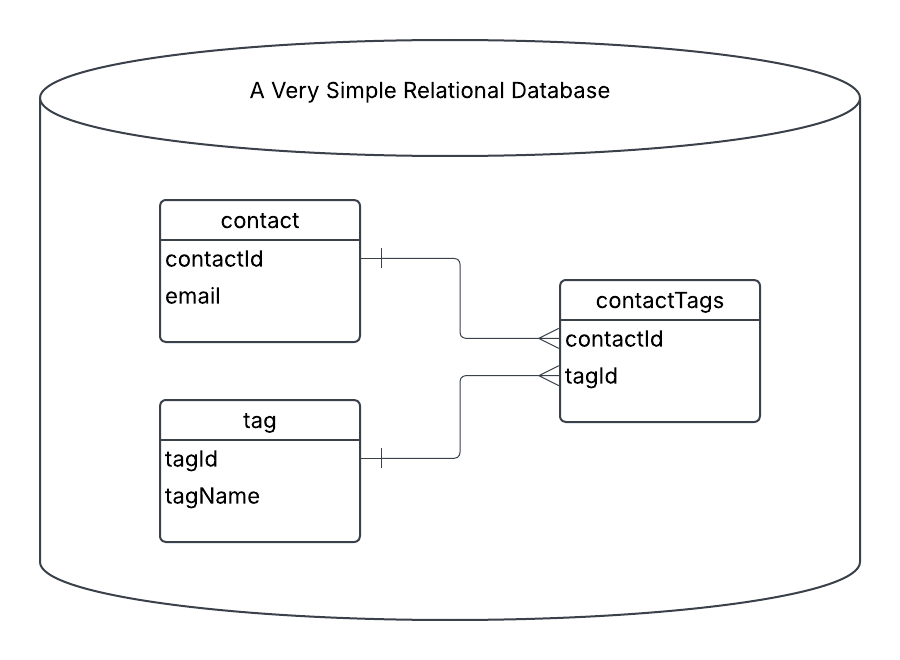
For the article, we are starting off with a simple CRM that lets you create email contacts, and add tags to them. This is a real, but very small, piece of functionality in all CRMs, and even most SaaS.
API First
Most SaaS start with basic CRUD abilities, an endpoint to create contacts, an endpoint to create tags, and an endpoint to associate tags with contacts. You
[POST] /api/contact - create the contact
[POST] /api/tag - create the tag
[POST[ /api/contact/{id}/tag - create the contactTag relationship
Simple and straightforward. Great for UIs. Cumbersome and clunky if you aren’t a programmer.
CSV Second
Since most people aren’t programmers, and most people can export their data to CSVs, “import data from a CSV” soon emerges.
Here’s our CSV header:
Email, tag1, tag2, …, tagN
Each line starts with an email address, and then 0->N tags that should be associated with the contact. To keep things simple we won’t be deleting any tags that are in the database, but not in the file.
When done well the customer’s file will be written somewhere like Amazon’s S3, and then processed asynchronously. The CSV processing code will be DRY and use the same code from the API.
For each line in the file:
Retrieve the existing contact’s id by email, or create a new contact
For each tag
Retrieve the existing tag’s id by name, or create a new tag
Insert contactId, tagId into the database, if it doesn’t already exist
The code to exercise these steps already exists.
[POST] /api/contact and Retrieve the existing contact’s id by email, or create a new contact run the same code.
[POST] /api/tag and Retrieve the existing tag’s id by name, or create a new tag are the second pair.
[POST[ /api/contact/{id}/tag and Insert contactId, tagId into the database, if it doesn’t already exist complete the functionality.
The emergent model is great because the only new functionality is the ability to store and process the CSV file. The business logic, how data actually gets inserted into the database, gets reused.
Big O, Performance, and Scalability
The algorithm described above has a Big O of O(n^2). For something like an import that’s not great, but it’s also not terrible.
O(n^2) doesn’t tell you much about the real world performance or scalability of the implementation. There are a few different implementations for the data access patterns which could result in wildly different performance characteristics.
In our simple example we look up the tagId in the database for each contact. This mirrors the access pattern for the API. But, we aren’t in the API, we’re in a long running process. We could store the tag-name-to-id information in a map in memory.
Adding an in-memory cache would limit step 2a to running once-per-tag instead of once-per-tag-per-contact. A file with a single tag per contact would save almost ⅓ of its calls. As the number of tags increased, the savings would increase towards ½ of the db calls.
Cutting the number of DB calls in half won’t change the Big O value, but it will greatly improve performance and reduce load on your DB.
Moving From Rows To Columns
The emergent model is great because it reuses code. One drawback is that it involves lots of trips to the database to do single inserts. Trips to the database over a network are relatively slow. Most databases are also optimized for fewer, larger writes.
Processing the CSV file row by row will always push you towards more, smaller, writes because the rows of the file will be relatively short.
Instead, let’s consider a “columnar” approach.
Instead of processing line by line and pushing it to the database, we’re going to sort the data in memory, and push the results to the database.
For simplicity, we will do two passes through the file.
Pass 1 looks very similar to the original process:
Retrieve the existing contact’s id by email, or create a new contact. Store the email/id relationship in a map.
For each tag, retrieve the existing tag’s id by name, or create a new tag. Store the tagName/id relationship in a map.
At the end of Pass 1, we have ensured that all contacts exist, and that all tags exist.
For Pass 2, we replace emails and tags with ids and build a single, large, insert statement like this:
Insert into contactTags (contactId, tagId) values
(1, 1), (1, 2), (1, 3),
(2, 1), (2, 3),
…
Again, simplifying and glossing over the entire subject of upserts, duplicate keys, etc. This post is dense enough as it is.
How Much Faster Is Going A Column At A Time?
In the real world the impact will vary based on the number of rows in the table, contention, complexity, indexes, and a whole host of variables.
Instead let’s look at it by the number of queries each option requires.
Let’s pretend we were inserting a file with 100 new contacts, and each contact had the same 5 tags.
API / Basic Import
We would insert the contact, then insert the tag, then the 5 contactTags.
That is 11 operations per row - 1 contact, 5 tags, 5 contactTags.
Over 100 rows that works out to 100 contact inserts, 5 tag inserts, 495 tag lookups, 500 contactTag inserts.
That’s 1,100 Operations
Import (or API) with tag caching between rows
Adding the in-memory tag cache greatly decreases the number of operations. We no longer need to do the redundant 495 tag lookups.
Now over the course of 100 rows it works out to 100 contact inserts, 5 tag inserts, 500 contactTag inserts.
That’s 605 Operations, at 45% reduction!
Columnar
Finally, we switched to a 2-pass columnar strategy. Instead of doing 500 contactTag inserts, we do a single insert with 500 clauses.
Now our 100 rows become 100 contact inserts, 5 tag inserts, 1 contactTag insert.
That’s 105 Small Operations and 1 Large Operation. That’s a 90% reduction from our initial version, and an 82% reduction from the improved version!
Reminder - that one large operation is going to take significantly longer than any one of the single inserts. You won’t see an 82-90% reduction in processing time. In the real world you would probably cut time by 50%, a mere 2x improvement!
The columnar work could be further optimized to be 1 large insert for contacts, 1 large tag insert, and 1 large contactTag insert. It is more complicated because we need to get the ids, but we could get it down to as little as 5 total db operations - 3 Large Inserts and 2 key lookups. I can cover the final technique in another post if there is interest.
Summary - Tradeoffs Make Columnar Fastest
Having your import process reuse the code from your API is a great way to start. Because of the code reuse the only thing you have to implement is the file handling. That keeps things simple and lets you get the feature out fast.
But, following your API’s code path is also going to be very inefficient and not scale well.
Changing strategies to favor fewer, larger, operations can reduce the number of operations by 80-90% and increase real world performance by 50% or more.
20 Things You Shouldn’t Build At A Midsize SaaS was about technical problems developers at a midsize SaaS shouldn’t try to solve. Is midsize SaaS development all glue work? Have all the problems been solved?
Of course not. Midsize SaaS is the garden of Refactoring, Scaling, and Performance.
To make it sound fancy: The deep work for developers at a midsize SaaS is designing solutions for emergent architectural problems.
A Midsize SaaS Has Different Problems Than A Startup SaaS
Startups have unproven theories about what customers want. They need to get features out as quickly as possible to test theory against reality. Worrying about multiple data centers, global latency, or the performance of features customers can’t see, is a waste of time.
At a startup you should write good code, find product market fit, and don’t worry about how the system will perform when you have 10,000 paying customers.
Once you have thousands of paying customers, that’s when architectural gardening kicks in.
How To Support What Customers Want
The startup phase will leave you with a valuable product and an almost random set of assumptions. You get to puzzle out the assumption, the reality, and choose solutions.
If your systems are in the United States, and all of your customers are in the United States, you will have different architecture needs than if your customers are globally distributed. Linear and exponential scaling produce different problems and require different solutions.
You need to identify which problems you have, and iterate towards standard solutions. Standard solutions are critical because it makes your competitive advantage, the differences that are valuable, shine through. You can’t find the valuable unique differences when everything in your system is bespoke.
Conclusion
The deep work at a midsize SaaS is identifying emerging problems and iterating towards solved solutions. Pathfinding from wherever the startup phase has left you towards known destinations. Moving towards known standard solutions makes it easier to find and improve valuable differentiators. Building unique versions of everything makes everything harder without adding value to your customers.
It’s a situation you never want to find yourself: Client support pulls you into a call with a large client, and they’re not happy. The website is slow! You need to fix it!
You know that websites can almost always be more responsive, but it’s not bad enough to justify this level of frustration. You start to ask questions. Where do things get slow? The “Add a New Deal” screen? That’s a simple page, there’s nothing going on there.
You go through the process of testing and pull it up on:
Your dev environment. You see a sub-second load time.
The test environment in production. There’s a sub-second load time there, too.
The client’s account. The load time is only 45 seconds.
How could that be? You wonder if the client’s database is overloaded. You check but the rest of their account is responsive.
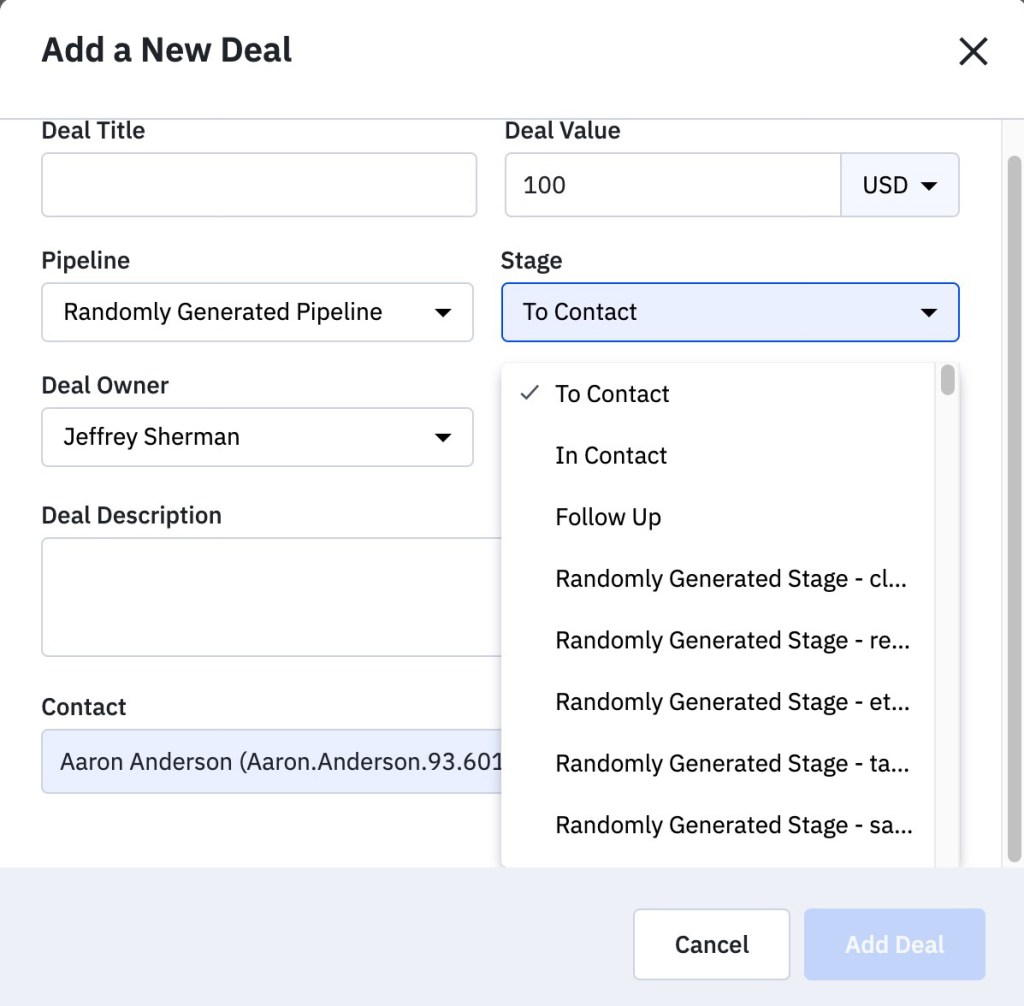
That’s when you spot it — the stage dropdown has 25,000 elements.
You’ve been dropdoomed!
What is a dropdoom?
Here is an example of a 4 element dropdown that operates fine with no loading issues.
A dropdoom is a regular DROPDOWN UI element that is populated from a user-generated list. When the dropdown gets more than (roughly) 300 elements it will start impacting page rendering. And that’s when it switches from a dropdown to a dropdoom.
Add 500 stages and the same screen now takes 3 seconds to load.
Even on fast computers, dropdowns with more than a few hundred elements are going to slow down page rendering.
With the example covered above, the developers gave clients the ability to add custom deal stages. The assumption that the list would be short — how many stages can a deal have? Apparently 25,000! The clients generated so much data that rendering the dropdown became a performance bottleneck. Since only the client could see their own data, the developer didn’t know that the issue existed until the client called to complain.
Other examples of real dropdooms I’ve encountered include:
Assigning a task to an employee using a dropdown with all employees. This worked fine at first — until the company expanded to 2,000 employees. A combined total of 6 dropdooms added 20 seconds to the page rendering time. Using the task system became a chore, and eventually people stopped using it entirely.
A multi-select dropdown with all the tags a user has created. The page loaded in less than a second for clients with only a dozen tags. It became an issue when a client had 80,000 tags, increasing load time to over 30 seconds.
A survey with a dropdown to select your favorite European city. The dropdown showed a list of the largest 2,080 cities in Europe. That one element added 3 additional seconds to the survey’s load time.
The underlying problem
Most of the time fields will only have a handful of options. But some fields will always be growing, slowly at first, and then an exponential explosion. When things go bad, it isn’t the user’s fault for hiring too many employees, creating too many tags, or running a survey with too many cities.
You’ve handed the user experience to the users, but kept control of the interface. And sometimes, clients will abuse a feature on accident - those 80,000 tags were a result of a developer developing against the API.
The Solution
Instead of a simple dropdown, the safest default option is a type-ahead search. This requires users to have some idea what to type in order to make results appear.
Other options include:
The top 10 options plus a type-ahead option
An interstitial/pop-up with all the options in paginated results
A mix of top options and an interstitial option
There’s no magic solution, and it can be easy to blame the user. Users will always do things you don’t expect and might not make sense to you — but they’re not developers, you are. Making safe tools to protect the user from inadvertently impacting performance is your job. When you can think ahead and plan for possible outcomes, you can solve the problem before it even starts — and avoid a dreaded dropdoom.
This post is a much less dense discussion of the same topic with examples from airports. Airports use a multiple queue system at Security, and a priority queue at Boarding.
Security Has Multiple Queues
Most airports in the US have 2 or 3 different queues to get through the security checkpoint: Clear, TSA Pre, and regular. Agents help filter passengers into the different lines. Each line represents different priorities and has a different number of agents conducting security screenings. Once in a line, it operates as a FIFO (First in, first out) Queue. There’s no additional sorting.
This is a human driven Multiple Queue system, and it makes sense:
The workload is highly variable. There are peak times and slow times. Times that favor high priority people, and times that favor regular people. It is impractical to constantly shuffle the security checkpoint layout, so the system must accommodate all workloads.
You need to prevent resource starvation. Ie - you need to keep the regular line moving no matter how many people show up at TSA Pre
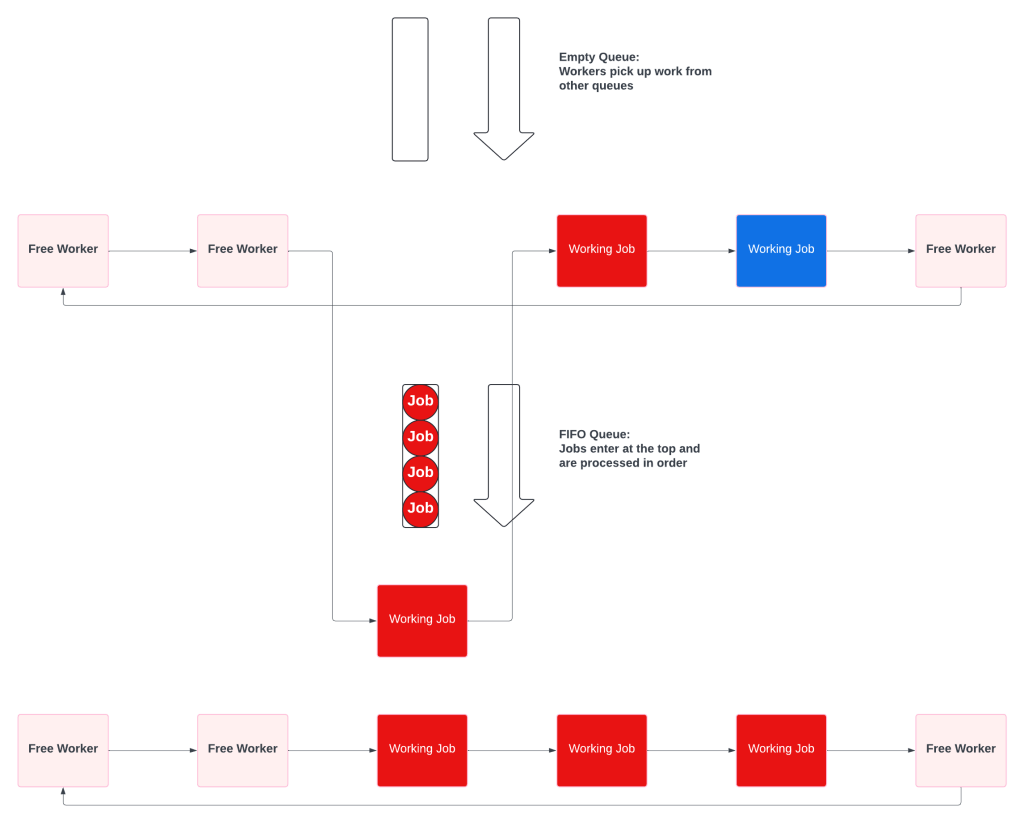
You want to minimize worker waste. Ie - when the TSA Pre line is empty, the agent starts screening people from the regular security line.
Security checkpoints are slow and frustrating. They are also well balanced to provide a simple, understandable, system that supports multiple priorities and minimizes agent idle time.
Boarding Gates Are Priority Queues
Boarding gates, where passengers wait to get on the airplane, are Priority Queues.
The gates operate under different constraints from the security checkpoint:
Nearly all passengers are at the gate when boarding begins
There are a set number of passengers
All of the high priority passengers should board before any of the regular priority passengers board. Unlike the security checkpoint, resource starvation is desirable.
The resources cannot be scaled. There’s one plane, one door, and one person through at a time.
The queues take multiple forms. They can be simple, like United’s
Or complex, like Southwest’s
The Priority Queues have a common structure. They have self sorting guided by signs and instructions. The ticket agent acts as a final filter, either accepting or rejecting people. The ticket agent (the worker) always runs at full capacity, while the queue itself is extremely inefficient and keeps people waiting a long time.
Since the plane only has one entrance, a Priority Queue is the only way to ensure that the high priority passengers get on first.
Reminder - We’re Really Talking About Scaling
Airports are designed to scale. They use Multiple Queues at the security checkpoint, because it fits the problem. They use Prioritized Queues at the boarding gate because it fits the problem.
Every SaaS has background workers. Processes that sync data between platforms, aggregate stats, run billing, send alerts, and a million other things that don’t happen through direct user interaction. Every SaaS also has limited resources; servers, databases, caches, lambdas, and other infrastructure all cost money.
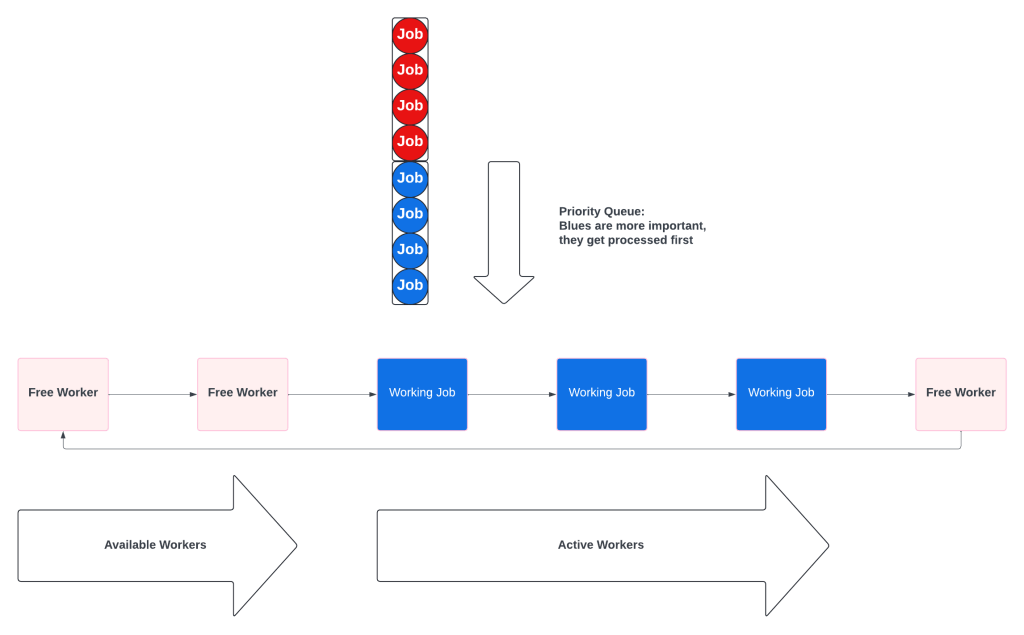
Most SaaS go through three main phases as they mature and discover that queues are harder than they seem:
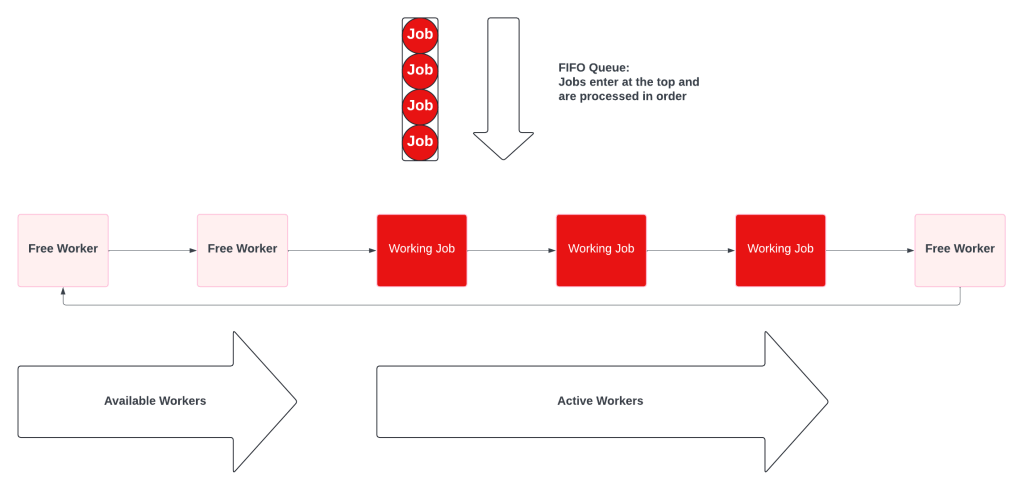
Whether driven by a database or proper queue, this high level system emerges:
Enter The Dream Of Priority
Because resources are limited and some jobs, and some customers, are more important than others, the idea of a Priority Queue will emerge.
“There are hours of work on the queue, and an important batch of jobs needs to be done now! If only some jobs can move to the front of the line.”
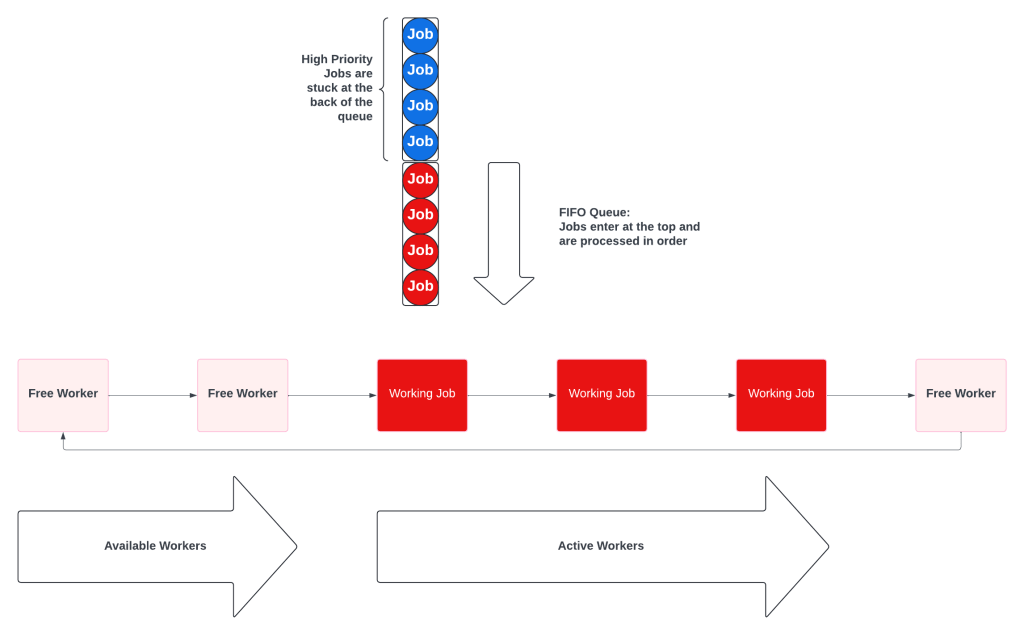
A Priority Queue seems like a great solution. The processes that create work can set a priority, add it to the queue, and sorting will take care of everything!
Unfortunately, what happens is that only high priority work gets processed. This is known as resource starvation. Low priority jobs sit at the back of the queue and wait until there are no high priority jobs.
Priority Queues only give you two options: add enough workers to prevent queue starvation, or make the priority algorithm more complex. Since resources are limited, engineers start getting creative and work on algorithms involving priority and age.
There is a much simpler solution.
Multiple Queues Have Priority Without Starvation
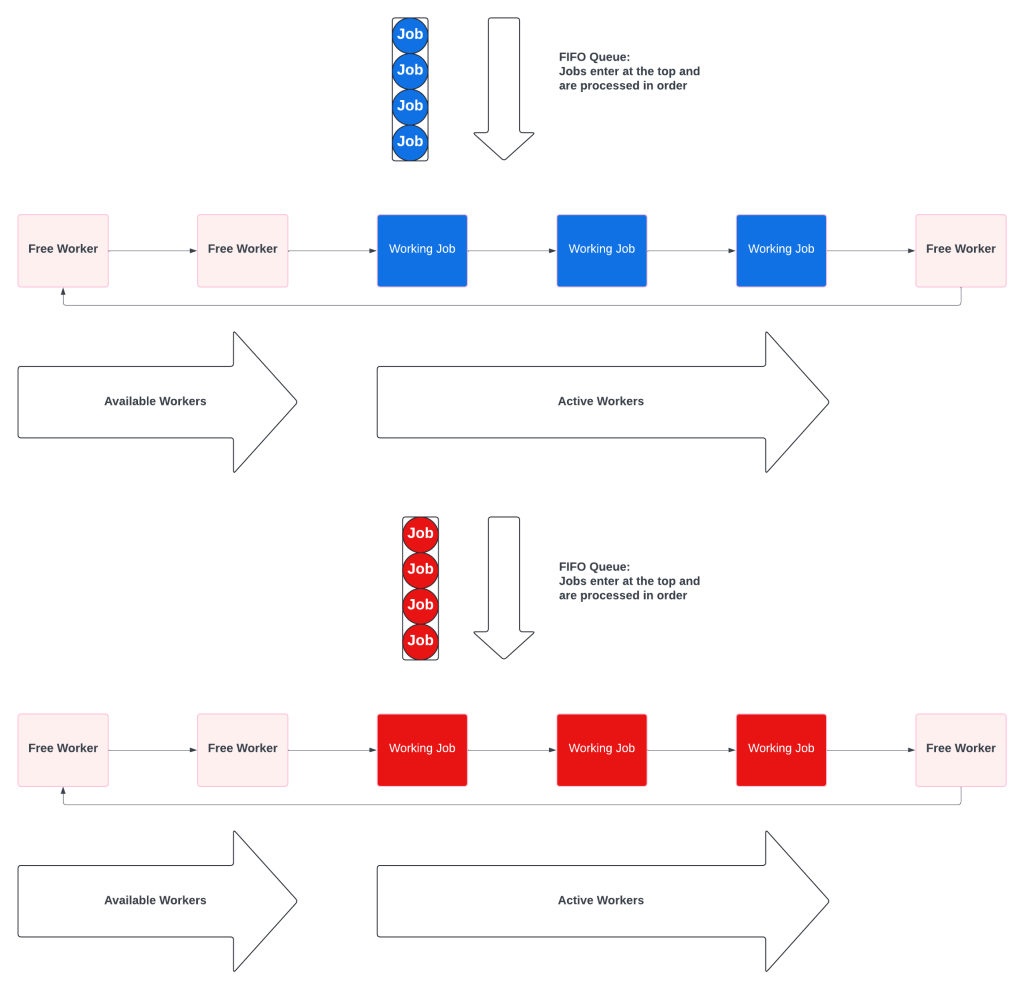
A Multiple Queue system is a prioritized collection of simple fifo queues. Each queue also has a dedicated worker pool, which prevents starvation. The key difference is that the workers will check the other queues when theirs is empty.
When all the queues have work, they behave like independent queues:
When the priority queue is empty, the priority workers pick up low priority tasks.
Multiple Queues solve priority in SaaS friendly ways:
No resource starvation. Some customers may be more important, but no customer ever gets ignored.
No wasted resources. High priority workers never sit idle waiting for high priority work.
Multiple Queues Push Complexity To Workers
Instead of having a complex Priority Queue, Multiple Queue systems push some complexity to the workers. Workers have to know which queue is their primary, and the order of the remaining queues.
Multiple Queues Have More Adjustment Options
Priority Queues only had 2 adjustment options: add more workers or adjust the algorithm. Multiple Queues allow much finer grained controls:
The number of different queues. Adding a new, super duper higher priority pool would not require a code change.
The size of the worker pool for each queue. Queues do not need to have the same size pools, and can be adjusted dynamically.
The relative priority of the queues. Priority becomes config, not an algorithm.
Conclusion - For SaaS Workers, Use Multiple Queues
Background workers are a common, critical, feature for most SaaS companies. Resource constraints make it impossible to run all background jobs as soon as they are created. Some jobs will have different priorities, which will require implementing either Priority Queues or Multiple Queues. Priority Queues sound like the correct answer because they describe the problem, but create resource starvation and ever increasing complexity. Multiple Queues are simple, safe from starvation, and much more effective for SaaS use cases.
Apple is legendary for the Grand Reveal. Steve Jobs would say “Just one more thing” and then reveal an entirely new category of device or software. It was amazing theatrics, shot Apple into the stratosphere, and cemented The Grand Reveal as a technology marketing tactic.
But for a SaaS The Grand Reveal violates a key principal: customers always have the latest software. Holding back months of development and new features in order to create an exciting reveal breaks that promise.
Anytime you’re considering holding back a feature to create buzz ask yourself, does this delay help my existing customers? You have customers that have already trusted you by buying subscriptions in exchange for the latest software. Is it fair to hold back, to devalue the service, in order to market to new customers?
Of course not!
As a SaaS you’ve promised customers that they will always have the latest software. Holding back breaks your promise. Never hold back from your existing customers to market to new ones.
Net Dollar Retention (NDR) is one of the core financial metrics for SaaS companies, and one where software developers have an outsized impact. This article explains NDR and how software influences can drive the number down. Finally, it discusses three areas for developers to focus on in order to bring the number up.
What is Net Dollar Retention?
Net Dollar Retention is the rate that your existing customers continue to spend money with your company. Renewals are flat, churn makes it go down, and expansion makes it go up.
As a formula using AAR (Annual Recurring Revenue), it looks like this:
Besides being a core metric, NDR is a key metric for companies considering going public. Typically, a company going public needs an NDR over 107%, and ideally over 120%.
Only existing customers affect this metric! For Net Dollar Retention it doesn’t matter if you replace every customer that churns with ten new ones, your retention rate will be terrible.
How Developers Impact Net Dollar Retention
There are only two real levers with NDR: Increase spend and reduce churn; and there is little that developers can do that will directly increase customer spend.
The top 3 developer levers to reduce churn:
Fix any bugs that corrupt or lose data
Make the system more reliable
Make the system faster
Fix Any Bugs That Corrupt Or Lose Data
This is the big one!
Customers come to your service to get things done. The more often they hit bugs, the faster they will churn. Only developers can fix bugs and prevent data corruption.
Make The System More Reliable
Close second to data corruption is reliability.
95% success rates mean that you should expect a daily job will fail at least once a month. If customers don’t trust your system to work, they will sit and watch the process. Usually by continually hitting refresh on your site. This is a massive waste for your customer and makes your SaaS much more expensive.
The less reliable your service is, the faster they will churn. Reliability is more than just a developer problem, but developers will need to lead the architectural charge.
Make The System Faster
Speed is a distant third because it rarely impacts the value that customers get from your service. Speed, especially UI speed, has a massive impact on the customer experience.
Slow websites won’t make customers leave, but they will kill your net promoter score and leave them open to a switch.
They don’t want to waste time staring at a blank screen waiting to render. When the problem is inefficient code, it is something that only a developer can fix
NDR is a Core Metric for SaaS Health
NDR is a core metric for health, and a critical one for companies seriously looking at going public. Developers can heavily influence the number by reducing churn.
Fix bugs, improve stability and increase performance.
Developers can push these levers and improve NDR; no one else in the company has that power! Become a hero to your business, pay attention to NDR and how you can reduce churn!
Customer Relations are ever growing, a CRM must provide Management as well. Punishing customers for loyalty is the inevitable consequence of not acknowledging and preparing for a long term relationship with your customers. Destroying your customer's long term experience increases churn and kills your net-dollar retention.
Saving long term customers requires work and planning from the frontend to the persistence layer.
Here is one strategy for each layer to help get you started:
Frontend: Dashboards over pagination.
Backend: Historical limits by default.
Persistence: Data partitioning.
Dashboards Over Pagination
New customers can see all of their contacts on one page. Same for their marketing campaigns, tags, and deals. That changes very quickly for customers who are using your system. When customers can’t see all of their data on a single page, the solution isn’t pagination, you need dashboards.
When your customers go to their contacts, you could show them “Page 1 of 10”, or you could show them a dashboard with contact activity. New contact counts, engagement rates, contacts who need a follow up.
A pagination is about databases, it is a terrible interface for getting things done. Make your CRM about management and workflows with dashboards.
Historic Limits By Default
Add sensible defaults to everything to limit the amount of data searched. Default to showing the last 6 months or 1 year of a customer’s interactions. Keep the older data accessible, but don’t waste the user’s time loading history.
Put another way, how many extra seconds should you make customers wait to find out if a contact opened an email 3 years ago? The correct answer is 0 seconds, and also 0 milliseconds; update your APIs accordingly.
Data partitioning
Event logs keep track of every email open, click, and website visit. Because events rarely get deleted, these tables grow and grow with your customers. Over time, the amount of data in the tables will cause queries to become slow. The more successful your customers get, the worse your database problems become!
Partitioning directs the database to create different logical tables based on a key while presenting a view of the combined table. Events are date based making them great candidates for partitioning by month or year. The previous tip, Historic Limits By Default, places an upper bound on the data in a table scan.
Conclusion
Customer data accumulates over time, especially in CRMs. Keeping customers for years requires preventing your system from punishing them for accumulating data. Failing to address the problems will destroy the customer’s experience, increase churn, and reduce your net-dollar retention.
These three strategies will help you start thinking about data accumulation and how customer needs change over time. Don’t throw away your loyal customers because your systems only consider the new user experience!