It sounds like a category error, but it’s a real trade off baked into every SaaS with a relational database. This is the tradeoff behind the question “Should we use Foreign Keys in our database?”
Many don’t, based on the argument that Foreign Keys slow down data insertion. The database does extra checks when inserting, deleting, and updating data, which reduces throughput. Foreign Keys force devs to check the database and require that insertions and deletions go in a specific order. The database runs slower and development takes longer.
On the other side of the tradeoff, Foreign Keys prevent entire categories of database issues. They ensure that data is inserted and deleted in the correct order. When something goes wrong, Foreign Keys prevent data corruption. They are important, but optional, safety equipment.
Back to the tradeoff: Are Foreign Keys going to raise your DB and developer costs more than you’ll lose from customer churn and developer time spent remediating data corruption?
It’s a situation you never want to find yourself: Client support pulls you into a call with a large client, and they’re not happy. The website is slow! You need to fix it!
You know that websites can almost always be more responsive, but it’s not bad enough to justify this level of frustration. You start to ask questions. Where do things get slow? The “Add a New Deal” screen? That’s a simple page, there’s nothing going on there.
You go through the process of testing and pull it up on:
Your dev environment. You see a sub-second load time.
The test environment in production. There’s a sub-second load time there, too.
The client’s account. The load time is only 45 seconds.
How could that be? You wonder if the client’s database is overloaded. You check but the rest of their account is responsive.
That’s when you spot it — the stage dropdown has 25,000 elements.
You’ve been dropdoomed!
What is a dropdoom?
Here is an example of a 4 element dropdown that operates fine with no loading issues.
A dropdoom is a regular DROPDOWN UI element that is populated from a user-generated list. When the dropdown gets more than (roughly) 300 elements it will start impacting page rendering. And that’s when it switches from a dropdown to a dropdoom.
Add 500 stages and the same screen now takes 3 seconds to load.
Even on fast computers, dropdowns with more than a few hundred elements are going to slow down page rendering.
With the example covered above, the developers gave clients the ability to add custom deal stages. The assumption that the list would be short — how many stages can a deal have? Apparently 25,000! The clients generated so much data that rendering the dropdown became a performance bottleneck. Since only the client could see their own data, the developer didn’t know that the issue existed until the client called to complain.
Other examples of real dropdooms I’ve encountered include:
Assigning a task to an employee using a dropdown with all employees. This worked fine at first — until the company expanded to 2,000 employees. A combined total of 6 dropdooms added 20 seconds to the page rendering time. Using the task system became a chore, and eventually people stopped using it entirely.
A multi-select dropdown with all the tags a user has created. The page loaded in less than a second for clients with only a dozen tags. It became an issue when a client had 80,000 tags, increasing load time to over 30 seconds.
A survey with a dropdown to select your favorite European city. The dropdown showed a list of the largest 2,080 cities in Europe. That one element added 3 additional seconds to the survey’s load time.
The underlying problem
Most of the time fields will only have a handful of options. But some fields will always be growing, slowly at first, and then an exponential explosion. When things go bad, it isn’t the user’s fault for hiring too many employees, creating too many tags, or running a survey with too many cities.
You’ve handed the user experience to the users, but kept control of the interface. And sometimes, clients will abuse a feature on accident – those 80,000 tags were a result of a developer developing against the API.
The Solution
Instead of a simple dropdown, the safest default option is a type-ahead search. This requires users to have some idea what to type in order to make results appear.
Other options include:
The top 10 options plus a type-ahead option
An interstitial/pop-up with all the options in paginated results
A mix of top options and an interstitial option
There’s no magic solution, and it can be easy to blame the user. Users will always do things you don’t expect and might not make sense to you — but they’re not developers, you are. Making safe tools to protect the user from inadvertently impacting performance is your job. When you can think ahead and plan for possible outcomes, you can solve the problem before it even starts — and avoid a dreaded dropdoom.
Years ago I worked at a mortgage company that bought a bank’s mortgage division. The deal was mostly for sales people, but it also included custom software and developers. To ensure that the handover was clean, we were only given the source code.
We had DB Schemas, but no seed data.
This was at the very dawn of Infrastructure-as-code; we didn’t get any.
There were docs about deploying, and there were docs about building servers; they were wildly out of date.
18 months and millions of dollars in salary and opportunity cost later, the project was shut down. We never got the system fully functional. We never got close.
You probably won’t be sold to a competitor, but there’s a decent chance your production environment will get compromised by hackers.
If you lost all running instances of your software and had to rebuild from whatever you had in source control, could you do it?
This post is a much less dense discussion of the same topic with examples from airports. Airports use a multiple queue system at Security, and a priority queue at Boarding.
Security Has Multiple Queues
Most airports in the US have 2 or 3 different queues to get through the security checkpoint: Clear, TSA Pre, and regular. Agents help filter passengers into the different lines. Each line represents different priorities and has a different number of agents conducting security screenings. Once in a line, it operates as a FIFO (First in, first out) Queue. There’s no additional sorting.
This is a human driven Multiple Queue system, and it makes sense:
The workload is highly variable. There are peak times and slow times. Times that favor high priority people, and times that favor regular people. It is impractical to constantly shuffle the security checkpoint layout, so the system must accommodate all workloads.
You need to prevent resource starvation. Ie – you need to keep the regular line moving no matter how many people show up at TSA Pre
You want to minimize worker waste. Ie – when the TSA Pre line is empty, the agent starts screening people from the regular security line.
Security checkpoints are slow and frustrating. They are also well balanced to provide a simple, understandable, system that supports multiple priorities and minimizes agent idle time.
Boarding Gates Are Priority Queues
Boarding gates, where passengers wait to get on the airplane, are Priority Queues.
The gates operate under different constraints from the security checkpoint:
Nearly all passengers are at the gate when boarding begins
There are a set number of passengers
All of the high priority passengers should board before any of the regular priority passengers board. Unlike the security checkpoint, resource starvation is desirable.
The resources cannot be scaled. There’s one plane, one door, and one person through at a time.
The queues take multiple forms. They can be simple, like United’s
Or complex, like Southwest’s
The Priority Queues have a common structure. They have self sorting guided by signs and instructions. The ticket agent acts as a final filter, either accepting or rejecting people. The ticket agent (the worker) always runs at full capacity, while the queue itself is extremely inefficient and keeps people waiting a long time.
Since the plane only has one entrance, a Priority Queue is the only way to ensure that the high priority passengers get on first.
Reminder – We’re Really Talking About Scaling
Airports are designed to scale. They use Multiple Queues at the security checkpoint, because it fits the problem. They use Prioritized Queues at the boarding gate because it fits the problem.
Every SaaS has background workers. Processes that sync data between platforms, aggregate stats, run billing, send alerts, and a million other things that don’t happen through direct user interaction. Every SaaS also has limited resources; servers, databases, caches, lambdas, and other infrastructure all cost money.
Most SaaS go through three main phases as they mature and discover that queues are harder than they seem:
Whether driven by a database or proper queue, this high level system emerges:
Enter The Dream Of Priority
Because resources are limited and some jobs, and some customers, are more important than others, the idea of a Priority Queue will emerge.
“There are hours of work on the queue, and an important batch of jobs needs to be done now! If only some jobs can move to the front of the line.”
A Priority Queue seems like a great solution. The processes that create work can set a priority, add it to the queue, and sorting will take care of everything!
Unfortunately, what happens is that only high priority work gets processed. This is known as resource starvation. Low priority jobs sit at the back of the queue and wait until there are no high priority jobs.
Priority Queues only give you two options: add enough workers to prevent queue starvation, or make the priority algorithm more complex. Since resources are limited, engineers start getting creative and work on algorithms involving priority and age.
There is a much simpler solution.
Multiple Queues Have Priority Without Starvation
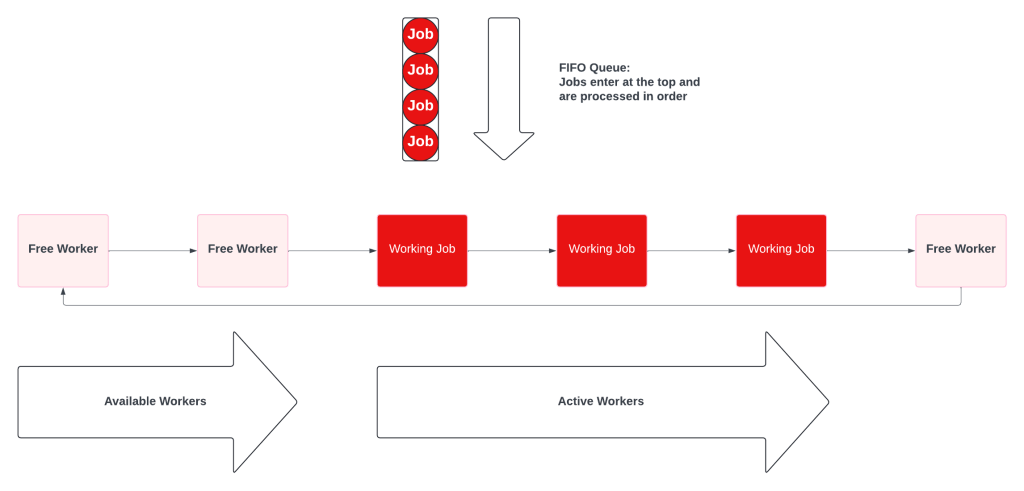
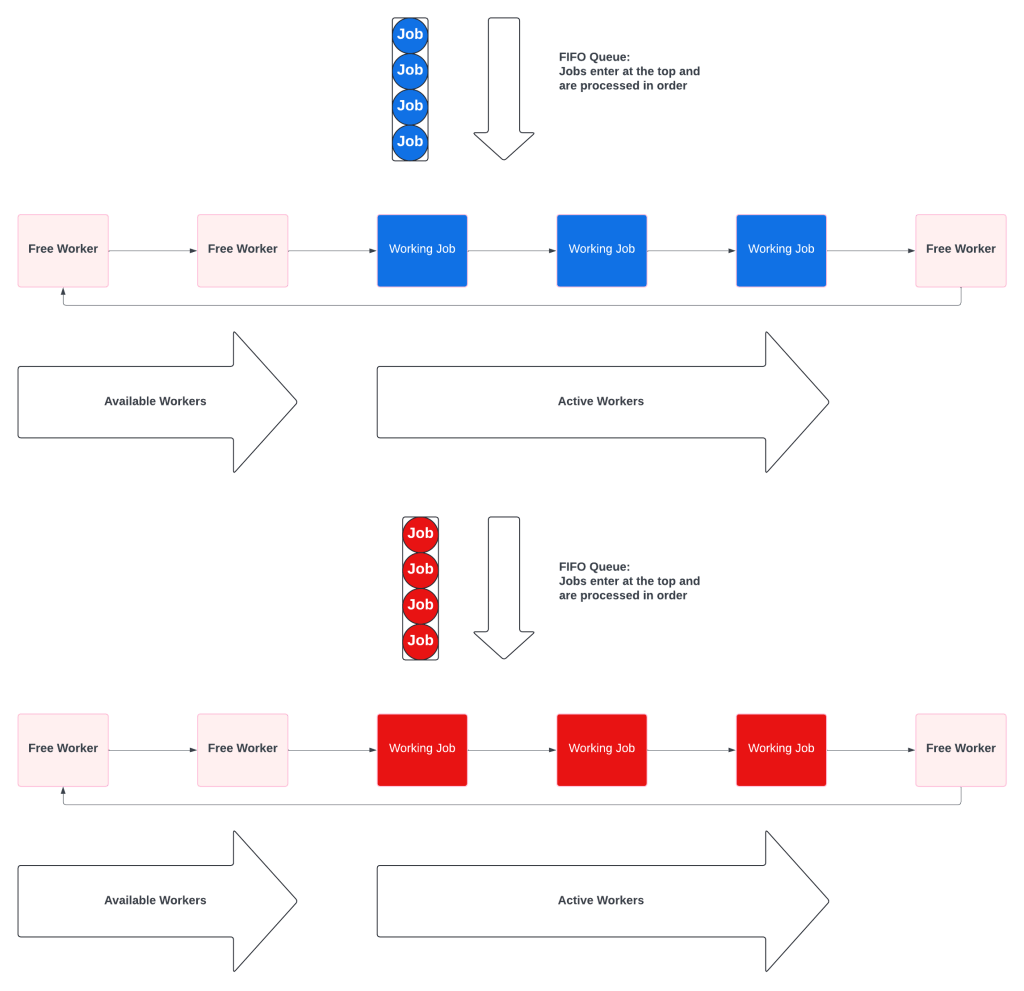
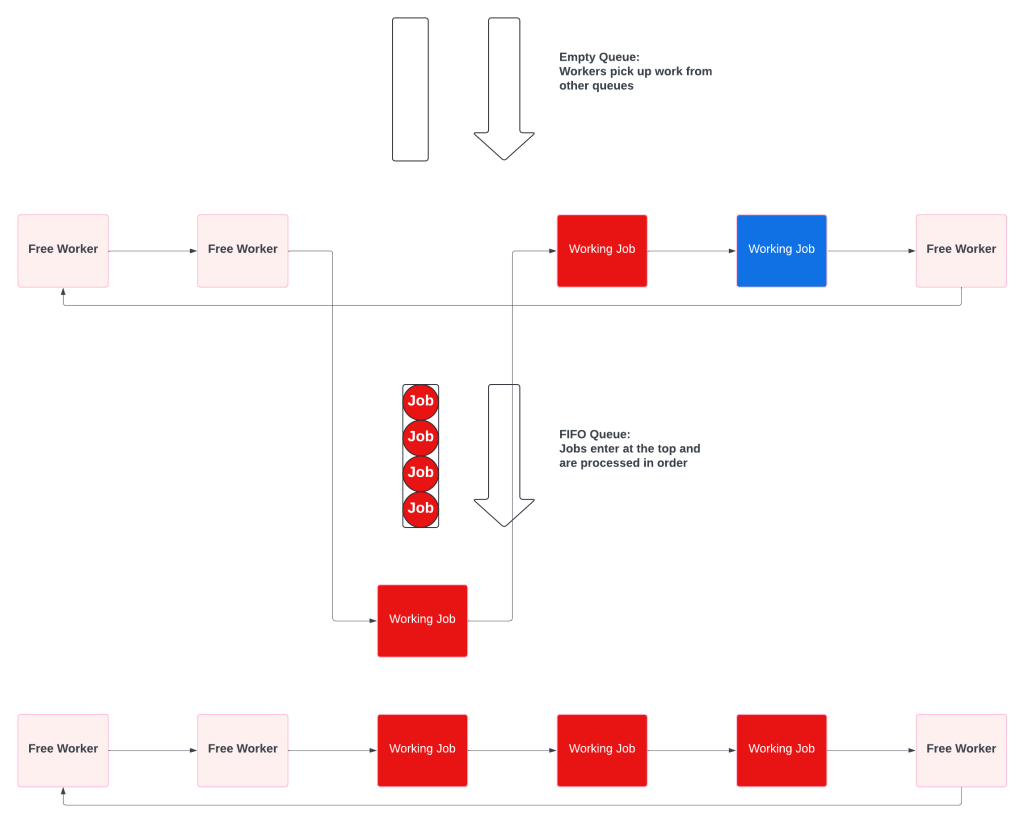
A Multiple Queue system is a prioritized collection of simple fifo queues. Each queue also has a dedicated worker pool, which prevents starvation. The key difference is that the workers will check the other queues when theirs is empty.
When all the queues have work, they behave like independent queues:
When the priority queue is empty, the priority workers pick up low priority tasks.
Multiple Queues solve priority in SaaS friendly ways:
No resource starvation. Some customers may be more important, but no customer ever gets ignored.
No wasted resources. High priority workers never sit idle waiting for high priority work.
Multiple Queues Push Complexity To Workers
Instead of having a complex Priority Queue, Multiple Queue systems push some complexity to the workers. Workers have to know which queue is their primary, and the order of the remaining queues.
Multiple Queues Have More Adjustment Options
Priority Queues only had 2 adjustment options: add more workers or adjust the algorithm. Multiple Queues allow much finer grained controls:
The number of different queues. Adding a new, super duper higher priority pool would not require a code change.
The size of the worker pool for each queue. Queues do not need to have the same size pools, and can be adjusted dynamically.
The relative priority of the queues. Priority becomes config, not an algorithm.
Conclusion – For SaaS Workers, Use Multiple Queues
Background workers are a common, critical, feature for most SaaS companies. Resource constraints make it impossible to run all background jobs as soon as they are created. Some jobs will have different priorities, which will require implementing either Priority Queues or Multiple Queues. Priority Queues sound like the correct answer because they describe the problem, but create resource starvation and ever increasing complexity. Multiple Queues are simple, safe from starvation, and much more effective for SaaS use cases.
You can’t point out that the Emperor Has No Clothes until the emperor puts on his invisible garments. Pointing out the problems before it is too late, is Calling The Baby Ugly. Incomplete software can be “ugly” right now and still be great by the time it is released.
That potential, it might still be fine, makes it difficult to short circuit the story as it unfolds. Software literally emerges from thin air as developers work. Pointing out that the pants only have one leg, the response can be that the second leg is coming in phase 2.
By itself, pointing out the flaws will not short circuit the process. Flawed architecture, wrong technology, and hostile UX don’t matter until it is too late. Nothing is real until it is time to put on the clothes. Calling the baby ugly makes you Cassandra, doomed to be correct and ignored.
The key to the Emperor Has No Clothes is that the truth emerges when the software meets reality. The Grand Reveal is a mistake and totally unnecessary. The baby may be ugly, but the Emperor can only have no clothes when he puts on a whole new wardrobe for the first time.
Iterative delivery short circuits the process because software is constantly going into production. Don’t bet on the Emperor’s New Clothes, send him out with a new jacket and find out if people see it, or the regular shirt underneath.
There are at least a dozen places for variation in a single, successful, RESTful POST:
1. Time to establish a connection between client and server 2. Time to send the data between client and server 3. Time for the event to go up the OSI stack from physical to application layer 4. Time for the application to process the event. This is impacted by CPU, Memory, Thread models, etc. 5. Time for the event to go back down the OSI stack 6. Time needed to connect to the database 7. Time database needs to perform the action 8. Network time to and from the database 9. Time for the event to go back up the OSI stack 10. Time for the application to process the database’s response and prepare a response to the client 11. Time for the event to go back down the OSI stack 12. Time to send the response to the client
Let’s say that your SaaS has an SLA that all calls should return to the customer within 300ms. Looking at the system metrics, you see that your endpoint meets the SLA 95% of the time. What to make of the remaining 5%?
Common Causes are issues due to the nature of the system and will continue until the system is changed. In software, Special Causes are bugs and hiccups and will appear and disappear at random.
For our RESTful POST that needs to return in under 300ms, a source of Common Cause could be the physical distance between the client and server. If you are running on AWS in US-EAST-1, it is physically impossible to meet the SLA for customers in Asia. Round trip to places like Seoul and Tokyo is at least 450ms!
Requests from Asia will fall outside the SLA 100% of the time. The only solutions are to change the SLA or stand up an instance of your system closer to your Asian customers. You must change the system.
An example of a Special Cause could be an overloaded database. Some requests will be fine, others will break the SLA. The issue will go away once load decreases. The answer may be to change the system by increasing the size of the databases. Or keep the system the same and change the software to make the database insert asynchronous. The software change decouples the SLA from database performance.
Knowing that 5% of your requests break the SLA doesn’t tell you anything about Common vs Special Cause. Developers can fix some of the problems with software, but some can only be fixed by changing the system architecture.
Until you analyze and determine the source of your variation, you’ll be stuck on the Path Of Frustration. Pouring ever more resources into ever smaller gains.
Software development has strongly resisted learning about quality from physical manufacturing. After all, our product isn’t physical and isn’t bound by the same constraints as the physical world. One of Deming’s core messages is that quality will increase as variation decreases. This applies to software too!
Even a simple CRUD app has tons of variation.
There are at least a dozen places for variation in a single, successful, RESTful POST:
Time to establish a connection between client and server
Time to send the data between client and server
Time for the event to go up the OSI stack from physical to application layer
Time for the application to process the event. This is impacted by CPU, Memory, Thread models, etc.
Time for the event to go back down the OSI stack
Time needed to connect to the database
Time database needs to perform the action
Network time to and from the database
Time for the event to go back up the OSI stack
Time for the application to process the database’s response and prepare a response to the client
Time for the event to go back down the OSI stack
Time to send the response to the client
Most of the time, things like traversing the OSI stack, CPU and memory management take minimal time and have minimal variation. One major source of variation is when the JVM or CLR enters a garbage collection cycle and halts execution for several seconds.
Even when every request succeeds, some requests can take 100x or even 10,000x longer than the median. Does that variation matter? Sometimes.
In rare cases, like High Frequency Trading, this variation can be the difference between earning millions and going bankrupt. Most of the time the variation is a sign of system health and doesn’t matter much in isolation. But if the variance gets bigger, week after week, release after release, it is a sign that your system has long term health problems.
Just because the code does the same thing every time, doesn’t mean that it executes the same. Variation applies to software and we can learn a lot from physical manufacturing.
Writing a Run Book can be your first iterative step towards mitigating recurring problems. Recurring problems can cause massive productivity problems, but don’t get fixed because the immediate issue is elsewhere.
For example, background worker systems rarely fail on their own, instead some unique situation will cause the workers to get stuck, the controller to get confused, or the queue to be poisoned. Each time, there are really two issues. The bespoke issue that broke the background processes and the recovery of the background worker system.
Since each new failure is unique, there is a tendency to treat the background system recovery as a unique problem too. This increases recovery time and prevents you from learning from past mistakes. Because the bug isn’t in the background system itself, there is often no motivation to spend time on the code. Fix the bug, restart the system, and move on with your day.
Enter the run book.
Write down the steps needed to mitigate the problem. This is for humans, so it can be an open ended description of what to look for, it won’t be very programmatic.
Once you have it, keep iterating. Add code snippets, descriptions, and flow logic.
As you iterate, you will notice that some parts of the process can be scripted, or even automated.
Iteration after iteration, more and more of the run book will become code, which makes it easier to code up the remaining pieces.
Will you be able to iterate the recurring problem out of existence? Maybe, maybe not. But with a run book and a plan, you will make progress and not be waiting for the next outage to wreck your day.
Continuing the discussion of the data loading and messaging, this post is going to cover the tradeoffs to consider when working with Topic and Broadcast based systems.
Directly Consuming Topics Isn’t Really A Thing
Topics, Pub/Sub, and other one-to-many messaging systems are an extremely interesting and important abstraction, but they don’t overlap with a discussion of data loading. The message broker will either use a queue for each client, which is covered here (link), or it is a broadcast, without guarantees.
Broadcast
Broadcast based systems come without guarantees. The broadcast server sends the message with no idea about how many listeners want the message, or how many that want it, get it. There is also no guarantee that messages will arrive in order.
These systems are designed to minimize the latency and push all of the queuing onto the receiver. This is when you need to understand your processor’s OSI Layer, implementation. It’s the rare time that the amount of memory on the network card might be important!
But, for the purposes of message processing and data loading, all of those details will be abstracted away.
To the application, things look very similar to running off a queue. The application has an ordered list of messages, and it needs to process them as quickly and consistently as possible.
Broadcast doesn’t have message visibility or the risk of double processing. Instead the pressure comes from internal queue and buffer management. The messages are on the processor, if they aren’t processed fast enough you will run out of memory.
Conclusion
Topic and Broadcast based messaging systems are extremely powerful systems. When it comes to data loading however, they tend to be a subset of queue processing.
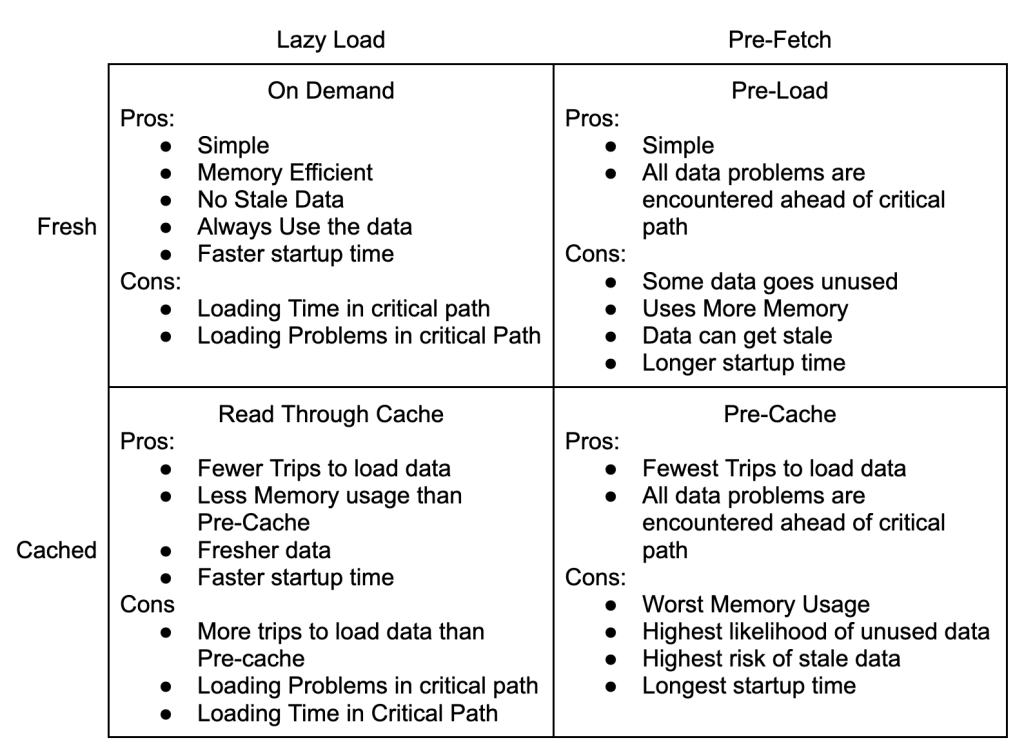
The need for consistent performance will push your design to the lower right quadrant.