I saw an ad on LinkedIn with the hook “Frustrated by getting 200% better at your craft and only getting a 6% raise?” The ad seemed to be selling grievances, and a course on becoming a freelance developer.
What the ad wasn’t doing was disagreeing with the idea that getting 200% better at your primary skill doesn’t make you more valuable or productive. A 6% raise for improving 200% implies that 94% of your job isn’t your primary skill. Or that your employer can’t use the marginal value of you getting better. Becoming a better programmer, by itself, isn’t very valuable to whomever pays your salary.
The ad was trying to do a sleight of hand: Improve your pay by becoming a freelance developer! By learning skills that don’t improve your craft! Being a successful freelancer means learning business, marketing, and sales skills. The same skills the ad starts off by bashing.
If someone is paying you to be a developer, chances are that becoming a better developer will have diminishing returns.
You can be angry, or you can learn about the other 94% of what makes a developer valuable.
Learn your industry, your company’s business model, and business strategy. Learn how to be a better teammate, to lead, to inspire, and help others to grow.
Messaging systems don’t change the fundamental tradeoffs involved in data loading, but they do add a lot of opinionated weight to the choices.
First, messaging and streaming have a lot of potential meanings and implementations. To overgeneralize, there are queues, where each message should be read once, topics, where each client should receive each message, and broadcast, where there are no guarantees about anything.
Queues and topics work as polling loops within your software. Broadcast messaging comes directly to the machine at the network level; the abstractions are highly dependent on implementation.
For the rest of this article I’m going to cover queues. I’ll cover topics and broadcast in future articles.
Loading Patterns with Queues
The main feature of a message queue is that you want each message to be processed exactly once. This requires clients claim messages when taking them off the queue, notifications back to the queue when messages have been processed, and a client timeout, after which a claimed message will reappear at the head of the queue.
A client has to connect to a queue, ask for some number of messages and indicate how long it will wait for the max number. For example, AWS’ SQS the defaults are 10 messages or 30 seconds. The client will block until 10 messages are available, or it has been waiting for 30 seconds.
Set the message request too big and you will wait while the queue fills. Set the timeout to long and the first few messages will get stale while the client waits. You need to balance the time cost of polling the queue against the cost of having your workers idle.
The main concern however, is visibility timeouts. If your client grabs 10 messages and has a 30 second timeout it absolutely must finish all 10 in under 30 seconds. After 30 seconds the unacked messages will be released to the next waiting worker and your message will be processed twice.
Optimizing worker counts, polling settings, and timeouts requires maximizing execution consistency. When working at scale, how long an action takes matters much less than how consistent the timing is.
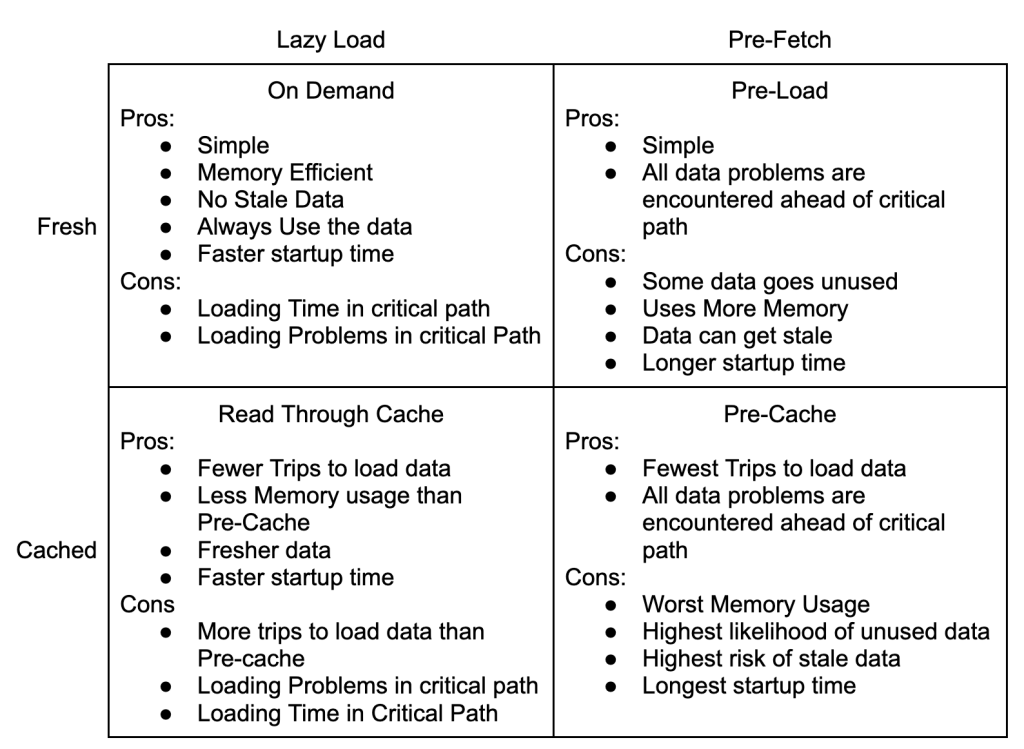
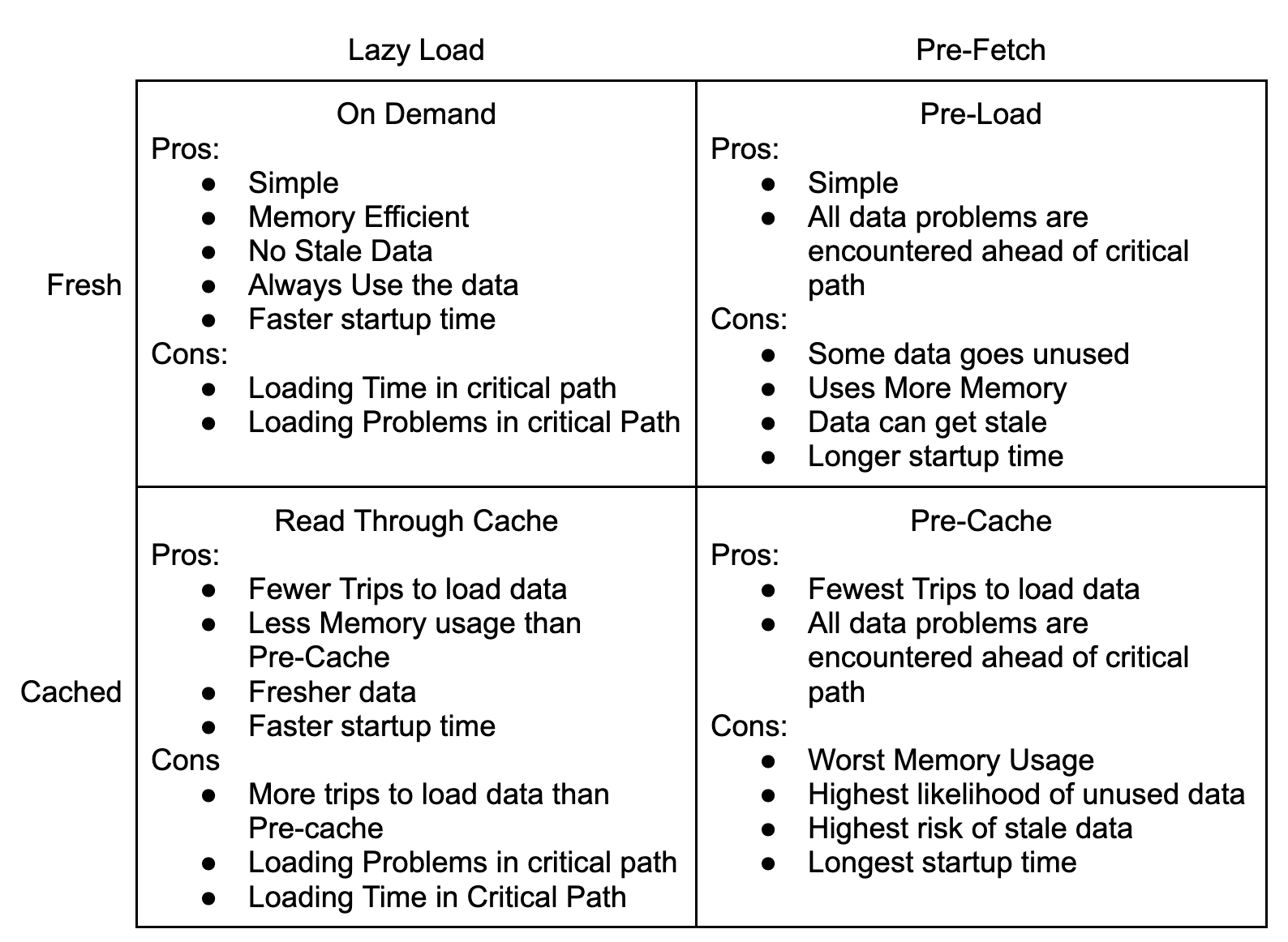
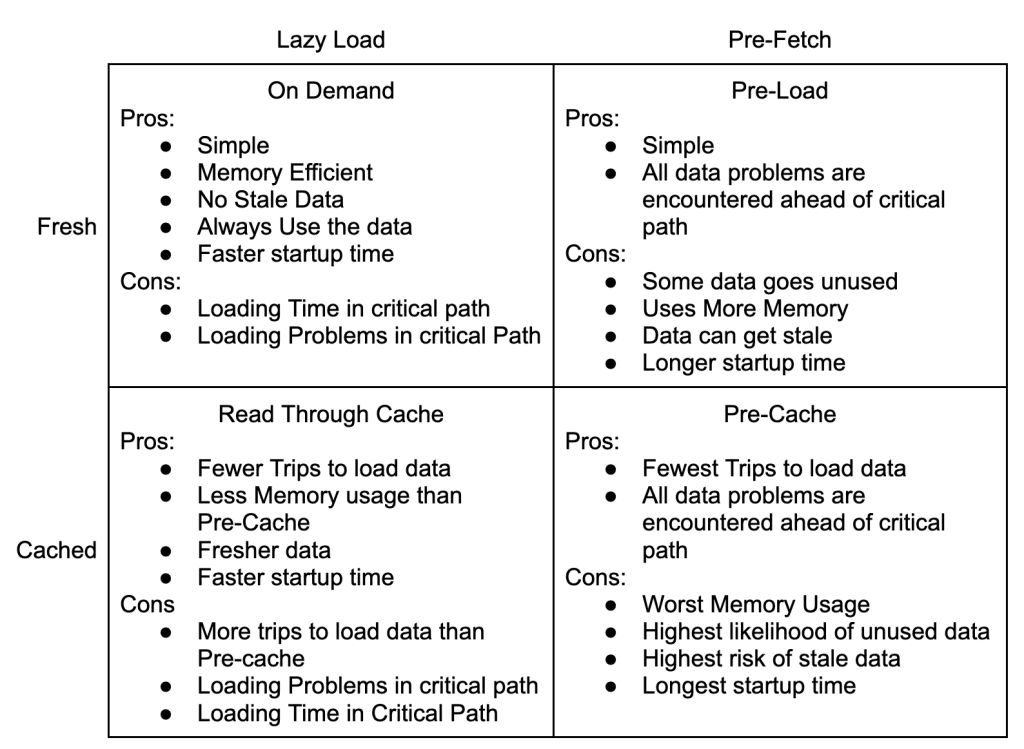
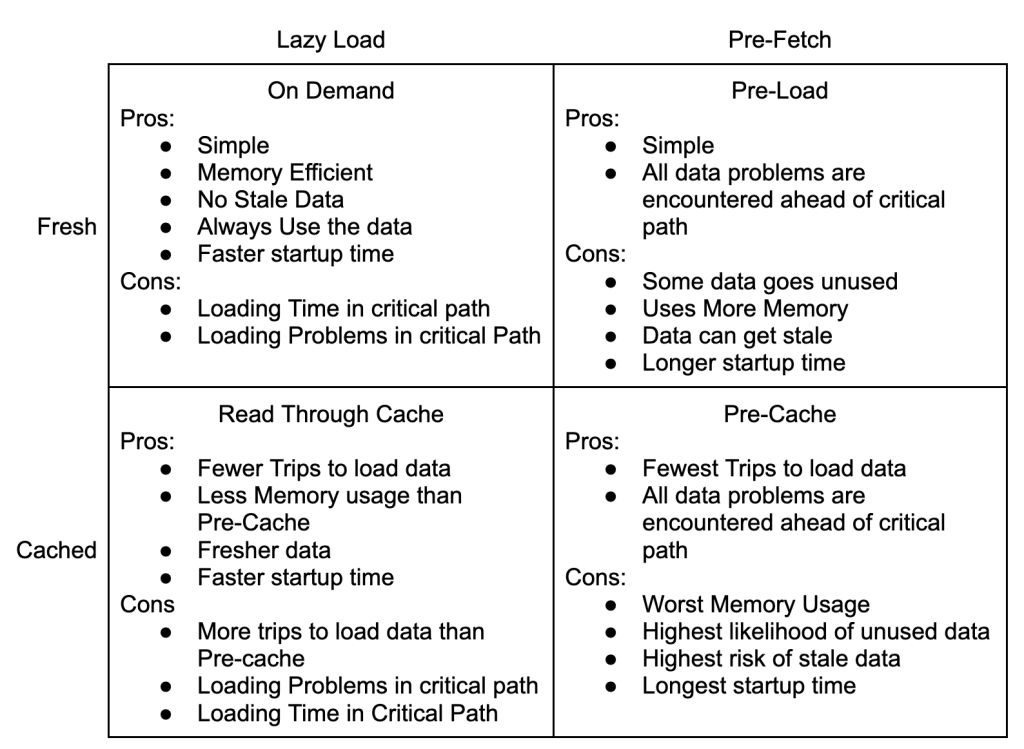
If your system is drinking from a firehose, you need to push everything towards a Pre-Cache model. Pre-Cache pushes data loading out of the critical path, which gives the most consistent timing for message processing.
Having fully Pre-Cached queue processors is rarely possible, there is too much data and it changes to often. Read Through Caching is the practical alternative.
Link Tracking Example
Link Tracking, recording when someone clicks on a link, is a common activity for Marketing SaaS. I’m going to use a simplified version and walk through each of the data patterns.
At a high level, we have a queue of events with 4 pieces of data that describe the click event: Customer Name, URL, Email, and Timestamp.
We want to process each event exactly once, as quickly as possible, and we don’t care about the order messages are processed. However, we can’t insert directly, we need to normalize Customer Name, URL, and Email into customerId, urlId, and emailId.
Lazy Load
The nice things about the Lazy Load pattern is that it starts quickly and is simple to understand.
Unfortunately, every event requires 3 trips to the database to normalize the data. This adds load to the database and has highly variable processing time.
It’s a fine place to start, but a terrible place to stay.
Pre-Fetch
The Pre-Fetch pattern separates fetching the data into a separate step from execution. In this example, the worker would be attempting to normalize multiple events at the same time. Once an event has been fully normalized, it is inserted into the database.
Pre-Fetch adds a lot of complexity because the workers now have internal concurrency in addition working in parallel with each other. This might be worth it if the data was being composed from different resources in a micro-service architecture and the three calls could be done in parallel. In this example though, you would be pounding the database.
Pre-Cache
The great thing about a Pre-Cache model is that there are no reads against the database during processing. It is read-only during init, and write only from the queue. That will really help the database scale!
Pre-Cache is impractical in this use case though. We might know the full set of customers at startup, but urls and emails are open ended. Pure Pre-Cache setups require that all of the data be known before starting. That can work for things like file imports and trading systems, but not link tracking.
Read Through Cache
The Read Through Cache Pattern is likely to be the best option for our use case. It is more flexible than the Pre-Cache Pattern and much friendlier to the database than Lazy Loading or Pre-Fetching. It pushes complexity to the cache where there are lots of great solutions. Most languages have internal caching mechanics, and external caches like memcached and redis are widely supported.
Conclusion
Reading from message queues is a common problem and usually requires composing data from a database. What’s the best way to load the data? As always, the right data loading pattern depends on a your conditions and assumptions.
Lazy Loading is always a decent place to start because it is simple. Performance, cost, and scaling constraints will push your design towards Read Through Caching and Pre-Caching. Pre-Fetch models are likely to be more effort than they are worth because they add a second source of concurrency and complexity.
Remember, requirements change over time, so will the best solution to your problem!
A new project arrives, you gather the team, and start planning. You talk through the requirements, write up the work, and put it in order. Then you iterate! Repeatedly work on the first task in the queue and keep going until the queue is empty.
Iterating off of a queue sounds iterative, it’s right there in the description. But it misses the mark because it ignores everything learned from implementing each piece of work.
Instead of imagining a work queue, envision a heap. With a heap, you are only guaranteed that the top element is most important. That’s it, the top, and the rest. Critically, when you take the top piece of work, you have to sort the heap. A heap forces you to consider what you’ve learned and apply it to determine what comes next.
An iterative process requires constant re-evaluation. There’s the current most important step, and a heap of work. Iterating off a perfect work queue is a sirin song, an illusion and a trap. To iterate, learn, and apply your learning, after every step.
The Four Patterns Of Data Loading are about two main trade offs: simplicity for performance, and freshness for execution consistency.
This may seem odd because the quadrants are defined by loading and caching strategies, not simplicity, performance or execution consistency.
Simple or Performant
The decision to use caching is about trading simplicity for performance. You can simply load the data every time you need it. If you’re using MySql on AWS, a basic query will take about 2ms to return. The pattern is very simple and self contained: load data when needed.
Caching, saving data for reuse, improves performance by reducing the time it takes to use the data again. In exchange, you have to think about your code and determine:
Will I use the data again?
Is the data likely to change in the DB while I have it cached?
If the data does change, do I want to use the latest version or the version that the process has been using so far?
How much server memory will I need for the cache?
Example – Adding a Tag to a Contact
Imagine a simple operation, adding a tag to a contact. The tag is a string and the contact is represented by an email address. You need to transform the tag and email into ids and store them in a normalized database table. For simplicity’s sake, let’s say all DB operations take 2ms.
There are 3 DB Operations
Load the contactId based on email
Load the tagId based on tag
Insert into contact_tags
With the On Demand access pattern, we do each action every time. This requires 3 trips to the DB for 6ms.
Similarly, with the Pre-Load pattern, we spend 2ms pre-loading the tagId, and each operation takes 4ms.
Using a Read Through Cache, we store the tagId after the first load. The first operation takes 6ms and each additional operation takes 4ms.
Finally, with the Pre-Cache pattern, we spend 2ms pre-loading the data and each operation takes 4ms.
1 Tag, 1 Contact
1 Tag, 10 Contacts
10 Tags, 10 Contacts
Init
Exec
Init
Exec
Init
Exec
On Demand
0ms
6ms
0ms
60ms
0ms
600ms
Pre-Load
2ms
4ms
20ms
40ms
200ms
400ms
Read Through Cache
0ms
6ms
0ms
42ms
0ms
420ms
Pre-Cache
2ms
4ms
2ms
40ms
20ms
400ms
Freshness or Execution Consistency
The next tradeoff to consider the value of fresh data vs execution time consistency. This goes beyond questions of caching, it also affects whether you can use the Pre-Load strategy at all. A big advantage of the Pre-Load and Pre-Cache strategies is that the execution time is lower and less variable.
Stock trading software is designed to pre-load as much data as possible and can spend minutes initializing so that the actual buying and selling happens in microseconds. Similarly, internet ad networks like Google’s demand responses in 100ms or less. Having consistent execution times in each piece of your software makes it much easier to monitor performance for signs of trouble.
Security software and reporting sit on the other end of the spectrum. It doesn’t matter if a user had permission 5 minutes ago and everyone hates waiting for report data to update. In these cases the variance for each response is much less important than getting the most recent data.
Some data never changes once it has been created. In the example above of adding a tag to a contact, both tagId and contactId will never change during your program’s execution. Generally, anything with ‘id’ in the name is safe to cache. On the other hand counts, permissions, and timestamps change all the time.
Strategies can be good for some situations and terrible for others. Sometimes it depends on expectations vs money.
Ids and static data
Permissions
Counts and Reporting
On Demand
Bad
Good
Good, until it doesn’t scale
Pre-Load
Good
It depends on time elapsed
It depends on time and money
Read Through Cache
Good
It depends on time elapsed
It depends on time and money
Pre-Cache
Best
Bad
It depends on time and money
Conclusion
The “right” data loading pattern is a moving target. Remember that in the beginning load is low and there are continuous changes. Simplicity is always a great choice when there isn’t enough scale to justify complexity.
As software matures two trade offs emerge: Simplicity vs Complexity and Freshness vs Consistency.
You’re changing the software for a reason. When you consider the tradeoffs it should become clear which patterns will help solve your problem.
Rewrites often start off with the assertion that the current code is buggy and can’t be fixed. The replacement code will fix all of the problems because the technology will be better, the devs have improved, or for any other reason.
The rewrite project will get off to a great start, but before production, it will run into The Two Clock Problem.
What is the Two Clock Problem
The Two Clock Problem occurs when you have two clocks that run at different speeds. One clock must be wrong. With only two clocks, you can’t tell which one is wrong. Even worse, the second clock can also be wrong.
Rewrites Have Two Clocks
The first clock is the original system. The second clock is the rewritten system. They produce different answers. The original system was deemed unreliable, so different answers should be a good thing. Except that different doesn’t mean correct, it means different. Both systems could be wrong. Sometimes, the original system is correct.
Two Clocks and No Confidence
The two clock problem kills rewrites because there is no way to gain confidence in the new system. Customers will see that the data has changed, but without an explanation there won’t be trust or confidence.
Finding the explanations requires finding and fixing all the differences. Fixing bugs, differing definitions, and edge case logic until the two systems return the same result.
Finally, when your two clocks agree, then you are ready to release the rewrite.
Except by that point you don’t need the rewrite anymore.
A program of improvement sets off with enthusiasm, exhortations, revival meetings, posts, pledges. Quality becomes a religion. Quality as measured by results of inspection at final audit shows at first dramatic improvement, better and better by the month. Everyone expects the path of improvement to continue along the dotted line.
Instead, success grinds to a halt. At best, the curve levels off. It may even turn upward. Despondence sets in. The management naturally become worried. They plead, beg, beseech, implore, pray, entreat, supplicate heads of the organizations involved in production and assembly, with taunts, harassment, threads, based on the awful truth that if there be not substantial improvement, and soon, we shall be out of business.
W. Edwards Deming, Out of the crisis, Page 276
In software, as in manufacturing, some problems occur due to bugs or “special causes”, and some are “common cause” due to the nature of the system’s design and implementation. Fixing bugs is removing special causes. Removing bugs greatly improves software quality, but it won’t impact “common cause” issues.
Some “common cause” software performance issues I have encountered:
The software is “in the cloud”, but really it is in one data center in the US. As a result the software is slow and laggy for customers in Europe and Asia.
The software runs slowly because the hardware is underprovisioned.
The software runs slowly because large amounts of unnecessary data are being sent to the users.
The software runs slowly because of inefficient data access patterns.
Even with no bugs, “common cause” issues can result in low quality software.
The way off of Deming’s Path Of Frustration is to attack system design and implementation issues with the same fervor used to fight bugs.
Years ago, Patrick McKenzie, wrote an article titled Falsehoods Programmers Believe About Names. The article inspired a short lived burst of other programming falsehoods. This is a very late entry in the genre, covering incorrect assumptions about software projects.
All of these assumptions are wrong. Try to make fewer of these assumptions when working on projects. Since you are always working on projects at work, always be questioning your assumptions about projects.
Projects have defined beginnings.
Maybe not formal beginnings, but there is a point when you are supposed to start work.
Your manager knows when you should start working.
You can use your priorities to determine when you should start working.
You should be working on the project because you were asked.
You should not be working on the project because you weren’t asked.
Projects have defined endings.
Successful projects have endings.
Failed projects have endings.
The project will solve the problem.
The project will solve a problem.
The project won’t make the problem worse.
Everyone on the project agrees on what problems the project is supposed to solve.
Everyone agrees about what solving the problems means.
Solving the problem will make the project a success.
Not solving the problem will make the project a failure.
There is a relationship between the project’s success and the status of the problem.
The software you are asked to write will solve the problem.
The software you are asked to write will make the project a success.
Writing the software you are asked to write means you are doing a good job.
At best, projects are best guesses by well intended people. At their worst, projects can become meaningless busywork that is completely unrelated to any problems or desires at a company. The fewer false assumptions you buy into the more effective you will be.
What does BYO-AI mean for your company’s API strategy?
This article goes into the obvious, and subtle, changes that need to happen to support customers bringing their own AI.
All Features Need To Be Fully API Accessible
AI can only interact with publicly facing endpoints. Any feature that isn’t publicly facing, or is only accessible through the UI, isn’t accessible to your customer’s AI.
Embracing your customer’s use of AI means making all of your features publicly available. Now is time to reevaluate past decisions about excluding features for performance, scalability, security, pricing, and other reasons.
Customers come to you with problems and AI opens up entirely new avenues for solutions; but only if you let AI into your API.
All Features Need To Be Documented
AI is going to learn about your API by reading the docs, reading the example code, and then reading StackOverflow.
If you want AI to do a good job writing code against your API, you need to do a good job telling it how. Undocumented endpoints, missing parameters, and bad code examples make that harder.
Outdated docs and libraries need to be scrubbed from the internet. It is very much like hiring a reputation company to ensure that what AI sees and knows about your API is what you want it to see and know.
Technical writers and other DevRel positions are notoriously understaffed. This is a great time to hire talented writers and get them writing for AI instead of human readers.
Features and Docs are the Easy Part
Fleshing out your API and producing up to date, readable docs are things you should have been doing all along anyway. AI doesn’t change that, it merely raises the cost of poor software hygiene.
Once you get the table stakes out of the way, things get harder. Or at least take more effort.
Assume That AI Has No Idea What It Is Doing
AI is the ultimate expression of the developer attitude, “I don’t want to understand the business, I just want to code.” AI can’t understand the context and the customer can’t understand code. This model works out because this is sort of how most software is written anyway.
These are the conceptual shifts you need to make with your API to support AI development.
Make Your API Simple and Verifiable
Users are going to manually confirm API actions through the UI so your API needs to be simple and easy to verify. Endpoints that take multiple, open ended collections are great for performance and pushing a lot of data.
If they can partially succeed, customers will find them a nightmare as they try to understand the results of the AI’s code.
Lean on strong validation, all or nothing changes, and understandable error responses.
Things Are Going To Be Rerun. A Lot.
Everything will end up being rerun. Customers won’t understand data models and won’t understand the risks with rerunning things.
Embrace it by making everything as idempotent as possible.
Make non-idempotent actions all-or-nothing. AI is going to get close, a lot. The last thing your customers expect is for all that flailing to wreck their data. Bias the endpoints to either fully succeed or to take no action. Don’t do partial updates and then bail on the request. Change your processing to do full validation, and make changes only when you know you can make the full change.
Idempotent and all-or-nothing can be shockingly hard changes to implement. Fortunately, you can iteratively improve your API!
Error Messages Need To Be Non-Developer Readable
Put effort into making your errors human readable and reasonable. AI is better at grokking text than dense error responses.
Even better, when something fails validation include a link to the documentation where you’ve explained the correct structure.
Shifting to An AI First API Takes Time
Shifting to an AI first API isn’t complicated, but it will take time and effort.
Start with the fundamentals – make all of your features available through your API, and get your documentation up to date. Then, if need be, work to make you API AI friendly.
Customers are going to bring their own AI to your API and do amazing new things that you would never have imagined. Embrace the change.
Long before AI becomes good enough to take over today’s developer jobs, it is going to unleash an explosion of programming, opening up the unprofitable low end. The transformational use case for AI development will be letting non-developers use APIs. For SaaS companies, expect to see AI tools become your most common 3rd party integrator. Not the highest volume and certainly not the best integrator, but when it comes to customer enablement, nothing else will be able to compete.
If you’re a SaaS, your customers are going to demand BYO-AI support!
Major Implications for SaaS Companies
According to best practices, every SaaS company has been API First for a decade now. That means that the APIs and UIs are separate. Everything the UI does is through the API and in theory a customer could write their own UI. SaaS with white labeling and reseller revenue streams may even have bespoke UIs.
In the real world however, public facing APIs are rarely complete. Tech debt, security, business models, and other concerns result in some features not being accessible through the API.
What’s a SaaS to do?
Anything not available through the API is not available to customer’s AI developers. Building AI features into the UI offers a partial solution with three large drawbacks:
The implementation is limited to how the SaaS’s product designers think about using the service, not how customers want to use the service.
The SaaS has to pay for the AI access instead of the customer.
The AI is locked in the UI and can’t interact with the rest of the customer’s workflow.
The first point is the most important – any SaaS that sets up internal AIs will always be playing catchup with the ideas of their customers and competitors.
Alternatively, being truly, completely, API First frees a SaaS to celebrate customer creativity. AI development and crazy implementations can become community building activities. Watching what customers build is free market research about what features the UI is missing. Build those features for the less savvy customers.
First, Go API First
The first step for every SaaS is to get every feature fully into the API. Make everything available to your customer’s AI of choice.
Embrace BYO-AI and let your customer’s visions soar!