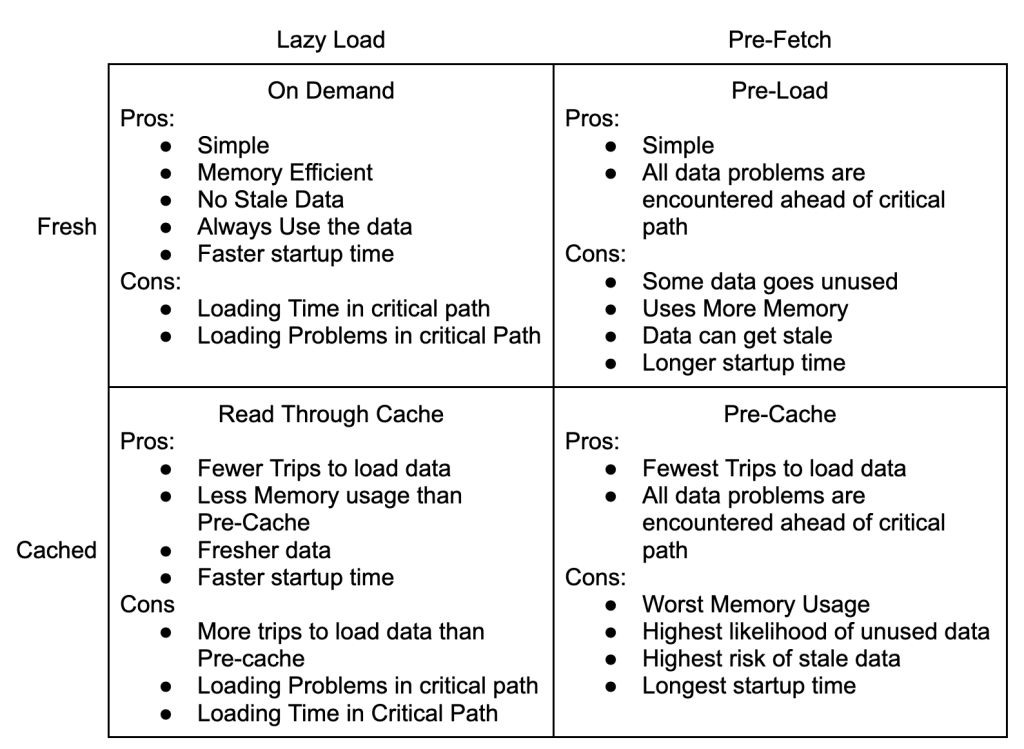
Scaling software has tension between the needs of today and tomorrow. How do you resolve the tension? Where does the work of today end? What makes the next step part of the work of tomorrow?
Consider this simple rule:
For any piece of software in your system, you should scale it when it is the primary constraint, and stop when a different part becomes the new primary constraint.
Easy to say, and easy to do…if you can measure the performance of your system in part and as a whole.
If you don’t know which piece of your software is failing to scale, if you’re guessing about the work of today, don’t be surprised when your scaling efforts don’t impact the system as a whole. Sometimes the scaling work of today isn’t scaling, it’s observability.
If you’re trying to reduce risk, do the hard part first. That way, if it fails, you’ll have minimized your time and effort.
On the other hand, if you’re looking for buy-in and commitment so you can get through the hard part, do it last. People are terrible at ignoring sunk costs, and the early wins and identity shifts that come from the easy successes at the beginning will give you momentum as you go.
The hardest part of scaling a system is getting pieces of the current system to work with the new scaled out versions. Design and implementation are usually much more work, and take much more time.
Design and implementation don't involve working with the imperfections of past design and implementation. They don't have political agendas, and they aren't too busy to make the changes you need.
From my experience, the hardest part of any project built in isolation, is bringing the system from isolation to production. Whether you are bringing in a scaling framework, doing a rewrite, or building a new product; you and your team can write the software. You can shape it how you want or need because it is in isolation. Getting out of isolation requires changing your software to match production, and changing production is very hard.
Save yourself and your team, get your software into production from the beginning. Otherwise you may find yourself throwing away a year's worth of work because getting into production is the hard part.
Data assumptions are baked into your CRM’s makeup and can seem impossible to change. Email marketing requires contacts to have an email, because you can’t do email marketing without one. Call center software requires prospects to have phone numbers so that agents can do outbound sales.
But what happens when your business needs to change and your fundamental constraints are no longer fundamental? How do you change your core data model assumptions without starting over or freezing development?
SmileAndDial CRM has spent years positioning themselves as the go to CRM for boiler rooms, pump and dumps, extended car warranties, and other outbound call centers on the strength of their dialer integrations. They’ve done well, making a quality product for horrible people. But the FTC is cracking down on junk calls and putting their customers out of business. They need to expand into email spamming and help support their horrid customers. After all, keeping your customers out of jail massively extends Customer Lifetime Value.
This series will follow SmileAndDial on their journey to remove phone numbers as a fundamental constraint in their software.
After a few weeks, a customer’s first page of contacts will become static. Same with tags, lists, and every other object that your CRM supports. When the data on the first page becomes static, users stop seeing it entirely.
Instead the first page becomes muscle memory on the way to your user’s real actions.
How long do you make your customers wait to load a page of data objects that won’t even register in their minds? How many extra hoops do they have to jump through to get to the actions they want to take? How much slower is the process for your biggest customers?
Customers log in to take actions, not objects. Don’t waste their time showing data objects until you know enough context to show meaningful data.
Data scales, actions and attention don’t. You can wage a constant fight to scale your UI, or you can choose Actions over Objects, and avoid the issue entirely.
I cohost a podcast devoted to the idea that starting over and rewriting your system is a mistake that will lead to failure. But I have struggled with explaining the alternative, iterative replacement.
One commenter summed it up as: Don’t rewrite, instead rewrite.
I’m inventing a new term, TheeSeeShip, to highlight the difference. Based off the Ship of Theseus, when you TheeSeeShip, you are iteratively replacing parts of the current system that are broken, don’t scale, or just aren’t useful anymore.
A rewrite creates a second system, with the hope of one day becoming the sole system. Until that day, you have the system you use, and an ever growing mass of untested work in progress.
When you TheeSeeShip, there is only ever one system and everything will be in production the whole time. Over time you’ll replace every line as you add and remove services, features, and scaling patterns. Everything changes, but the system remains.
The opposite of a Rewrite is to TheeSeeShip. TheeSeeShipping is lower risk, provides more value to your customers, and boosts morale. I’ll dig into why in the posts ahead.
In part 1 - I covered the classic solution for User Defined Fields; simple but unscalable.
NoSQL emerged as a solution to relational fields in the late 2000s. Instead of having a meta table defining fields in a relational database, the User Defined data would live in NoSQL.
The structure would look like this:
This model eliminates the meta programming and joining the same table against itself. The major new headache that this model creates is difficulty in maintaining the integrity of the field data.
Pros:
No complicated meta programming. Instead you write a filter/match function to run against the data in the Collection Of Fields.
No more repeated matching against the same table. Adding additional search criteria has minimal cost.
Open ended/internet level scaling. For a CRM or SaaS, the limiting factor will be the cost of storing data, not a hard limit of the technology.
Cons:
Much more complicated to set up and maintain. Even with managed services supporting two database technologies doubles the difficulty of CRUD. Multiple inserts, multiple deletes, tons of ways for things to go wrong.
Without a relational database enforcing the data structure, poisoned or unreadable data is common. Being able to store arbitrary data collections means you’ll invariably store buggy data. You’ll miss some records during upgrades and have to support multiple deserializers. You will lose customer data in the name of expediency and cost control.
It’s more expensive. You’ll pay for your relational database, NoSQL database, and software to map between the two.
Conclusion
NoSQL systems solve the scaling problems with setting up User Defined Fields in a relational database. The scaling comes with high costs in terms of complexity, fragility and costs.
Reducing the complexity, fragility, and costs leads to the upcoming 3rd shift, covered in part 3.
This series covers a brief history of the 2 historic patterns for implementing User Defined Fields in a CRM, the upcoming hybrid solution that provides the best of both worlds, and how to evolve your existing CRM to the latest pattern. If you care about CRM performance, scaling, or cost, this series is for you!
What are User Defined Field Patterns?
Every CRM provides a basic fields for defining a customer. Every CRM’s basic field set is different depending on the CRM’s focus. So, every user of a CRM needs to expand the basic definition in some way. Birthdays, purchase history, and interests are three very common additions.
The trick is allowing users to define their own fields in ways that don’t break your CRM.
The Three Patterns
At a high level, there have been three major architectures for implementing Custom Fields. Most of the design is driven by the strengths and weaknesses of the underlying database architecture.
Pattern 1, generalized columns in a database, spanned the dawn of time until the rise of NoSQL around 2010.
Pattern 2, NoSQL, began around 2010 and continues to today.
Pattern 3, JSON in a relational database, began in the late 2010s and combines the best of the two approaches
Pattern 1 - All in a Relational Database
Before the rise of NoSql there was pretty much one way to build generic user defined fields.
The setup is simple, just 3 tables. A table of field definitions, a table for contacts, and a relational table with the 2 ids and the value for that contact’s custom field.
The Pros
This design is extremely simple and can be implemented by a single developer very quickly.
Basic CRUD operations are easy and efficient.
The Cons
Building search queries requires complicated techniques like metaprogramming.
Every search criteria results in a join against the ContactFields table. This results in an exponential explosion in query times.
The lack of defined table columns handicaps the database’s query optimization strategies.
Conclusion
The classic relational database pattern is easy to set up, but has terrible scaling. This super simple example would bog down by 1,000 contacts and 50 fields.
There are lots of ways to redesign for scale, but this is a SHORT history. Suffice it to say that it takes extremely complex and finicky systems to scale past 100,000 contacts and 1,000 fields.
The solutions to the classic pattern’s scaling led to the NoSQL revolution, covered in part 2.
I recently stepped into an elevator and saw this panel:
The panel was clean, full of high quality materials, and everything worked.
Quality is about more than the functionality, does this look like a quality panel?
Everything works!
Push a button and it lights up!
Sure, it might light up red, green or blue. And the light might be around the edge or in the center. And some of the buttons are flush with the mount, while others extend out; but that doesn't impact the light turning on.
There are 12 possible button implementations, and 5 of them appear randomly.
But when you push the button, the light turns on!
What does that have to do with SaaS Scaling?
No matter how excellent any individual endpoint implementation is, having an API with endpoints that work differently decreases the overall quality of your product.
Having a UI with mismatched widgets and styles increases the user’s cognitive load and decreases quality, even when the differences don’t change any functionality.
Consistency during the scaleup period can be difficult as multiple new teams spin up, but it’s critically important if you want a quality product.